If you have spent any time in developer circles recently, you’ve heard the roar: DeepSeek-R1 has rewritten the economics of artificial intelligence.
With its open-weight release of the 671B Mixture-of-Experts (MoE) reasoning model alongside distilled versions ranging from 1.5B to 70B, engineering teams are asking a critical question: Can we replace our expensive Claude 3.5 Sonnet API keys with DeepSeek-R1, and should we run it locally or in the cloud?
In an agentic loop, where an AI is reading files, running terminal tests, and self-correcting code, token volumes explode. An 85% reduction in API bills sounds like a developer’s dream.
But moving a reasoning model into production workflows isn’t as simple as swapping an endpoint URL. It introduces new friction: reasoning token overhead, Time-to-First-Token (TTFT) latency, and parser complications.
Here is our honest, data-backed engineering audit of deploying DeepSeek-R1 inside autonomous software workflows in 2026.
The Economics: Cloud API Pricing Showdown
Let’s start with the raw billing data. To run an active agentic loop, you pay for massive volumes of input context (entire files, schemas, rules) and output blocks (full code modifications).
Here is how the official DeepSeek API pricing stacks up against Anthropic’s Claude 3.5 Sonnet:
| Model / Endpoint | Input Price (per 1M) | Input Cache Hit (per 1M) | Output Price (per 1M) |
|---|---|---|---|
| Claude 3.5 Sonnet | $3.00 | $0.30 | $15.00 |
| DeepSeek-R1 (Cloud) | $0.55 (81% cheaper) | $0.14 (53% cheaper) | $2.19 (85% cheaper) |
| DeepSeek-R1 (Distill 70B) | $0.70 | $0.17 | $0.70 |
For a standard coding session where an agent executes five file edits and runs three test iterations, the agentic loop processes roughly 150,000 input tokens and 8,000 output tokens:
- Claude 3.5 Sonnet Cost: (150k * $3.00/M) + (8k * $15.00/M) = $0.45 + $0.12 = $0.57
- DeepSeek-R1 Cost: (150k * $0.55/M) + (8k * $2.19/M) = $0.0825 + $0.0175 = $0.10
Swapping to DeepSeek-R1 reduces the cost of that single coding run by 82.4%. Across a team of 10 developers making 100 agent calls a day, monthly LLM API billing drops from $1,710 to $300. The financial argument is immediate.
The Catch: Reasoning Token Overhead & Latency
If R1 is so cheap, why isn’t everyone migrating? The answer lies in the Reasoning Loop Latency.
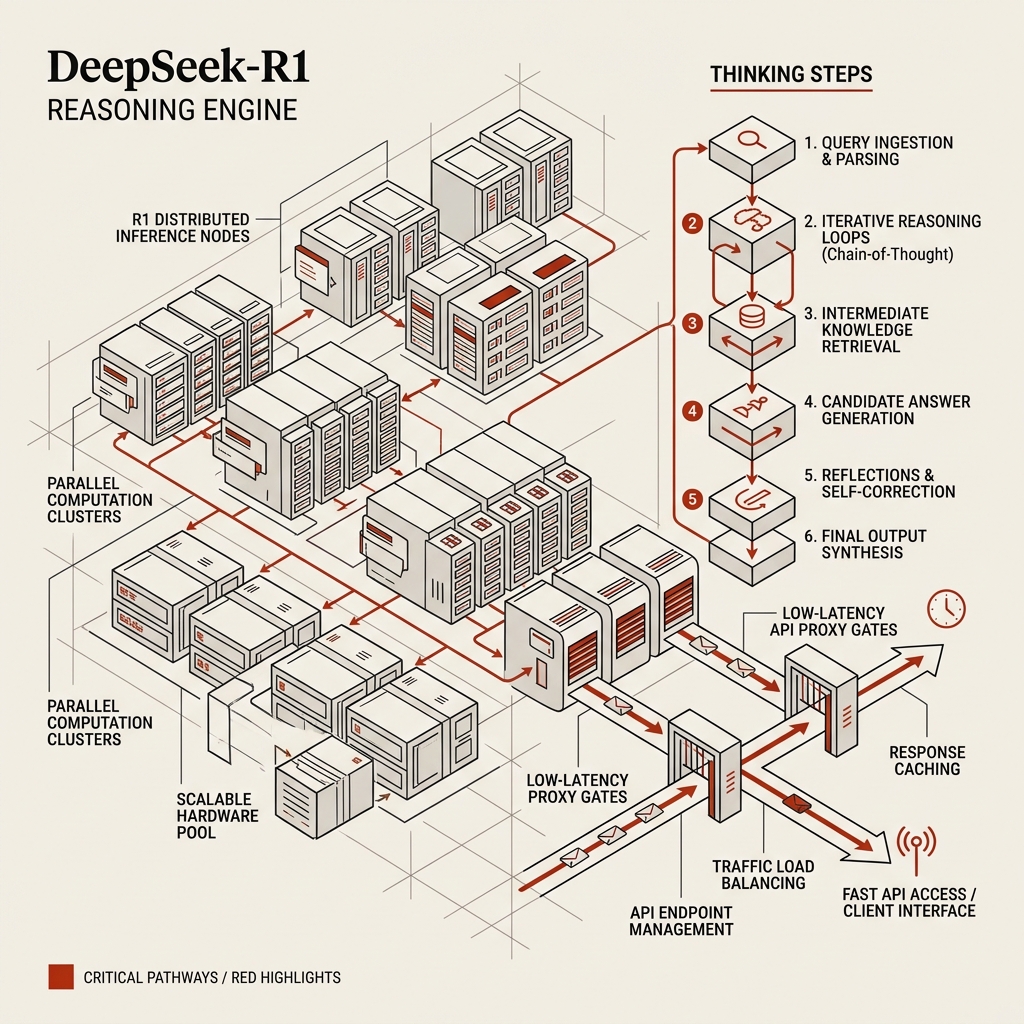
DeepSeek-R1 is a reasoning model. Unlike traditional models that output their immediate guess, R1 uses reinforcement-learned chain-of-thought (CoT). It spits out thousands of “thinking tokens” wrapped in a <think> tag before generating the actual code.
While these reasoning tokens are essential for solving complex architectural problems, they introduce two distinct production challenges:
1. The Latency Cost
Reasoning tokens take time to generate. Even at a fast 60 tokens per second, if R1 decides to “think” for 1,500 tokens, you will wait 25 seconds before the first character of code is written.
For routine autocomplete or simple edits (like changing an H1 tag color), this latency is unacceptable. It destroys the flow state of interactive development.
2. Output Token Inflation
Reasoning tokens are billed as output tokens. If a model generates 1,200 thinking tokens to write a 100-token fix, you are paying output pricing for the reasoning path. While still far cheaper than Sonnet due to R1’s low base rates, it means your token volume scales faster than your code volume.
DeepSeek-R1 Output Token Breakdown:
+-----------------------------------------------------------+
| <think>                                                   |
| Hmm, let's look at the database view...                   |
| If we map the users table, we must handle null emails...   |
| Let's check if the index exists... [1,200 tokens of CoT]   |
| </think>                                                  |
| export const users = pgTable("users", { ... });           |
| [100 tokens of actual code output]                        |
+-----------------------------------------------------------+
Local Deployment: distilled vs. MoE Models
One of R1’s greatest assets is its open-source license. You can download the weights and run them entirely on your own local infrastructure. But what hardware do you need?
Running the Full DeepSeek-R1 (671B MoE)
The full, uncompromised R1 model requires around 720GB of VRAM to run at FP8 precision. In production, this requires an 8x H100 GPU node, which costs roughly $2.50/hour to rent on cloud providers like Lambda Labs. Unless you are running massive, company-wide parallel indexing pipelines, renting a dedicated instance is more expensive than using the serverless API.
Running Distilled Models via Ollama
For local developer setups, DeepSeek released distilled versions trained on R1 outputs.
We audited three distilled versions running locally on an Apple Mac Studio (M2 Ultra, 128GB Unified Memory) using Ollama:
1. **DeepSeek-R1-Distill-Qwen-14B**
   - **Memory Footprint:** ~9GB
   - **Generation Speed:** 65 tokens/sec
   - **Verdict:** Highly responsive. Excellent for standard inline code editing, boilerplate generation, and basic test writing.

2. **DeepSeek-R1-Distill-Qwen-32B**
   - **Memory Footprint:** ~20GB
   - **Generation Speed:** 42 tokens/sec
   - **Verdict:** The sweet spot. Genuinely understands complex TypeScript types and can resolve multi-file imports with minimal guidance.

3. **DeepSeek-R1-Distill-Llama-70B**
   - **Memory Footprint:** ~43GB
   - **Generation Speed:** 18 tokens/sec
   - **Verdict:** Extremely powerful reasoning, but the speed drop on local hardware is noticeable. Best reserved for offline background refactoring.
3. Parsing the <think> Tags
When integrating R1 into automated tools (like Cursor Composer or custom MCP servers), the model is typically expected to return structured outputs—like a strict JSON schema containing the file name and the code diff.
If R1 writes a raw chain of thought, it will output:
<think>
First, we must format the response as JSON...
</think>
{
  "file": "src/App.tsx",
  "diff": "..."
}
A standard JSON.parse() call on this stream will instantly crash, failing to parse the <think> tags.
The Solution: Stream Interceptor Wrapper
To make R1 compatible with structured tools, you must write an intermediary parser that filters out the reasoning tokens before they reach your tool engine. Here is a clean TypeScript implementation for a streaming wrapper:
// Intercepting and stripping <think> tags from the stream
export function createReasoningStreamFilter(onReasoningText?: (chunk: string) => void) {
  let inThinkBlock = false;
  let buffer = "";

  return new TransformStream({
    transform(chunk: string, controller) {
      buffer += chunk;

      while (buffer.length > 0) {
        if (!inThinkBlock) {
          const thinkStartIdx = buffer.indexOf("<think>");
          if (thinkStartIdx !== -1) {
            // Push everything before <think> to the controller
            controller.enqueue(buffer.slice(0, thinkStartIdx));
            inThinkBlock = true;
            buffer = buffer.slice(thinkStartIdx + 7);
          } else {
            // No think block started, pass the whole buffer
            controller.enqueue(buffer);
            buffer = "";
          }
        } else {
          const thinkEndIdx = buffer.indexOf("</think>");
          if (thinkEndIdx !== -1) {
            // Capture the reasoning text
            if (onReasoningText) {
              onReasoningText(buffer.slice(0, thinkEndIdx));
            }
            inThinkBlock = false;
            buffer = buffer.slice(thinkEndIdx + 8);
          } else {
            // Stream reasoning text to callback and discard from main code output
            if (onReasoningText) {
              onReasoningText(buffer);
            }
            buffer = "";
          }
        }
      }
    }
  });
}
This parser allows you to display R1’s “thinking steps” inside a collapsible UI element in your development console while sending only the clean, type-safe JSON structure to your system-level file modifiers.
The Verdict: How to Build Your Stack
Is DeepSeek-R1 a Sonnet killer? Not entirely. But it is the ultimate co-processor.
For a highly optimized, cost-efficient 2026 developer stack, we recommend a hybrid routing architecture:
- Route 1: Fast Interactive Edits → Claude 3.5 Sonnet (or local 14B). For quick UI tweaks, simple completions, and interactive file navigation, prioritize low latency.
- Route 2: Complex Logic & Deep Debugging → DeepSeek-R1 (API). When you encounter a circular dependency, a performance leak, or need to draft complex data models, route the task to R1. Let it “think” for 40 seconds—the resulting code will be incredibly accurate and cost pennies.
By routing queries intelligently based on task complexity, you get the best of both worlds: the speed of classic LLMs and the depth of reasoning models, all while keeping your monthly API costs fully in check.