The frontend consensus has shifted.
For years, web development was caught in a tug-of-war between two extremes: Static Site Generation (SSG) (which is lightning fast but struggles with dynamic user states) and Single Page Applications (SPAs) (which handle dynamic state beautifully but force users to download megabytes of client-side JavaScript).
In June 2026, production architectures are settling on a new, server-first standard. By pairing Astro 6 with React 19, we can finally build web applications that load instantly as static HTML, yet update dynamically with personalized user content—without shipping a massive JavaScript bundle to the browser.
Here is a deep dive into how Astro 6 Server Islands and the React 19 Compiler work in production.
1. The React 19 Compiler: Automatic Performance
For years, React developers spent hours optimizing rendering cycles. We manually wrapped components in React.memo and memorized values with useMemo and useCallback. If we missed a single dependency, the application suffered from unnecessary re-renders.
The React 19 Compiler (often called React Forget) automates this. It operates as a build-time compiler that parses your TypeScript code and automatically injects memoization logic at the AST layer.
What it means for Astro Islands:
When you hydrate a React component in Astro using client directives:
<!-- Astro Page -->
<InteractiveDashboard client:load />
The compiled React code shipped to the browser is significantly smaller and faster. Because the compiler optimizes component updates out-of-the-box, client-side hydration happens with near-zero UI main-thread blocking time.
2. Astro 6 Server Islands: Deferring Dynamic Elements
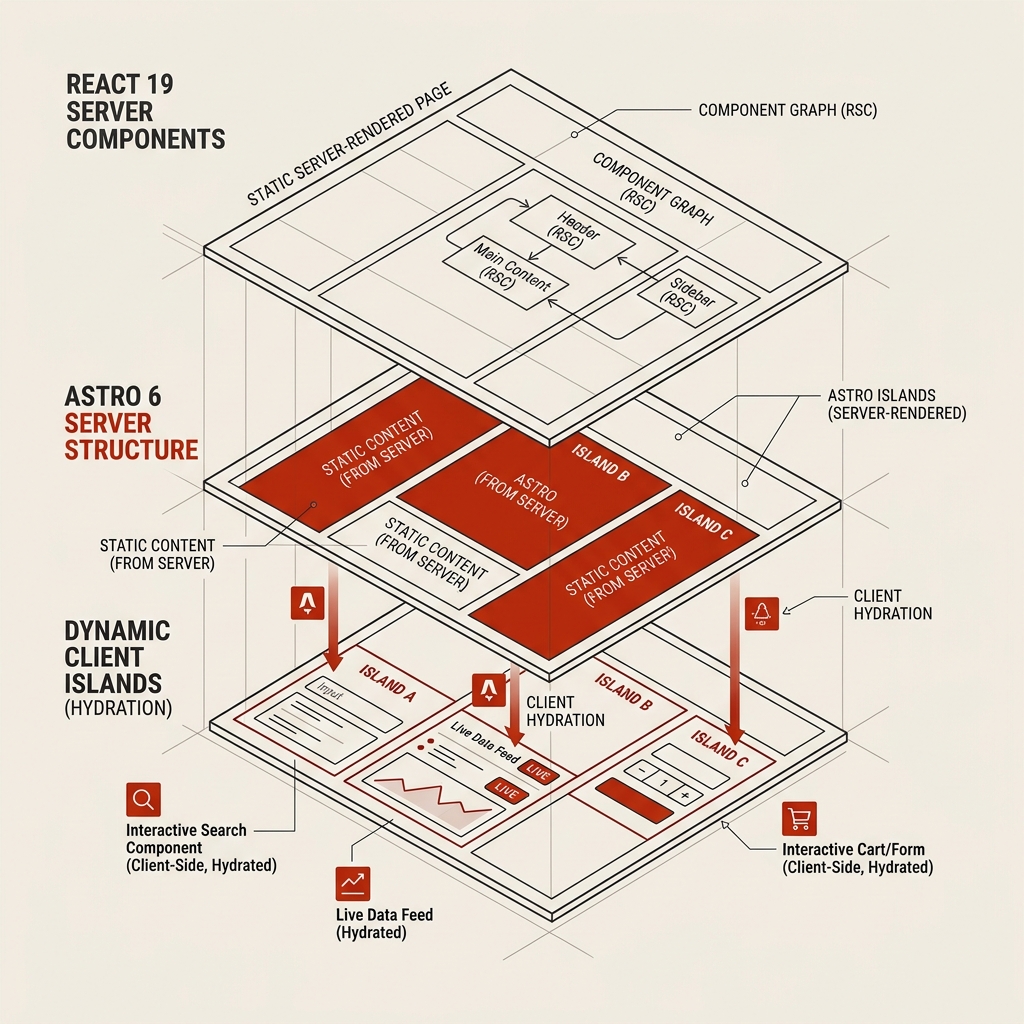
Astro’s original “Islands Architecture” allowed developers to render static HTML on the server and load interactive client islands only where needed.
However, if a static landing page contained a single personalized widget—such as a shopping cart or a user profile badge—the entire page had to be server-side rendered (SSR) on every request, sacrificing the latency benefits of edge caching.
Astro 6 Server Islands solve this. They allow you to defer specific components to separate, asynchronous rendering pipelines:
---
// src/pages/index.astro
import StaticHero from '../components/StaticHero.astro';
import DynamicUserStatus from '../components/DynamicUserStatus.astro';
---

<html>
  <body>
    <StaticHero />

    <!-- Render the rest of the page statically, but defer the user badge -->
    <DynamicUserStatus server:defer>
      <!-- Optional: Loading skeleton displayed until the island streams in -->
      <div slot="fallback" class="animate-pulse bg-gray-200 h-8 w-20 rounded" />
    </DynamicUserStatus>
  </body>
</html>
How Server Islands render:
- Instant Edge Delivery: The browser requests the page. Since the page is primarily static, the CDN edge server returns the static shell instantly.
- Skeleton Screen: The browser renders the shell and displays the fallback skeleton for the dynamic badge.
- Deferred Stream: In the background, the edge server continues running the
DynamicUserStatuscomponent, rendering its HTML. - HTML Injection: Once the server finishes rendering the component, it streams the raw HTML down to the browser. The browser swaps out the fallback skeleton with the final HTML.
Because DynamicUserStatus uses the server:defer directive, it is rendered on the server, and zero React code or JS bundle is sent to the client. The browser gets only clean HTML.
Astro 6 Server Island Streaming:
+-----------------------------------------------------------+
| 1. CDN Edge -> Ships Static Page Shell Instantly (15ms)    |
| 2. Edge runs server:defer -> Streams dynamic HTML (80ms)  |
| 3. Client receives dynamic HTML -> Swapped in -> Zero JS  |
+-----------------------------------------------------------+
3. Combining React 19 Server Actions in Astro
In React 19, developers can execute backend mutations directly from client-side forms using Server Actions. In Astro 6, this integration is fully native.
You can build a React form component and call a secure database action, and Astro will automatically manage the network proxy:
// src/actions/subscribe.ts
'use server';

import { db } from '../db';

export async function handleNewsletterSubscribe(formData: FormData) {
  const email = formData.get('email') as string;
  if (!email) return { success: false, error: 'Email required' };

  await db.insertEmail(email);
  return { success: true };
}
// src/components/NewsletterForm.tsx
import { handleNewsletterSubscribe } from '../actions/subscribe';
export default function NewsletterForm() {
return (
<form action={handleNewsletterSubscribe}>
<input type="email" name="email" required />
<button type="submit">Subscribe</button>
</form>
);
}When you render this React component as an Astro client island:
- The React 19 Compiler optimizes the form state representation.
- When the user clicks “Subscribe”, React automatically executes a POST request behind the scenes, running the server-side
handleNewsletterSubscribedatabase function. - You don’t need to configure routing, write fetch controllers, or build dedicated API routes.
The Performance Verdict
By moving the boundary of dynamic rendering from the client back to the server via Astro Server Islands, and letting the React 19 Compiler optimize what little client code remains, we achieve the holy grail of web performance:
- 80% smaller JavaScript bundles: Personalized content no longer requires loading large React contexts or client fetch libraries.
- Improved First Input Delay (FID) and LCP: Static shells render in milliseconds, and deferred HTML streams in without blocking user interaction.
- Simplified codebase: Server Actions eliminate API routing boilerplate.
The web is fast again.