AI agents are the new users.
In mid-2026, millions of search queries and web actions are no longer performed by humans clicking links. Instead, they are delegated to autonomous agents—from search engines like Google’s AI Overviews and Perplexity to developer coding tools like Cursor, Claude Code, and Antigravity.
But when these agents land on your website, they face a wall of layout shift, dynamic JavaScript hydration, pop-ups, and obscure CSS selectors. They are forced to “scrape” your page—guessing which input field corresponds to search, and which button triggers checkout. It is slow, error-prone, and burns thousands of LLM reasoning tokens.
Announced at Google I/O 2026 and currently in origin trials, WebMCP (Web Model Context Protocol) is designed to change this. It is a proposed open web standard that lets you transform your website from a visual-only interface into a structured, agentic toolkit.
Here is how WebMCP works and how to implement it.
What is WebMCP?
The Model Context Protocol (MCP), pioneered in late 2024, allowed developers to connect AI models to secure local datasources and development tools. WebMCP extends this concept directly to the open web.
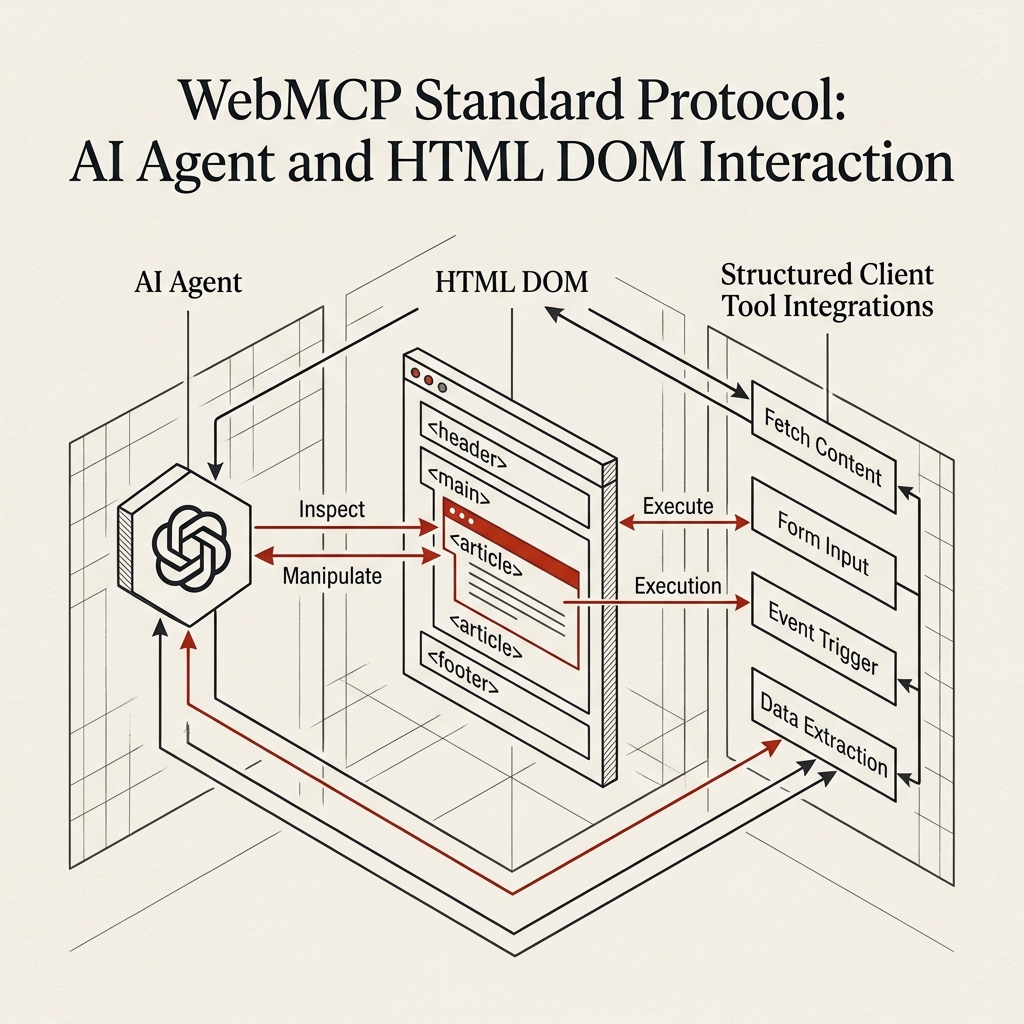
Instead of an AI agent loading your site, parsing the DOM tree, and attempting to fill out inputs via automated browser clicks, WebMCP allows your website to explicitly tell the browser: “Here is the list of tools I support, here are the input schemas they require, and here is how to call them.”
AI Agent Web Interaction:
+-----------------------------------------------------------+
| BEFORE: Agent -> HTML Scraping -> DOM Guessing -> Errors   |
| AFTER:  Agent -> WebMCP Handshake -> Structured Tools     |
+-----------------------------------------------------------+
When an agentic browser visits a WebMCP-enabled page, it executes an handshake. The browser reads the site’s manifest, exposing a list of native tools directly to the agent’s LLM context window.
1. Declarative HTML WebMCP Tools
The simplest way to make your website AI-ready is by using Declarative WebMCP. You can take any standard HTML form and annotate it with tool directives.
For example, if you run a travel booking site and want AI agents to search for flights programmatically:
<form
  action="/api/flights"
  method="GET"
  toolname="searchFlights"
  tooldescription="Searches for available flights between two cities on a specific date"
>
  <label for="from">Origin:</label>
  <input
    type="text"
    id="from"
    name="origin"
    placeholder="SFO"
    required
  />

  <label for="to">Destination:</label>
  <input
    type="text"
    id="to"
    name="destination"
    placeholder="JFK"
    required
  />

  <label for="date">Departure Date:</label>
  <input
    type="date"
    id="date"
    name="departureDate"
    required
  />

  <button type="submit">Search Flights</button>
</form>
What happens behind the scenes:
- When a WebMCP-compliant browser visits this page, it scans the DOM for forms containing the
toolnameattribute. - It automatically compiles a JSON Schema for the tool based on the form inputs. The
nameattributes serve as properties, andtypeattributes (e.g.text,date,number) declare the data types. - The schema is sent to the AI model as:
{ "name": "searchFlights", "description": "Searches for available flights between two cities on a specific date", "parameters": { "type": "object", "properties": { "origin": { "type": "string" }, "destination": { "type": "string" }, "departureDate": { "type": "string", "format": "date" } }, "required": ["origin", "destination", "departureDate"] } } - When the agent calls
searchFlights, the browser automatically populates the form inputs and submits it programmatically, returning the server response directly to the agent.
2. Programmatic JavaScript WebMCP API
For more complex applications, declarative HTML isn’t enough. You may want to expose custom, client-side JavaScript functions to the agent without reloading the page.
WebMCP introduces the navigator.mcp API. You can register tools directly in your client-side bundle:
if ('mcp' in navigator) {
  navigator.mcp.registerTool({
    name: "calculateMortgage",
    description: "Calculates monthly mortgage payments based on principal, interest rate, and term",
    parameters: {
      type: "object",
      properties: {
        principal: { type: "number", description: "Loan amount in USD" },
        rate: { type: "number", description: "Annual interest rate (e.g., 5.5 for 5.5%)" },
        years: { type: "number", default: 30, description: "Loan term in years" }
      },
      required: ["principal", "rate"]
    },
    async execute({ principal, rate, years = 30 }) {
      const monthlyRate = (rate / 100) / 12;
      const numberOfPayments = years * 12;
      const monthlyPayment = (principal * monthlyRate * Math.pow(1 + monthlyRate, numberOfPayments)) /
                             (Math.pow(1 + monthlyRate, numberOfPayments) - 1);

      // Return structured JSON back to the AI agent
      return {
        success: true,
        monthlyPayment: parseFloat(monthlyPayment.toFixed(2)),
        totalPayments: parseFloat((monthlyPayment * numberOfPayments).toFixed(2))
      };
    }
  });
}
Now, instead of the agent trying to type values into a complex interactive mortgage calculator page, it invokes calculateMortgage directly. The execution happens instantly in the client browser, returning clean JSON to the model’s context.
3. The Security & Consent Handshake
Allowing arbitrary web agents to execute tools on your site is a security nightmare. What if a shopping agent purchases a $1,000 item without user authorization? Or what if a scraper submits a form repeatedly, causing a Denial-of-Service?
WebMCP solves this via a strict User-in-the-Loop Consent Policy:
- Passive Tools (Read-Only): Tools that only fetch information (like product search) can run automatically.
- Mutative Tools (Write/Action): Any tool that initiates a purchase, submits an email, or modifies user data triggers a browser-level confirmation dialog:
“This AI Agent wants to execute tool ‘placeOrder’ with cost $45.00. Do you authorize this action?”
- Manifest Scopes: Websites must host a
.well-known/webmcp.jsonfile defining what tools are allowed on what routes, preventing unauthorized domain hijack attacks.
Why WebMCP is the Future of SEO
We are moving from traditional Search Engine Optimization (SEO) to Generative Engine Optimization (GEO).
If your website is hard for an AI agent to read, the agent will skip it. By implementing WebMCP, you make your site the easiest option for AI buyers and information seekers. When an agent searches for flights, products, or financial calculators, it will prioritize the domains that provide direct, high-speed WebMCP interfaces over legacy layouts.
Exposing your web app as an agentic toolkit is no longer a niche feature. In 2026, it is the new standard.