Claude Code auto mode is now where new sessions start for most Pro, Max and Team users. Anthropic’s October 22 update said the default would roll out “next week” across most Claude apps, and the Claude Code docs now list auto as the built-in starting mode in the terminal and VS Code from v2.1.283.
That means a classifier, not you, now decides whether most shell commands run. If you have not changed anything, you are already using it.
I read the permission modes docs, the configuration reference and every auto mode changelog entry up to v2.1.316 so you do not have to. Here is what auto mode actually blocks, how to teach it about your infrastructure, and the specific cases where I would turn it off.
What Is Claude Code Auto Mode?
Auto mode is a permission mode where a separate classifier model reviews actions instead of prompting you. The permission modes docs say it blocks anything that escalates beyond your request, targets infrastructure it does not recognise, or looks driven by hostile content Claude read.
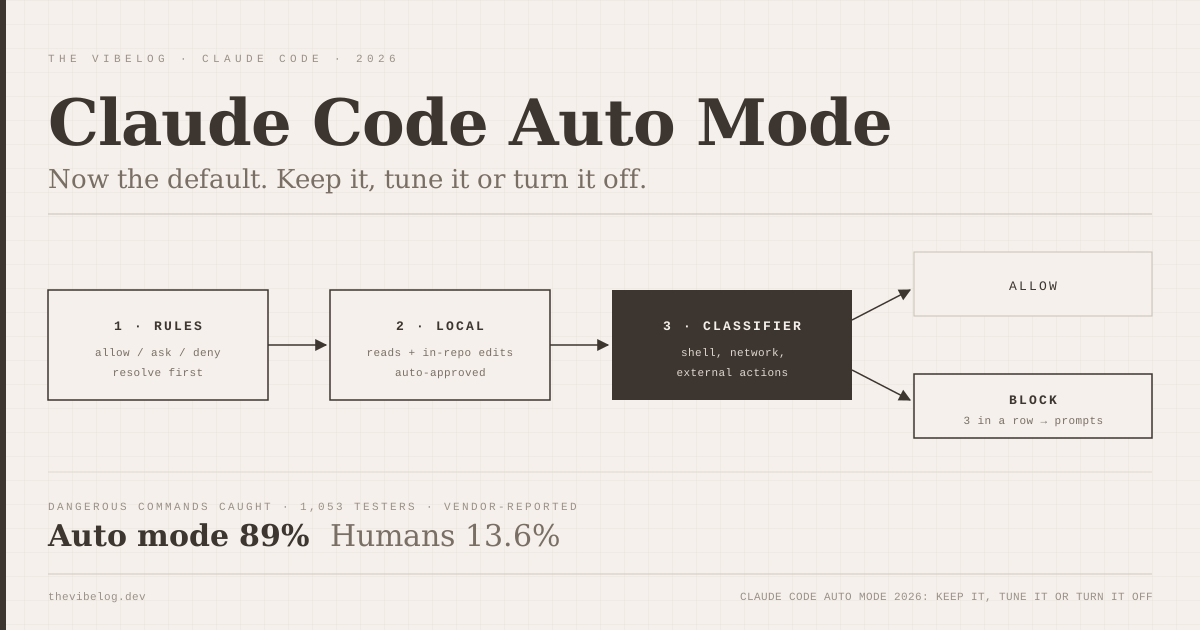
Every tool call goes through four steps, and the first match wins:
- Your allow, ask and deny rules resolve first.
- Read-only actions and edits inside the working directory are approved automatically.
- Everything else goes to the classifier.
- If the classifier blocks, Claude gets the reason, often a named rule like
[Data Exfiltration], and tries another route.
The design choice I like most is what the classifier cannot see. It reads your messages, Claude’s tool calls and CLAUDE.md, but tool results are stripped out. A malicious README or web page can steer Claude, but it cannot talk to the referee directly.
By default the classifier is Claude Sonnet 5, and since v2.1.302 you can override it with CLAUDE_CODE_AUTO_MODE_MODEL.
Auto mode is a second gate after your permission rules, not a replacement for them.
What the Auto Mode Classifier Blocks by Default
The docs list the default blocks. These are the ones that matter for day-to-day work:
- Downloading and running code, such as
curl | bash - Sending sensitive data to external endpoints
- Production deploys and migrations
- Force pushes,
git reset --hard,git checkout -- .,git clean -fdandgit stash drop terraform destroyand similar- Merging a PR no human approved, or disabling CI checks
- Granting IAM or repository permissions
- Changing push targets with
git remote set-urlunless you named the remote - Launching nested agents with
--dangerously-skip-permissions
And it allows, by default, things you might expect it to block: installing dependencies from a lockfile, reading .env and sending credentials to their matching API, read-only HTTP requests, and pushing to any branch of the current repository, including the default branch. Deploy-looking branches like production or gh-pages get judged on their own terms.
That last point is the one that caught my attention. If your team’s rule is “nothing lands on main without review”, auto mode does not enforce it for you.
There is one more quiet change. When you enter auto mode, broad allow rules that amount to arbitrary code execution are dropped: Bash(*), wildcarded interpreters like Bash(python*), package-manager run commands and Agent allow rules. Narrow rules such as Bash(npm test) stay. Your old Bash(*) shortcut does nothing in auto mode, and that is intentional.
The defaults stop the catastrophic stuff. They do not encode your team’s review policy.
Auto Mode vs Manual Approval: What Anthropic’s Data Shows
Anthropic’s case for making auto mode the default rests on one uncomfortable statistic: users approve 97% of permission prompts. At that rate, a prompt is not a safety check, it is a speed bump people click through.
From Anthropic’s auto mode article:
| Measure | Humans approving prompts | Auto mode |
|---|---|---|
| Dangerous commands caught (1,053 testers) | 13.6% (143) | 89% (937) |
| Sessions with an unrequested harmful action (severity 7+) | 6.3% | 2.4% |
| Block rate late in a session | about 5% (from about 17%) | Flat |
(Source: Anthropic, Auto mode is now the default in Claude Code, vendor-reported.)
Auto mode blocked 800 commands that humans approved, while humans blocked 6 that auto mode allowed. The fatigue number is the one I would show a sceptical security team: humans go from blocking about 17% early in a session to about 5% after 50 prompts. The classifier does not get tired.
Now the caveats, which Anthropic states itself. After red-teaming by Apollo Research, the classifier’s miss rate fell from 12% to 7%, and Anthropic says that is not a real-traffic miss rate. In Trajectory Labs’ prompt-injection test, none of 720 attempts succeeded against Claude Fable 5, Opus 5 or Sonnet 5 in auto mode. The article also says teams using auto mode ship about 25% more PRs.
All of these are vendor-reported. I find the direction convincing and the exact percentages unproven.
Auto mode beats a tired human clicking yes. It does not beat a deny rule.
How to Configure Claude Code Auto Mode
Out of the box, the classifier trusts only your working directory and the repo’s configured remotes. Push to another repo in your company’s org, or write to a team bucket, and it blocks. The fix is autoMode.environment, documented in the auto mode configuration reference:
{
  "autoMode": {
    "environment": [
      "$defaults",
      "Source control: github.com/acme-corp and all repos under it",
      "Trusted cloud buckets: s3://acme-build-artifacts",
      "Trusted internal domains: *.internal.acme.dev"
    ]
  }
}
The entries are prose, not regex. You describe your infrastructure the way you would to a new engineer. Keep "$defaults" in the array, because leaving it out replaces the built-in list entirely.
Three things tripped me up reading the docs:
- Where it lives. The classifier ignores
autoModein.claude/settings.jsonand.claude/settings.local.json. It reads only~/.claude/settings.json, managed settings and the--settingsflag. That is deliberate, because a cloned repo could otherwise grant itself allow rules. - Four rule lists. Besides
environment, there areallow,soft_denyandhard_deny. Hard denies block unconditionally. Soft denies can be cleared by anallowrule or by you explicitly asking for that exact action. “Clean up the repo” does not authorise a force push. “Force-push this branch” does. - Personal allows beat org soft denies. A developer’s
allowentry can override an organisation’ssoft_deny. For a hard policy, usepermissions.denyin managed settings.
You do not have to write this by hand. /auto-mode-setup, added for every provider in v2.1.304, reads your project and recent sessions and drafts the entries. Then use the CLI to check the result:
claude auto-mode defaults   # print built-in rules as JSON
claude auto-mode config     # print the effective rules with your settings applied
claude auto-mode critique   # AI review of your custom rules
claude auto-mode reset      # remove your autoMode block
If you want a human checkpoint on pushes and PRs while keeping auto mode for everything else, add ask rules. These are evaluated before the classifier and always prompt:
{
  "permissions": {
    "ask": ["Bash(git push *)", "Bash(gh pr create *)"]
  }
}
The docs warn that git -C dir push will not match that pattern. If you need a watertight check, use a PreToolUse hook, which I walked through in the Claude Code hooks guide.
Spend ten minutes on autoMode.environment and an ask rule for pushes. That fixes most false blocks and the main-branch gap.
When to Turn Claude Code Auto Mode Off
Switching is easy. Press Shift+Tab in the terminal to cycle modes, use the mode selector in the desktop app or VS Code, or start with claude --permission-mode default. To change your starting mode permanently, set permissions.defaultMode in ~/.claude/settings.json. Setting "auto" there from a project file is ignored, for the same reason as above.
Admins on Team and Enterprise can pin defaultMode in managed settings or remove auto mode with disableAutoMode.
I would switch to manual or plan mode in these cases:
- Production credentials are reachable from the shell. Auto mode allows sending credentials to their matching API. If that API is production, you want a human in the loop.
- You are reviewing untrusted code. Auto mode reduces prompt-injection risk; it does not sandbox anything. Turn on
/sandboxtoo, or run in a container. The AI coding agent security roundup covers why repo-borne attacks are the real threat. - You need a step-by-step audit trail. Manual approvals leave a clear record of who said yes.
Auto mode also backs off on its own. After 3 blocks in a row or 20 in a session, Claude Code falls back to prompting, and those thresholds are not configurable. Blocked actions show up under /permissions in a “Recently denied” tab, where pressing r retries with manual approval.
Two edge cases matter for automation. The docs say the built-in default for claude -p and the Agent SDK is Manual, so CI scripts must pass --permission-mode auto explicitly if they want it. And auto mode is not the default under the HIPAA configuration.
Turn auto mode off where a wrong command touches production or untrusted code. Keep it everywhere else.
Claude Code Auto Mode vs Codex Auto-Review
OpenAI’s Codex has a close equivalent called Auto-review, set with approvals_reviewer = "auto_review". According to OpenAI’s approvals docs, it sends sandbox escalations, blocked network requests and side-effecting app or MCP tool calls to a reviewer agent. Actions inside the sandbox run without review.
| Feature | Claude Code auto mode | Codex Auto-review |
|---|---|---|
| Default sandbox | None unless enabled | workspace-write, network off |
| What gets reviewed | Every non-read-only action outside the working directory | Sandbox escalations, side-effecting tool calls |
| Org trust config | Prose autoMode.environment | Not documented on the approvals page |
| No verdict | Action denied; prompts after 3 or 20 blocks | Fails closed; timeouts do not run |
(Source: Claude Code permission modes docs, OpenAI Agent approvals & security, October 2026.)
My read is that Codex is safer out of the box because its sandbox is on by default, and Claude Code is easier to fit to a real company because you can describe trusted infrastructure in plain English. If you are choosing between the two agents for other reasons, the Codex CLI vs Claude Code comparison covers the rest.
Auto mode is also part of a broader shift in where review happens. On the same week it became the default, ex-GitHub CEO Thomas Dohmke launched a forge that replaces pull requests with agent eval scores, which I covered in the Entire Git forge breakdown.
Keep auto mode on, configure the environment, add ask rules for pushes, and put a real sandbox under it for anything you do not trust.