There is a specific paradox in the Codex CLI versus Claude Code debate that most comparison posts skip over because it is uncomfortable to explain: developers prefer Codex CLI in daily use, and yet they rate Claude Code’s output higher when they cannot see which tool produced it.
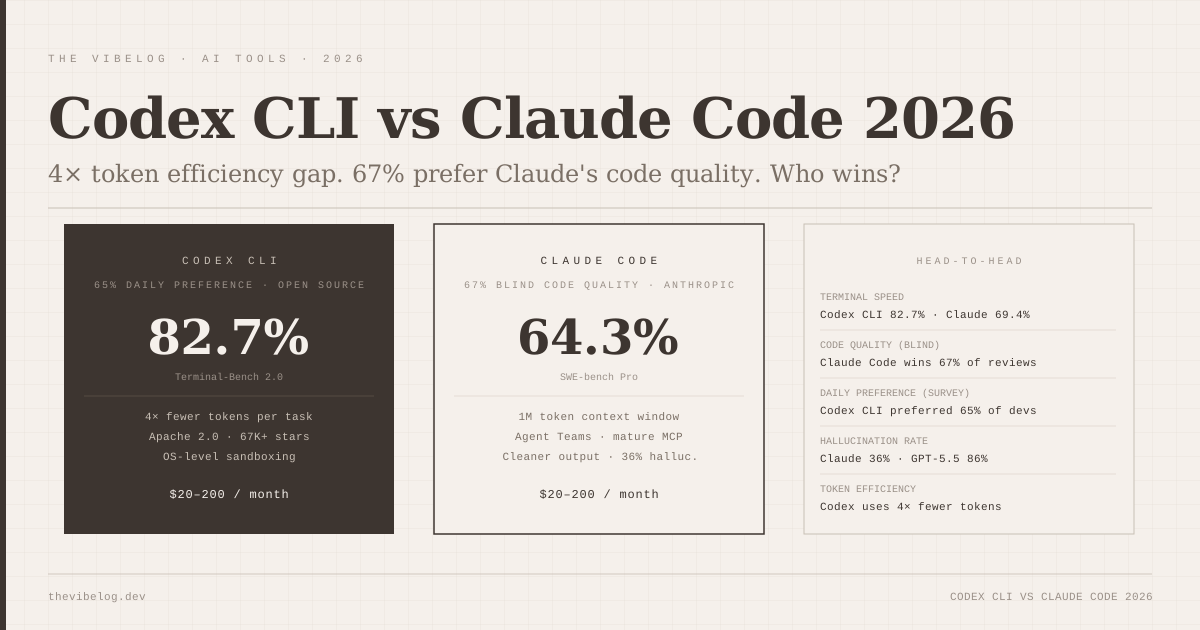
A 500+ developer Reddit survey found 65% preferred Codex CLI day to day. Blind code reviews of output from both tools rated Claude Code cleaner 67% of the time. Both data points are real. The explanation matters for how you choose.
What each tool actually is
Codex CLI is OpenAI’s terminal coding agent — open source under Apache 2.0, built in Rust, with 67,000+ GitHub stars and over 400 external contributors as of May 2026. It runs GPT-5.5 or GPT-5.3-Codex underneath, operates in your terminal, and includes OS-level sandboxing (Seatbelt on macOS, Landlock and seccomp on Linux) to limit what it can do without your approval. It is fast, transparent, and you can read the source code if you want to understand how it works.
Claude Code is Anthropic’s terminal agent — closed source, built on Claude Opus 4.7, running with a 1 million token context window. It reads your filesystem, writes files, runs commands, and operates autonomously across your codebase. As covered in the full AI tool comparison, Claude Code’s approach to complex multi-file work is distinctly different from IDE tools — it delegates and you review, rather than offering suggestions for you to accept.
Both tools live in your terminal. Both can read your codebase, run commands, and write code. The architecture underneath is fundamentally different, and that difference shows up in specific ways.
The token efficiency gap — and why it matters
The clearest quantitative difference is token consumption. In a Figma-to-code benchmark run by Morph LLM comparing the two tools on the same task, Claude Code consumed approximately 6.2 million tokens while Codex CLI consumed 1.5 million tokens — a 4x gap for identical work.
At GPT-5.5 API pricing ($5 input / $30 output per million tokens), 1.5 million tokens is meaningfully cheaper than 6.2 million tokens. The efficiency difference is real, and for teams running agents continuously across many tasks, it compounds into substantial monthly cost differences.
Claude Code’s verbosity is intentional — it explains its reasoning, documents its decisions, and narrates what it is doing. This is a feature when a developer is reviewing the agent’s work closely. It is cost without value when the agent’s output goes directly to a test suite or gets merged after a quick diff review.
There is also an operational reality from METR’s research: Claude Code runs approximately 19% slower than expected in practice due to hitting rate limits and usage caps on the Anthropic API. At scale, this is not a footnote. If you are running Claude Code continuously — queued tasks, CI triggers, overnight autonomous sessions — that 19% throughput reduction affects your actual turnaround time.
Benchmarks: where each leads
The benchmark picture is genuinely split, which is why picking a winner is harder than most comparison articles claim.
Where Codex CLI / GPT-5.5 leads:
Terminal-Bench 2.0: 82.7% versus Claude Code’s 69.4% — a 13-point gap on complex shell workflows requiring planning, iteration, and tool coordination. For DevOps automation, CLI tooling, build pipeline debugging, and anything terminal-native, this matters.
Where Claude Code leads:
SWE-bench Pro: 64.3% versus 58.6% for GPT-5.5 — a 5.7-point gap on resolving real GitHub issues in real codebases. For the kind of work that represents most developer tasking — actual bugs, actual features, actual codebases — Claude Code’s architectural reasoning produces better results more often.
The hallucination rate gap from the GPT-5.5 vs Claude Opus 4.7 comparison is relevant here too: Claude Opus 4.7 at 36% versus GPT-5.5 at 86%. When a terminal agent fabricates an API endpoint, incorrect import path, or nonexistent configuration option, you debug a silent failure. The hallucination rate is not an abstract benchmark — it shows up as time spent chasing problems that the tool introduced.
Why people prefer Codex CLI daily despite rating Claude Code higher
The paradox resolves when you think about what “daily preference” measures versus what “blind code review” measures.
Daily preference reflects the experience of working with the tool — response speed, how it communicates what it is doing, how often it asks for clarification versus proceeding, whether it feels like it is with you or ahead of you. Codex CLI is faster at producing output, more transparent in its sandboxed execution, and — for developers who want to maintain hands-on control — less likely to surprise you by doing something larger than intended.
Blind code review reflects only the artifact: is this code correct, readable, maintainable? Claude Code produces cleaner, more modular, better-documented code. The 67% preference in blind reviews is not close.
The practical implication: if you hand the tool’s output directly to a colleague or into a PR that your team will maintain, Claude Code’s output requires less cleanup. If you are iterating quickly on your own tasks, experimenting, or running high-volume automation where you review output at a coarser grain, Codex CLI’s speed and efficiency is the better fit.
Open source versus closed — the real difference for teams
Codex CLI’s open-source Apache 2.0 license is not just a philosophical preference. It has practical consequences:
Auditability: You can read exactly what Codex CLI does before you run it on a production codebase. For security-sensitive environments, this matters. Claude Code’s behavior is documented but not inspectable at the source level.
Self-hosting and modification: Teams with specific security requirements can run Codex CLI without routing through OpenAI’s servers by pointing it at a self-hosted model. That option does not exist with Claude Code.
Contribution: The 400+ contributors to Codex CLI’s codebase have added integrations, fixed edge cases, and built extensions that OpenAI’s own team did not. This is real value that open-source development compounds over time.
The counterargument is that Claude Code’s closed-source development allows Anthropic to ship tightly integrated features — Agent Teams with coordinated sub-agents and direct messaging between them, a built-in diff viewer, native session management — that open-source coordination cannot match for speed of iteration.
MCP support: where Claude Code still leads
Both tools now support MCP for connecting to external data sources and tools. The difference is maturity and breadth.
Claude Code’s MCP integration has been in production longer and has broader coverage. The MCP servers guide on this blog covers the ecosystem in detail — but the practical version is that Claude Code connects smoothly to Postgres, Figma, Notion, Slack, and the full range of official MCP servers. Codex CLI uses TOML for MCP configuration and has solid support for the core use cases, but the ecosystem integration is less mature.
For teams already running MCP infrastructure, this is a non-trivial difference. The agent that connects to your database, your design tool, and your project management system has significantly more context than one that can only see your filesystem.
The actual cost picture
Both tools cost roughly $100–200 per month for heavy users, though the paths there are different.
Codex CLI on ChatGPT Pro ($20/month): Includes Codex sessions with a 5x usage multiplier (10x through May 31, 2026 on the promotional offer). For developers who stay within the included usage, this is $20/month. For heavy users who need API-level access, token costs at GPT-5.5 rates add up — but the 4x token efficiency advantage means equivalent work costs less in API credits than Claude Code.
Claude Code ($20/month + API): The flat $20 subscription is a floor, not a ceiling. METR’s research on real-world heavy usage puts typical total costs at $100–200/month. The Max 20x plan at $200/month provides a ceiling for teams that need predictable billing.
Which one to use
Use Codex CLI if:
You care about token efficiency and operating cost at scale. You want open-source auditability. Your work is terminal-heavy — DevOps, CLI tools, build automation — where the 82.7% Terminal-Bench lead is relevant. You prefer faster, more transparent agent behavior and are comfortable with slightly lower code quality in the output.
Use Claude Code if:
Code quality and correctness is the primary constraint. You are working on complex multi-file reasoning tasks where SWE-bench Pro leadership (64.3%) matters. You want deeper MCP integration and Agent Teams for parallel sub-agent workflows. You are comfortable with higher token consumption in exchange for cleaner output and more reliable long-horizon task completion.
The most common professional setup: Codex CLI for speed-sensitive daily tasks and high-volume automation. Claude Code for complex feature work, large-codebase refactors, and anything that goes directly to a colleague for review. The tools are genuinely complementary — running both at $100–200/month each is a real setup for teams where the productivity return justifies it.
Token efficiency figures from Morph LLM Figma-to-code benchmark, April 2026. METR rate limit analysis from METR research report, April 2026. Terminal-Bench 2.0 and SWE-bench Pro figures from April 2026 evaluation leaderboard. Reddit developer preference survey (500+ developers), May 2026. Codex CLI GitHub star count from github.com/openai/codex as of May 2026.