I have been running Claude Code, Cursor, and GitHub Copilot side by side since February — not on toy apps, not on “build me a to-do list” demos, but on a production Next.js codebase with a real auth system, a real payment flow, and real users who would notice if something broke.
Here is what I found. No affiliate links. No vendor briefings. Just three months of daily use.
Why this comparison is different
Most comparisons run each tool through the same contrived prompt and paste screenshots. That tells you nothing about how a tool performs when you are three hours into debugging a race condition in your job queue, or when you need to refactor a 2,000-line file that nobody on the team fully understands anymore.
I evaluated all three on tasks that actually consumed my working hours:
- Greenfield feature development (new payment webhook handler)
- Bug hunting in unfamiliar code (inherited auth middleware)
- Refactoring and modernisation (moving from Pages Router to App Router)
- Code review and explanation (understanding a colleague’s async patterns)
Claude Code: the terminal agent that thinks in systems
Claude Code arrived as a research preview in February 2025 and became generally available alongside Claude 4 in May 2025, according to Anthropic’s Claude 4 announcement. It is fundamentally different from the other two tools. It is not an IDE feature. It lives in your terminal, reads your filesystem, writes files, runs commands, and operates autonomously across your entire codebase.
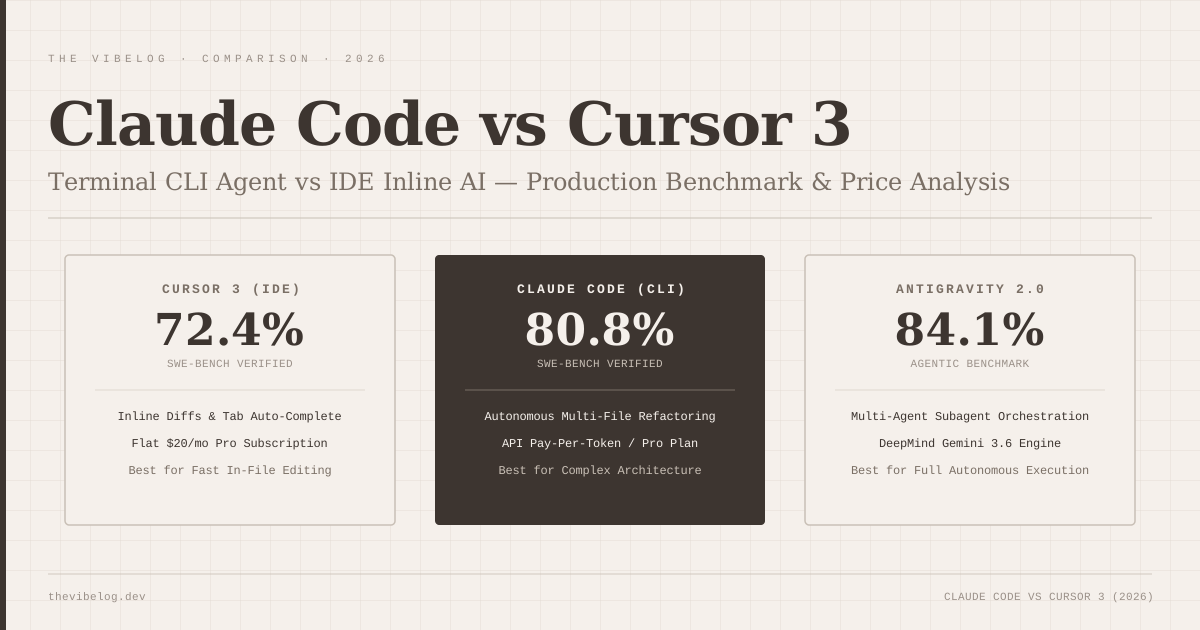
When I first published this comparison in May, Claude Code ran Claude Opus 4.7. Today the defaults are Claude Opus 5.5 and Sonnet 5.5, and Anthropic reports Opus 5.5 at 66.4% on Terminal-Bench 4.0, an agentic terminal benchmark rather than the SWE-bench Verified numbers everyone quoted in spring. Those are vendor-reported scores. More practically: when I handed it the task “migrate our API endpoints from Express callbacks to async/await and update the corresponding tests,” it did it. All of it. Took about twelve minutes. I reviewed the diff, caught one edge case it missed in an error handler, asked it to fix that, and it was done.
That is a task that would have taken me two hours and probably a second pair of eyes.
Where Claude Code actually earns its place:
The context window is 1 million tokens on current Opus and Sonnet models. For large codebases, this matters enormously — it can hold your entire project in context in a way that smaller-window tools cannot. Complex multi-file changes, architectural refactors, tracking down a bug that spans four files and two packages: Claude Code handles these with a coherence that other tools lose partway through.
The April 2026 desktop app redesign added multi-session management, drag-and-drop layout, an integrated terminal, and a rebuilt diff viewer. Anthropic shipped Routines the same week as a separate research preview: you bundle a prompt, a repo, and any connectors into a config that runs on Anthropic’s cloud on a schedule, from an API call, or off a GitHub event. I have one set up that reviews every new PR automatically. It is not a perfect reviewer, but it catches things that slip through. If you want that cloud side in more depth, I compared it with OpenAI’s equivalent in Codex Cloud vs Claude Code on the web.
The honest tradeoff:
Claude Code comes with the Claude Pro plan at $20/month ($17 a month billed annually), with usage drawn from the plan’s session and weekly limits, according to Anthropic’s pricing page. Heavy users either move to Max, which starts at $100/month, or switch on usage credits billed at API rates once they hit a limit. The feedback loop is slower than an IDE tool — you give it a task, it works, you review the output. If you want to feel your hands on the wheel at every step, the terminal-first model will frustrate you. If you are comfortable delegating and reviewing, it is extraordinarily powerful.
Cursor 3: the IDE rebuilt for agents
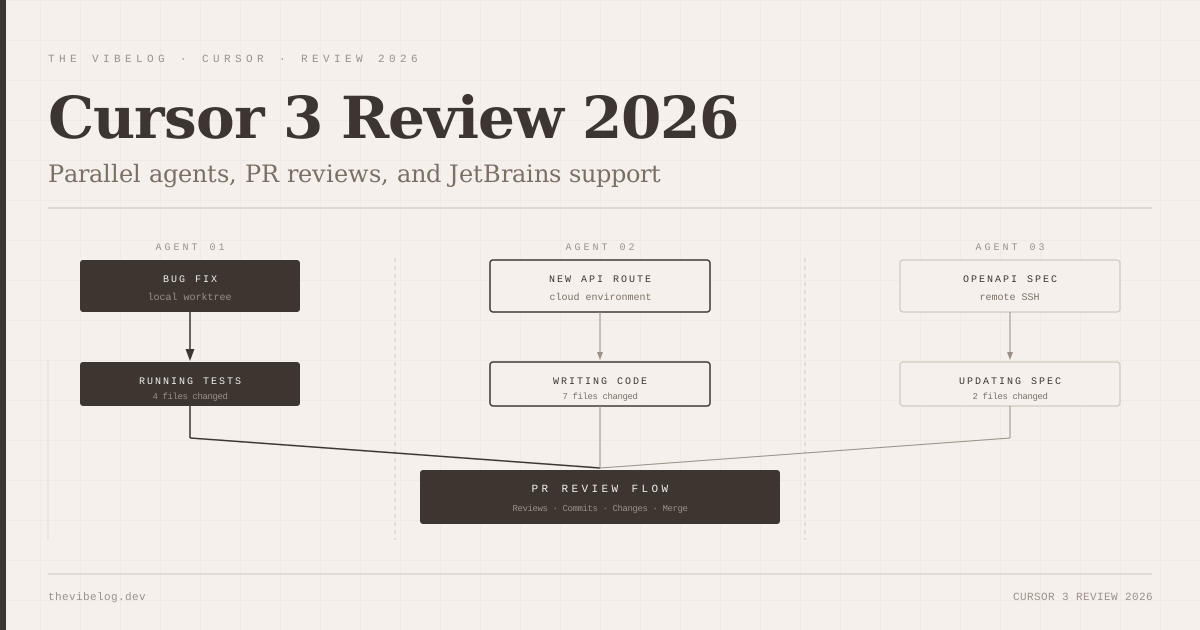
Cursor released version 3 on April 2, 2026, and it represents a genuine rethinking of what a coding IDE should be in an agent-native world. The headline feature, per the Cursor 3.0 changelog, is the Agents Window, where you run many agents in parallel, locally, in git worktrees, in the cloud or over SSH. It also added Design Mode, Agent Tabs and /worktree and /best-of-n commands.
In practice: I set one agent to build a new API route while another updated the corresponding OpenAPI spec and a third wrote the integration tests. All three ran concurrently. The workspace pulled the results together and flagged conflicts. It is legitimately impressive.
What Cursor does better than anything else:
The inline autocomplete is the best I have used. Cursor bought Supermaven, the fast-completion startup, in November 2024, and the completions are faster and more contextually accurate than anything else in my editor rotation.
The /best-of-n command is also worth calling out. It runs the same task through several agents and lets you keep the best result, which is the closest thing to a free second opinion that any of these tools ship. I went deeper on how the parallel-agent model compares with a terminal agent in Claude Code vs Cursor 3.
The honest tradeoff:
Cursor is $20/month. The parallel agents eat through your usage quota quickly on complex tasks. The tool is also deeply tied to the Cursor ecosystem, and that ecosystem changed owners: SpaceX completed its acquisition of Cursor on August 14, 2026. Pricing has not moved, but you are now betting on SpaceX’s roadmap for the company rather than an independent startup’s.
GitHub Copilot: the one that works anywhere
Copilot Pro is $10/month, half the cost of either of the above. Since June 1, 2026 it has run on usage-based billing, with that $10 including $10 of AI Credits, according to GitHub’s billing changelog. It works in VS Code, Visual Studio, JetBrains IDEs, Vim, Neovim, Xcode and more. In the editor it has an agent mode, and on GitHub.com the Copilot cloud agent (formerly the coding agent) can take an issue and turn it into a pull request autonomously. The full plan breakdown is in my GitHub Copilot pricing guide.
For teams that do not want to change editors, cannot get everyone to pay $20/month, or are working across multiple languages and environments, Copilot is the practical choice. It will not win on benchmarks. But it is reliable, it is fast, and it is everywhere.
Where Copilot falls short:
The context window is smaller. Multi-file reasoning is weaker. Complex architectural tasks that Claude Code handles cleanly become a back-and-forth negotiation with Copilot. You end up doing more of the thinking.
The numbers that matter
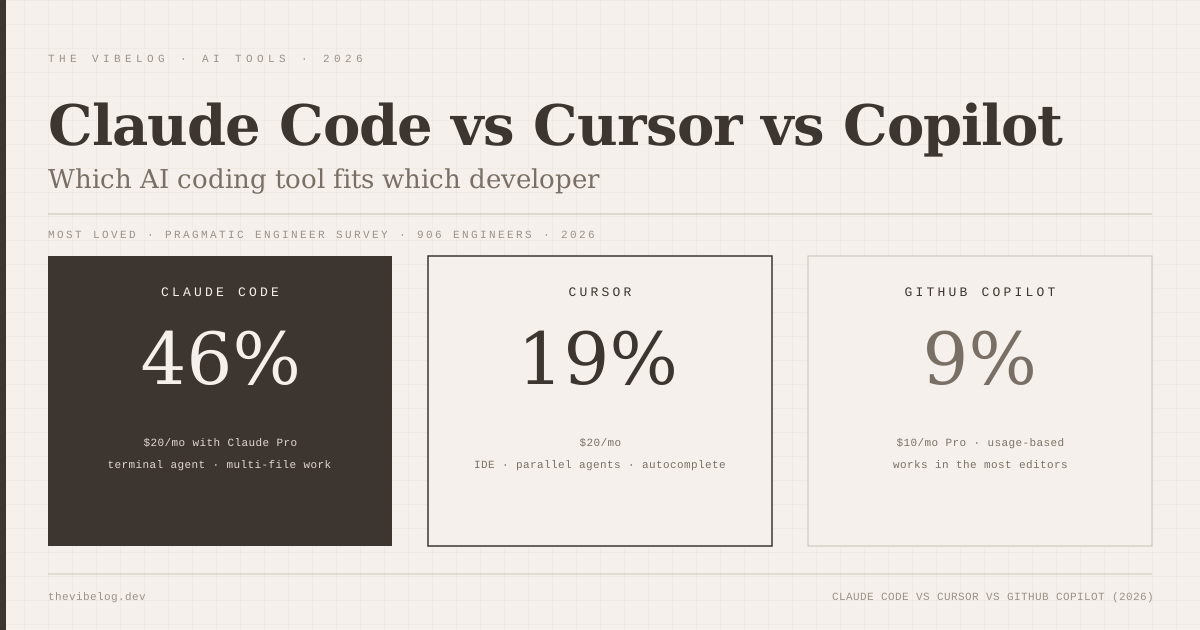
Claude Code earned a 46% “most loved” rating, against 19% for Cursor and 9% for GitHub Copilot, in The Pragmatic Engineer’s AI tooling survey of 906 software engineers, published March 3, 2026. That gap is partly novelty, partly Claude Code genuinely solving problems the others do not.
The much larger 2026 Stack Overflow Developer Survey points the same way. Its AI section has Claude Code at 66% and GitHub Copilot at 59% among the leading coding agents, and 73% of respondents using coding assistants or agents daily. Trust is more conditional: 48% say they trust AI when they can easily validate its answers.
| Tool | Entry price | Most loved (Pragmatic Engineer, 2026) | Best at |
|---|---|---|---|
| Claude Code | $20/mo (Claude Pro) | 46% | Multi-file, autonomous work |
| Cursor | $20/mo | 19% | IDE editing, autocomplete |
| GitHub Copilot | $10/mo (Pro) | 9% | Price, editor coverage |
(Sources: Anthropic pricing, GitHub billing changelog, Cursor pricing page and The Pragmatic Engineer, checked October 2026.)
Whatever your feelings about these tools, the adoption numbers say literacy in at least one of them is now a professional expectation.
Which one should you use?
Use Claude Code if your work involves complex, multi-file tasks, large codebases, or long-horizon refactors. If you think of your AI tool as a colleague you can delegate to and then review, Claude Code is the best colleague available. My agentic coding guide covers how to write those delegated tasks so the review stays manageable. For a sense of how far that delegation now stretches, Claude Opus 5.5 recently produced a working Rust port of the TypeScript compiler in two weeks.
Use Cursor if you spend most of your time in an IDE doing active development, want the best autocomplete available, and are comfortable in a tool that is evolving fast.
Use GitHub Copilot if your team is not ready to change editors, or you need something that works across every environment with minimal friction at a lower price.
Use all three. The most common professional setup I see is Cursor for daily editing and Claude Code for complex tasks. The tools complement rather than replace each other.
The answer to “which AI coding tool wins” is the same as most engineering questions: it depends on the work.
Pricing current as of October 2026. Claude Code: included in Claude Pro at $20/month ($17 annual) or Max from $100/month. Cursor: $20/month. GitHub Copilot: $10/month Pro, $19/user/month Business, with usage-based AI Credits.
(Updated May 2026: corrected Claude Code SWE-bench Verified score from 80.8% to 87.6% following the Claude Opus 4.7 release on April 16, 2026.)
(Updated October 9, 2026: corrected Claude Code pricing, which is included in Claude Pro and Max plan limits rather than billed as API credits on top of $20; corrected the launch date to a February 2025 preview and May 2025 general availability; replaced the Opus 4.7 SWE-bench figure with current Opus 5.5 data; corrected Cursor 3’s feature list, which did not include a PR review workflow or the SDK; noted SpaceX’s August 2026 acquisition of Cursor; updated GitHub Copilot to usage-based billing and the Copilot cloud agent name; attributed the 46/19/9 most-loved figures to The Pragmatic Engineer; and removed an unverifiable 72% autocomplete acceptance figure and an unverifiable 340% job-postings statistic.)