I love terminal agents. In the last three months, Claude Code has saved me dozens of hours of grunt work. But at the end of my first month of heavy usage, my Anthropic API bill was $184.20—and that was just for one seat. Across our small three-person engineering team, we were staring at a monthly LLM spend of nearly $500.
AI-assisted development is incredibly fast, but if left unoptimized, it makes your API billing even faster.
In April, we set out to systematically audit and optimize how we interact with our AI stack—specifically Cursor 3 and Claude Code. By modifying our prompt structures, managing our context sizes, and using Anthropic’s prompt caching mechanics, we cut our API billing by 64% in May ($66.30 for my seat), while actually getting better code outputs.
Here is the exact playbook we used to tame our token consumption.
The Economics of the Agentic Loop
To optimize your costs, you have to understand where the tokens are actually going. In a standard chat interface, you pay for your prompt and the response. In an agentic tool like Claude Code or Cursor’s Composer, you are running an agentic loop:
- You write a prompt: “Find the bug in our auth pipeline.”
- The agent reads a file. (API Call 1)
- The agent runs a terminal command to test. (API Call 2)
- The agent writes a fix to the file. (API Call 3)
- The agent runs the test suite again. (API Call 4)
- The agent reports back to you. (API Call 5)
Every single step in that loop is a separate API call. And because LLM chats are stateless, each step sends the entire conversation history, all read files, and all command outputs back to the model.
If you are working inside a 20,000-word codebase and have a conversation that stretches for ten turns, you aren’t just paying for ten prompts. You are paying for the cumulative sum of all previous context, ten times over. By turn ten, a single command execution can cost you 80,000 input tokens.
Accumulating Context in an Agentic Loop:
Turn 1: [System Prompt] + [Your Prompt]
Turn 2: [System Prompt] + [Your Prompt] + [File A Content] + [Turn 1 History]
Turn 3: [System Prompt] + [Your Prompt] + [File A Content] + [Terminal Output] + [Turn 2 History]
...
Turn 10: [Massive History & File Content Sent Again] — Exponential Cost Growth!
1. Master Anthropic’s Prompt Caching
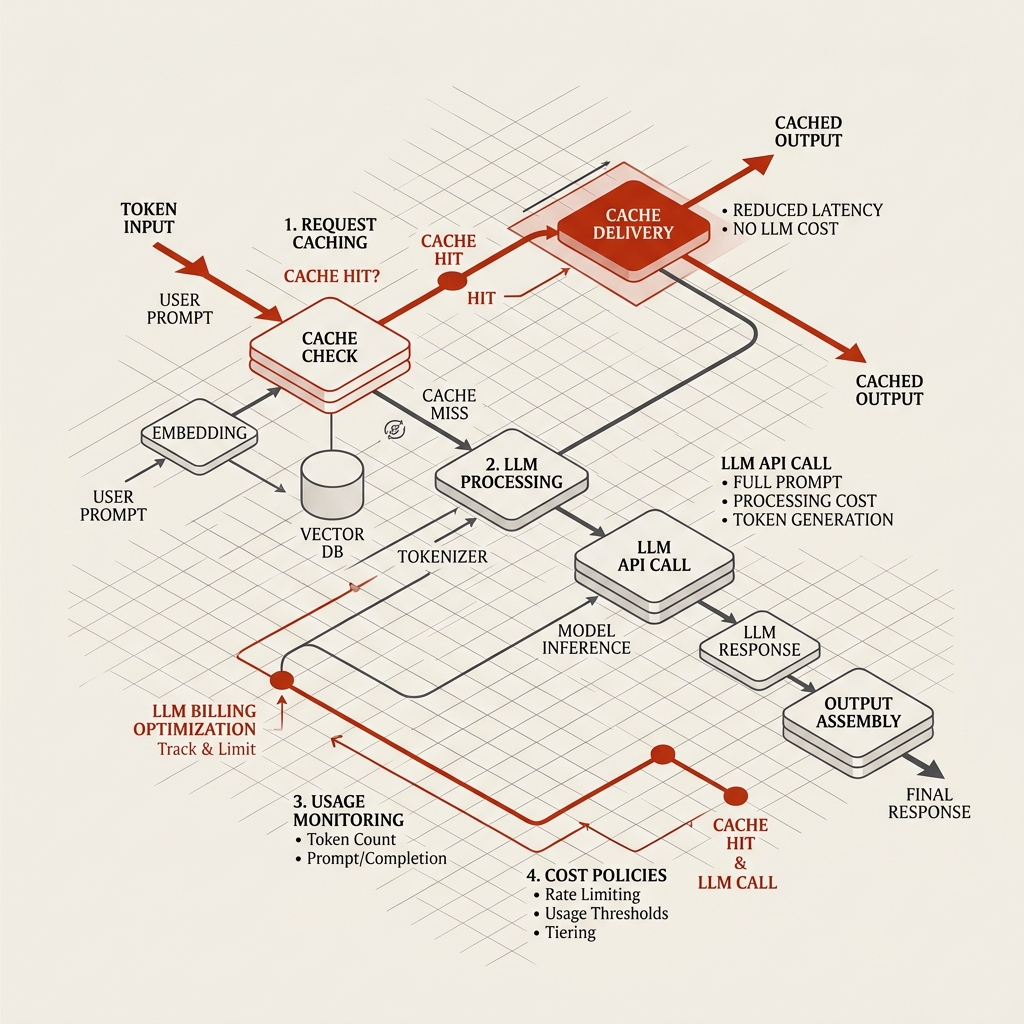
Anthropic introduced prompt caching in late 2024, and in 2026 it remains the most powerful tool for cost optimization. It allows the API to store a “prefix” of your prompt (like system instructions, project-level configurations, or long conversation histories) on Anthropic’s servers.
Subsequent API calls that share that identical prefix read it from the cache instead of processing it from scratch.
The pricing differences are dramatic:
| Transaction Type | Cost Multiplier | Cost per 1M Tokens (Sonnet 3.5) |
|---|---|---|
| Standard Input | 1.0x (Base) | $3.00 |
| Cache Write (TTL 5m/1h) | 1.25x – 2.0x | $3.75 – $6.00 |
| Cache Read (Hit) | 0.10x (90% off) | $0.30 |
Because a cache hit costs only 10% of a standard input token, a single cache write pays for itself after just two turns in a chat.
How to maximize cache hits in Claude Code:
Claude Code manages prompt caching automatically, but it relies on you keeping the prefix of your conversation stable.
- Avoid modifying your system rules mid-session: Changing your
.cursorrulesor project-levelCLAUDE.mdin the middle of a coding session invalidates the cache, forcing Claude Code to write a brand new cache at the 1.25x premium. - Run long, focused sessions instead of scattered queries: If you query the agent once, wait ten minutes (exceeding the cache TTL), and query it again, you will pay the cache write premium repeatedly without ever getting a cache hit. Group your work so that you are interacting with the agent continuously within the cache’s time-to-live window.
2. Keep Chats Scoped (New Task = New Chat)
The single biggest mistake developers make is keeping a single chat window open for hours, using it to solve five different problems.
By hour three, you are carrying around 100,000 tokens of dead context—conversations about a CSS bug you fixed two hours ago, which are now being sent to the model while you try to write a database migration.
We instituted a strict “Single-Purpose Chat” rule:
- One issue, one session: As soon as a feature is built or a bug is squashed, close the terminal session or chat panel and start a brand new one.
- The “Summarize and Reset” technique: If you are working on a massive refactor that genuinely requires hours of iteration, do not let the chat drag on. At turn eight or nine, type:
“Summarize our progress, the current architecture we have agreed upon, and the remaining TODOs.” Copy that summary, close the session, open a fresh one, paste the summary, and continue. This instantly trims away the conversational deadweight, saving us thousands of input tokens per turn.
3. Limit Context Scope Aggressively
Both Cursor and Claude Code make it incredibly easy to include your entire repository in the context. In Cursor, typing @codebase is a habit. In Claude Code, letting the agent search the whole project is the default.
But sending your whole repository to a model is like hiring a contractor and paying them to read your entire house’s blueprints just to change a lightbulb in the kitchen.
### Rules of Context Engagement:

1. **Avoid `@codebase` for routine edits:** Only use codebase search when you genuinely don't know where a function is defined.
2. **Use `@selection` or `@file`:** Limit the model's sight to the precise files you are editing. If you are changing a React component, there is no reason the model needs to see your database schema or Tailwind configuration.
3. **Ignore node_modules and dist:** Ensure your `.gitignore` and `.cursorignore` files are properly configured. If they are not, AI indexers will scan compiled build files and dependencies, ballooning your token count on every query.
4. Move Rules to Modular Files
In 2025, developers loved writing massive, 5,000-line global .cursorrules files containing every coding standard, UI pattern, and package configuration they could think of.
The problem? That entire 5,000-line file is injected as a system prompt on every single keystroke and query, burning through your premium fast-credit pool or costing you massive API fees.
In 2026, Cursor introduced modular rules (scoped folders like .cursor/rules/). You can now write small, targeted rules files that only load under specific conditions:
// Example: .cursor/rules/react-components.mdc
{
  "globs": "src/components/**/*.tsx",
  "description": "Rules for React components and styling"
}
By splitting our massive global rules file into six highly targeted .mdc files, we reduced our baseline system prompt size by 82% for the vast majority of our queries. The styling rules only load when we edit CSS/TSX; the database rules only load when we edit Prisma/SQL files.
5. Implement a Hybrid “Ask → Inline → Debug” Workflow
Agentic modes (like Cursor’s Composer or Claude Code’s autonomous loops) are extremely powerful, but they are cost-heavy because they make multiple API calls to self-correct. For minor edits, using a full agent is overkill.
We trained our team on a hybrid workflow that matches the tool to the task:
- Use Chat for Architecture & Logic: Ask the chat agent to explain a concept or write a high-level plan. This is a single, inexpensive query-response turn.
- Use Inline Edit (
Cmd+K) for Implementation: Once you have the plan, highlight the specific block of code you want to change, hitCmd+K(or equivalent inline editor), and describe the change. Inline models are highly optimized, use far less context history, and apply modifications directly. - Use Agent Mode ONLY for System-Wide Changes: Reserve the fully autonomous agent loops for complex refactoring that spans three or more files, or when hunting a tricky bug that requires running active test commands in the terminal.
6. Configure Local Offline Fallbacks
Not every task requires a frontier model like Claude 3.5 Sonnet or GPT-5. If you are writing standard boilerplate, generating basic test structures, or converting an array format, you are wasting money using a premium model.
We set up Ollama on our local developer machines, running DeepSeek-Coder-V2 (16B) and Llama-3-70B.
- Routine Coding (Local): For day-to-day autocomplete, documentation drafting, and boilerplate, we switch our local editor models to our offline Ollama instances. They cost zero dollars, run at zero latency, and handle routine tasks beautifully.
- Complex Reasoning (Cloud): We reserve our premium Claude API keys for the hard problems—architectural decisions, security reviews, and multi-file debugging.
The Verdict: Reclaiming Your Budgets
By treating our API consumption like any other engineering bottleneck—measuring it, identifying waste, and applying technical optimizations—we transformed our AI tools from a luxury spend into a highly profitable utility.
You do not have to stop using agents to save money. You just have to stop sending them dead context, use modular rules, and let prompt caching do the heavy lifting.
Your development speed will stay exactly the same. Your finance lead, however, will be much happier.