Cursor 3 is not an incremental release. It is a different mental model for what an IDE is — and whether that model fits your workflow depends on how much of your day you are willing to spend managing agents rather than writing code directly.
I have been using it since the 3.0 launch in April and through the 3.3 release in May. Here is what actually changed, what works, and where it falls short.
What Changed in Cursor 3.0: The Agents Window
The headline feature in Cursor 3.0 is the Agents Window. Open it with Cmd+Shift+P → Agents Window and you get a multi-agent orchestration layer that sits above the editor itself.
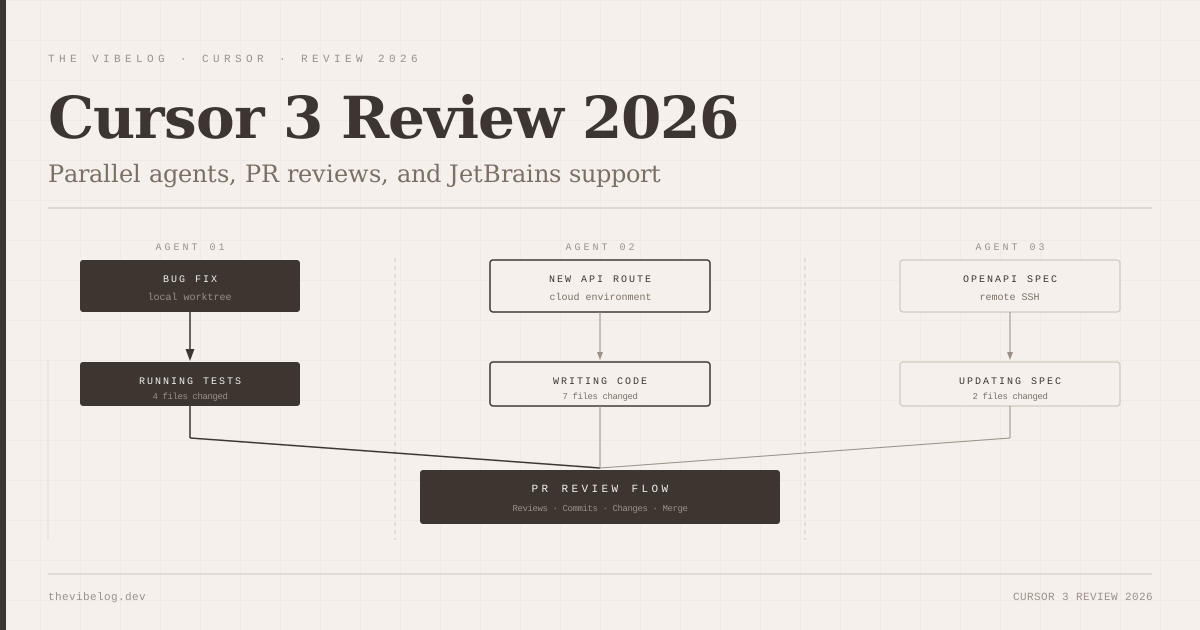
Each agent runs independently. You can have one working on a bug fix in one repo, another scaffolding a new API route in a second repo, and a third running against a remote SSH environment — all simultaneously, without one blocking the other. Cursor has always had agent capabilities, but they were sequential. This is fundamentally different.
The multi-repo layout is useful for monorepo setups or teams where front-end and back-end live in separate repositories. You can set agents against both repos in the same session and have them work in parallel. Handoff between local and cloud agents is designed to be continuous — start a task locally, continue it in a cloud environment without re-explaining context.
In practice, the handoff works but is not instant. There is a noticeable delay when shifting an agent from a local worktree to a cloud execution environment. Not a dealbreaker, but worth knowing if your mental model of “handoff” is zero-latency.
Composer 2.5: Smarter Long-Running Tasks
Cursor shipped Composer 2.5 on March 19, 2026, about two weeks before the 3.0 release. The timing matters because Composer 2.5 is what makes 3.0’s parallel agents actually useful.
The previous Composer struggled with tasks that required holding a lot of context across many steps — the kind of multi-file refactors where the agent would start coherently and drift by file eight. Composer 2.5 uses a different underlying model for long-running tasks, and the difference shows. I ran a full TypeScript migration on a medium-sized Express service — twenty-three files, a mix of JS and TS in the same codebase — and it tracked the overall goal consistently across all of them.
Anysphere offered double usage in the first week after Composer 2.5 launched, plus a faster tier alongside the standard one. That kind of launch incentive suggests they knew the previous version had been frustrating users and wanted people to give the new one a fair try. The faster tier is meaningfully faster on short tasks; I default to it now unless a task is long enough that I want the more deliberate pace.
Cursor 3.3 Review: PR Flow and Parallel Subagents
Cursor 3.3 shipped on May 7, 2026, and it added two things I use daily: the PR review experience and the “Build in Parallel” feature for splitting tasks across subagents.
The PR review workflow finally makes it possible to take a pull request from creation to merge without leaving the IDE. There is a Reviews tab with inline commenting threads, a Commits tab, and a Changes tab with a full file tree. It is genuinely how GitHub should have worked inside an editor years ago. I noticed after a week that I was spending significantly less time context-switching to the browser — not zero, but far less.
The inline thread experience is good. You can reply to existing PR comments, resolve threads, and add new review comments directly from the diff view. Where it is still limited: you cannot trigger CI re-runs from inside Cursor, and the PR merge confirmation feels buried. Small friction, but friction.
“Build in Parallel” is the 3.3 feature I am most excited about conceptually, and also the one where I have the most reservations. The idea is straightforward: when a task has clearly independent subtasks, Cursor splits them across async subagents that run simultaneously. In clean cases — “write unit tests for these five utility functions” — it works well. In cases where the subtasks have hidden dependencies, you end up with agents that have made conflicting assumptions about a shared type or interface, and reconciling those conflicts takes longer than just doing it serially would have.
The tool does not always get the decomposition right. I would not use Build in Parallel for anything involving shared state without reviewing the task breakdown first.
Cursor 2026 Review: JetBrains Integration
The JetBrains integration, which shipped in March 2026, is the most underreported development in Cursor’s history. Cursor’s entire identity has been built around being a VS Code fork. Supporting JetBrains is a signal that Anysphere is thinking about a different distribution strategy.
It works via the Agent Client Protocol (ACP). You install the AI Assistant plugin on JetBrains 2025.3.2 or later, connect it to Cursor, and you can use OpenAI, Anthropic, Google, or Cursor’s own models inside IntelliJ, PyCharm, or WebStorm. No separate JetBrains AI subscription required.
I tested it in WebStorm on a TypeScript project and in PyCharm on a data pipeline. The feature parity is not complete — you do not get the Agents Window or the PR review flow inside JetBrains, and some of the Cursor-specific model optimisations are absent. What you do get is the Cursor model access and the completions, which are meaningfully better than the default JetBrains AI experience.
For teams that are stuck on JetBrains and do not want to migrate entire workflows to VS Code, this is a real option. The January 2026 JetBrains developer survey found 29% of developers still using GitHub Copilot as their primary AI tool. A significant share of those are JetBrains users who have not had a strong reason to switch. Cursor is now an option for them.
Parallel Agents in Practice: Honest Assessment
The agentic coding shift that has been building across the industry is real, and Cursor 3 is a direct response to it. But parallel agents introduce a supervision problem that the tool does not fully solve.
When one agent is running, you can follow what it is doing. When three are running simultaneously, you are not supervising any of them — you are waiting and then reviewing all of them. The review burden scales with the number of agents, and the agents’ decisions can interact in ways that are not obvious until you look at the combined diff.
I ran a session where I set three agents: one to add input validation to an API endpoint, one to update the corresponding tests, and one to update the OpenAPI spec. All three completed. The validation and tests were inconsistent — the agent writing tests had used a slightly different schema assumption than the agent writing the validation. Both were internally consistent. Together they were wrong.
That is not a theoretical risk. It is something I hit in my third session with the Agents Window. The fix was straightforward once I caught it, but I would not have caught it if I had just looked at each diff in isolation.
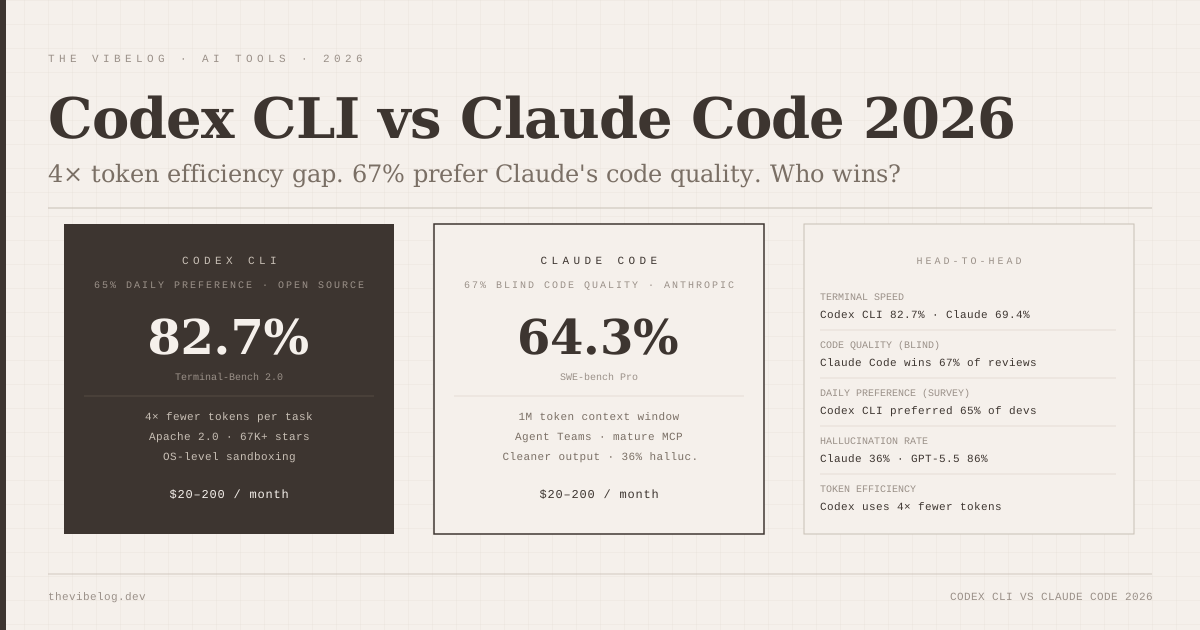
The cursor-claude-codex comparison I ran earlier this year still holds for the fundamental dynamic: Cursor’s parallel agents are best for developers who already understand the codebase deeply enough to review multi-agent output intelligently.
Cursor Pricing 2026: Is It Worth It?
Cursor’s pricing in 2026:
- Hobby (free): 2,000 completions per month, 50 slow premium requests
- Pro ($20/month): Unlimited completions, 500 fast premium requests
- Business ($40/user/month): Everything in Pro, plus enterprise admin controls, model access restrictions, spend limit alerts with usage analytics
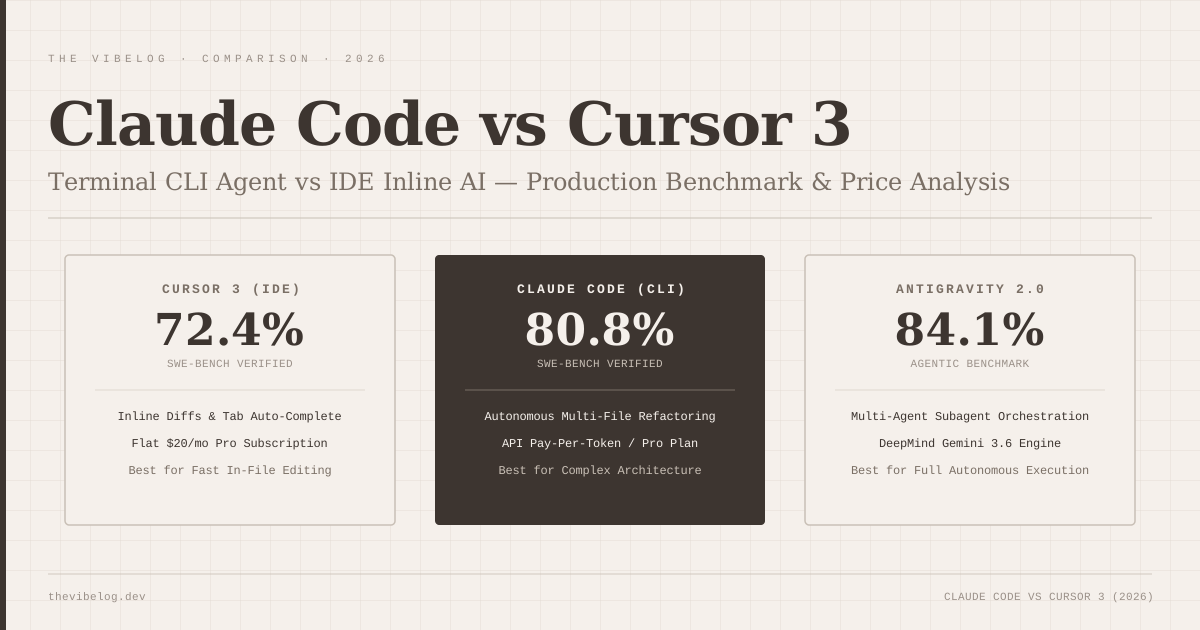
The free tier is genuinely useful for evaluating the tool, but the 50 slow premium requests cap is low enough that you will hit it quickly if you are doing any serious agent work. Pro at $20/month is competitive with Claude Code and significantly cheaper than most enterprise AI coding tools.
The Business tier’s admin controls deserve a mention for teams. You can block specific model providers or configurations granularly — useful if your organization has compliance requirements around which models can process your code. The spend limit alerts with usage dashboards are the kind of feature that enterprise buyers have been asking for since AI coding tools went mainstream.
What Cursor 3 Does Not Do Well
The multi-agent orchestration UI is powerful and also complicated. New users are going to find the Agents Window disorienting. The mental model requires a shift from “I am using an assistant” to “I am managing a team of agents,” and Cursor does not provide much hand-holding on that transition.
The cloud execution environments are slower than local. Not dramatically, but enough that if your default is “run everything in the cloud,” you will feel it on tasks that should feel snappy.
Cursor’s model for dealing with agent failures mid-task is still underdeveloped. When an agent hits an error it cannot recover from, the failure reporting is not always clear about where the task was abandoned and what state the files are in. I have had to manually check a few times whether a failed agent had written partial changes. That is the kind of thing that makes you nervous on a shared branch.
The JetBrains integration is real but limited. If you are a JetBrains-first developer expecting the full Cursor experience, you will be disappointed. What you get is good completions and model access, not the full IDE redesign.
Cursor 3 Verdict: Who Should Upgrade
If you are already a Cursor Pro user, the 3.0 and 3.3 improvements are worth the upgrade — there is no separate version to buy, they ship as updates. The Agents Window, Composer 2.5, and the PR review flow together represent a meaningful increase in what you can get done in a session.
If you are evaluating Cursor for the first time in 2026, the Hobby tier is the right starting point. The parallel agents and advanced enterprise features are not where you will spend your first week anyway.
If you are a JetBrains developer who has been watching Cursor from a distance, the March 2026 integration gives you a real on-ramp. Set expectations correctly: it is model access and completions, not the full Cursor workspace. But that is still better than what you had before.
The one group I would tell to wait: teams that are already well-served by GitHub Copilot’s agent mode and do not want to invest in learning a new tool’s orchestration model right now. Cursor 3 is more powerful, but more powerful and more complex are the same thing here. If your workflows are working, the switching cost needs justification.
Cursor’s 22% daily-use share among AI coding tool users as of January 2026 — up from a much smaller base two years ago — reflects that developers are finding the IDE-first approach compelling. The 3.x releases are pushing further into territory that no other IDE has mapped. Whether that is exactly where you want to be depends on how much of your work benefits from parallel agent management versus focused, single-context development.
For most developers doing greenfield work or large-scale refactors: yes, Cursor 3 is worth it. For developers whose primary use of AI is inline completion and occasional one-off asks: Cursor was already great at that, and 3.0 adds complexity that you will not always need.
Cursor pricing and feature details current as of May 2026. Adoption figures from the January 2026 JetBrains Developer Ecosystem Survey. Cursor 3.0 release date: April 2, 2026. Cursor 3.3 release date: May 7, 2026.