Claude Code hooks are the most useful Claude Code feature most people never configure. They run your own commands at fixed points in a session, before a tool call, after an edit, when Claude stops, so the things that must always happen actually happen. The model does not get a vote.
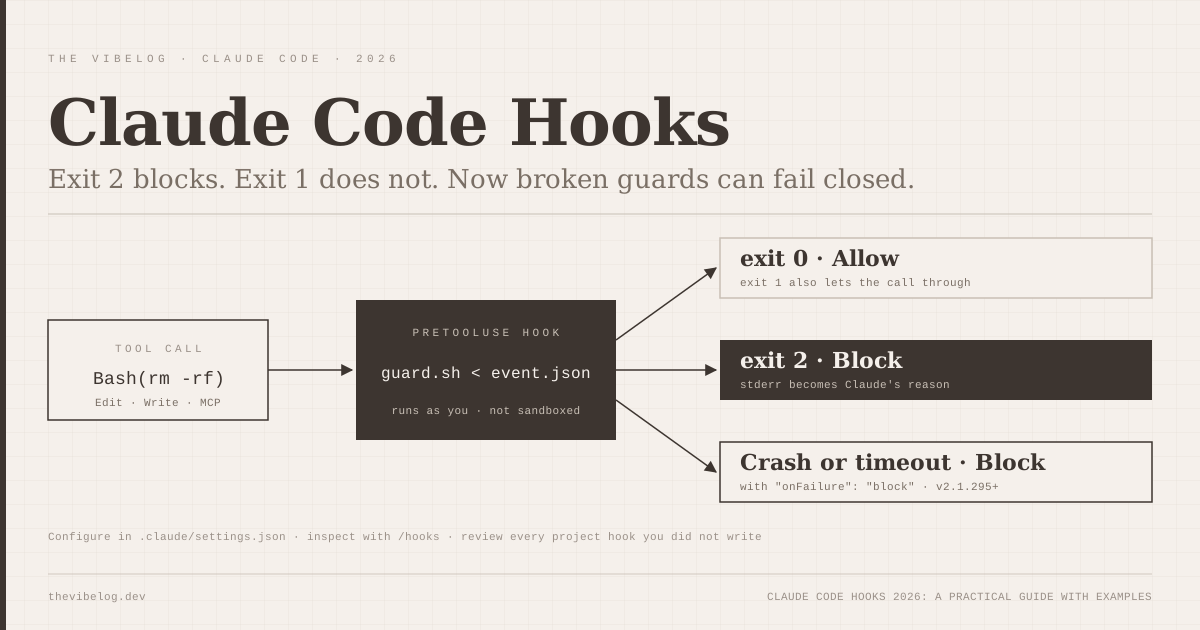
The trap is in the details. In a Claude Code hook, exit code 1 does not block anything. Only exit code 2 does. Until this week, a hook that crashed or timed out let the action through as well.
Claude Code v2.1.295, released on October 8, 2026, added an onFailure: "block" option that closes that second gap. That makes this a good moment to write the guide I wanted when I first read the docs. It covers how hooks work, the events worth knowing, five configs worth copying, and the security side, which got real this year.
What Are Claude Code Hooks?
Claude Code hooks are handlers that Claude Code runs automatically on lifecycle events, configured in a settings file. Anthropic’s hooks guide puts the purpose in one line: hooks give you “deterministic control: certain actions always happen rather than relying on the LLM to choose to run them.”
That distinction matters more as Claude Code usage grows. Stack Overflow’s 2026 Developer Survey found 73% of respondents use coding assistants or agents daily, and Claude Code was the most used coding agent at 66%. A CLAUDE.md instruction like “always run Prettier” is a request. A hook is a guarantee.
There are five handler types, per the hooks reference:
| Hook type | What it does | Default timeout |
|---|---|---|
command | Runs a shell command, JSON on stdin | 600 s |
http | POSTs the JSON event to a URL | 600 s |
mcp_tool | Calls a tool on a configured MCP server | 600 s |
prompt | Sends a prompt to a Claude model for a single-turn evaluation | 30 s |
agent | Spawns a subagent to verify a condition (experimental) | 60 s |
(Source: Claude Code hooks reference, October 2026)
Most real setups use command hooks. The prompt and agent types are for checks that need judgement, such as “did Claude actually finish the task?”, and they cost tokens every time they fire.
Use command hooks for rules a script can check, and model-based hooks only where a script cannot.
How Claude Code Hooks Work: Events, Matchers and Exit Codes
A hook config has three levels: the event, a matcher group, and one or more handlers. This is the shape:
{
  "hooks": {
    "PreToolUse": [
      {
        "matcher": "Bash",
        "hooks": [
          { "type": "command", "command": "\"$CLAUDE_PROJECT_DIR\"/.claude/hooks/check-bash.sh" }
        ]
      }
    ]
  }
}
The reference lists more than 30 events. These are the ones I would learn first:
PreToolUsefires before a tool runs and can block it or rewrite its inputPostToolUsefires after a tool succeeds, which is where formatters belongUserPromptSubmitfires before your prompt is processed and can add context or block itStopfires when Claude finishes responding and can block, forcing Claude to keep goingSessionStartfires on start, resume and after compaction, and its stdout becomes contextNotificationfires when Claude is waiting for you
Matchers are simpler than they look. A plain string like Edit|Write is an exact list. Anything with other characters is treated as an unanchored JavaScript regex, so mcp__memory__.* matches every tool on one MCP server. There is also an if field that takes permission-rule syntax such as Bash(git *), but the docs call it best-effort and say to use the permission system for hard enforcement.
Then the exit codes, which are where most broken hooks go wrong:
| Exit code | Effect on a blocking event | What Claude sees |
|---|---|---|
| 0 | Allowed; stdout parsed as JSON if it is a JSON object | Nothing, or added context on some events |
| 2 | Blocked | stderr, as the reason |
| Any other, including 1 | Not blocked; the action continues | A hook error notice in the transcript |
(Source: Claude Code hooks reference, October 2026)
I can see why people get this wrong. Every Unix habit says non-zero means failure, and failure should stop things. In Claude Code, exit 1 is a “non-blocking error”. The reference says it directly: use exit 2 to enforce a policy.
If your guard script ends with exit 1, it is a logger, not a guard.
Five Claude Code Hooks Worth Copying
All five come from or follow Anthropic’s own examples. The Bash ones need jq installed.
1. Get a notification when Claude needs you
This goes in ~/.claude/settings.json so it works on every project. On Linux, swap the command for notify-send 'Claude Code' 'Claude Code needs your attention'.
{
  "hooks": {
    "Notification": [
      {
        "matcher": "",
        "hooks": [
          {
            "type": "command",
            "command": "osascript -e 'display notification \"Claude Code needs your attention\" with title \"Claude Code\"'"
          }
        ]
      }
    ]
  }
}
The docs note a macOS gotcha. osascript routes through Script Editor, and if Script Editor lacks notification permission the hook fails silently. Run osascript -e 'display notification "test"' once, then enable Script Editor in System Settings.
2. Format every file Claude edits
Put this in the project’s .claude/settings.json so your whole team gets it:
{
  "hooks": {
    "PostToolUse": [
      {
        "matcher": "Edit|Write",
        "hooks": [
          { "type": "command", "command": "jq -r '.tool_input.file_path' | xargs npx prettier --write" }
        ]
      }
    ]
  }
}
This one hook removes a whole category of noisy review comments. The docs point out that it only sees Claude’s file tools. If a Bash command rewrites a file, a FileChanged hook catches that instead.
3. Block edits to protected files
Save this as .claude/hooks/protect-files.sh and chmod +x it:
#!/bin/bash
INPUT=$(cat)
FILE_PATH=$(echo "$INPUT" | jq -r '.tool_input.file_path // empty')
PROTECTED_PATTERNS=(".env" "package-lock.json" ".git/")
for pattern in "${PROTECTED_PATTERNS[@]}"; do
  if [[ "$FILE_PATH" == *"$pattern"* ]]; then
    echo "Blocked: $FILE_PATH matches protected pattern '$pattern'" >&2
    exit 2
  fi
done
exit 0
Register it as a PreToolUse hook on Edit|Write, pointing at "$CLAUDE_PROJECT_DIR"/.claude/hooks/protect-files.sh. Claude receives the “Blocked:” message and adjusts its plan rather than failing blindly.
4. Re-inject context after compaction
Compaction summarises the conversation and can drop details you care about. A SessionStart hook with a compact matcher puts them back:
{
  "hooks": {
    "SessionStart": [
      {
        "matcher": "compact",
        "hooks": [
          { "type": "command", "command": "echo 'Reminder: use Bun, not npm. Run bun test before committing.'" }
        ]
      }
    ]
  }
}
Swap the echo for something dynamic, like git log --oneline -5. For context you want on every start, CLAUDE.md is still the better place.
5. Audit config changes
This logs every settings or skills change made during a session, which is cheap insurance on a shared machine:
{
  "hooks": {
    "ConfigChange": [
      {
        "matcher": "",
        "hooks": [
          {
            "type": "command",
            "command": "jq -c '{timestamp: now | todate, source: .source, file: .file_path}' >> ~/claude-config-audit.log"
          }
        ]
      }
    ]
  }
}
After adding any of these, type /hooks in a session. It opens a read-only browser that shows every configured hook and which file it came from. That is the fastest way to confirm a hook loaded.
Start with the formatter and the notification; they pay for themselves on day one.
The New onFailure Setting in Claude Code v2.1.295
Before October 8, a guard hook had a silent failure mode. If the script was missing, crashed with an unexpected exit code, or hit its timeout, Claude Code treated that as a non-blocking error and the tool call went ahead.
For a formatter that is fine. For a hook whose whole job is to stop rm -rf or a push to main, it is a hole.
The v2.1.295 release notes describe the fix: onFailure: "block" on command and HTTP hooks means “a hook that can’t start, times out, or exits with an unexpected code blocks the action instead of letting it through.” Per the reference, failures also include an HTTP connection error, a non-2xx response and invalid output.
{
  "type": "command",
  "command": "\"$CLAUDE_PROJECT_DIR\"/.claude/hooks/check-bash.sh",
  "timeout": 10,
  "onFailure": "block"
}
Two limits are worth knowing. It has no effect on Stop, SubagentStop, TaskCompleted, TeammateIdle or async hooks. And it fails closed, so a guard script with a bug will now block everything it matches until you fix it.
I think that is the right default for anything security-related. A guard that fails open is worse than no guard, because it gives you confidence you have not earned. I would also set an explicit timeout, since the 600-second default means a hung guard stalls the session for ten minutes before it blocks.
Every security hook you write from now on should carry onFailure: "block" and a short timeout.
Claude Code Hooks Security: The Risk Runs Both Ways
Hooks protect you from Claude. They can also be turned against you.
The reference is blunt: hooks run with your user privileges. There is no sandbox. A project’s .claude/settings.json is code that runs on your machine when you start a session in that repository.
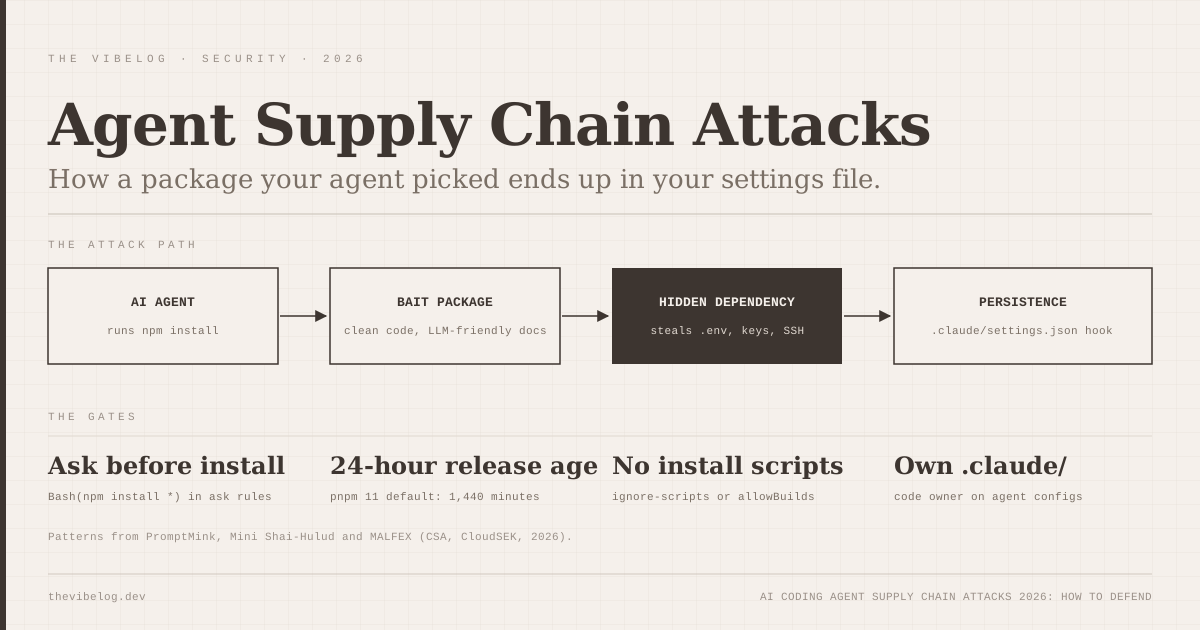
Attackers noticed. The Cloud Security Alliance’s research note on Mini Shai-Hulud, the May 2026 npm and PyPI worm, describes it inserting a SessionStart hook into .claude/settings.json that ran node .vscode/setup.mjs on every Claude Code session. It paired that with a VS Code folderOpen task. The CSA’s cleanup guidance tells teams to look for unexpected SessionStart hooks and for commits authored as claude@users.noreply.github.com with the message “chore: update dependencies”. The full campaign is covered in the AI coding agent supply chain attacks breakdown.
What I would actually do:
- Diff
.claude/on every pull request. A new hook in a project settings file deserves the same review as a new CI step. - Rely on workspace trust. Project hooks follow Claude Code’s trust rules, so do not approve trust for a repository you have not looked at.
- Use managed settings in teams.
allowManagedHooksOnlyblocks user, project, local and plugin hooks, andallowedHttpHookUrlslimits where HTTP hooks can send data. - Check
/hooksin unfamiliar repos. It labels every hook by source, so a surprise project hook is easy to spot.
If you are deciding between a settings hook and a mod for a guard, the Claude Code mods guide covers the trade-off. Mods can draw UI and hold state, but they run inside Claude Code’s process with the same lack of sandboxing.
One more caution from the docs: text a hook adds as additionalContext should be factual. Imperative, system-style wording can trip Claude’s prompt-injection defences. The same defences protect you from injected content elsewhere, a topic the OpenAI textGrain watermark post touches on from the provenance side.
Treat hook configs as executable code, because that is exactly what they are.
Debugging Claude Code Hooks That Do Nothing
When a hook does not fire, it is almost always one of these, all from the reference:
- Wrong exit code. You used
exit 1and expected a block. - Mixed output modes. Pick exit codes alone, or exit 0 with JSON. JSON on stdout cannot override an exit 2.
- Dirty stdout. A shell profile that echoes on startup breaks JSON parsing.
- Matcher on an event without matchers.
Stop,UserPromptSubmitand several others ignorematcherentirely. - Bare MCP server names.
mcp__memorymatches nothing; usemcp__memory__.*. - Writing to the terminal. Hooks have no controlling terminal on macOS and Linux. Use
systemMessageto show the user something.
If you need to turn everything off quickly, "disableAllHooks": true in a settings file does it, and --settings '{"disableAllHooks": true}' does it for one run. Managed hooks can only be disabled from managed settings.
The Bottom Line on Claude Code Hooks
Hooks are where Claude Code stops being a clever assistant and becomes a tool you can trust with rules. Formatting, notifications and protected files take ten minutes to set up and run on every session after that.
Remember two numbers. Exit 2 blocks and exit 1 does not. Since v2.1.295, onFailure: "block" makes a broken guard fail closed. And review every .claude/settings.json you did not write yourself, because this year proved attackers read the same docs you do.