Claude Code mods are the biggest change to how Claude Code can be customised since hooks shipped, and they landed on October 1, 2026 with less noise than they deserve. A mod is a small JavaScript or TypeScript plugin that runs inside Claude Code, so it can rewrite your prompts, hold a tool call, add a pane next to the transcript, or redraw the spinner.
That is also the part that should make you pause. A mod runs with your permissions, is not sandboxed, and can approve a tool call before you ever see the permission prompt.
I read Anthropic’s announcement, the full mods documentation, and the admin and reference pages. This guide covers what mods are, how one is built, what it can reach on your machine, and the checks I would run before installing anyone else’s.
What Are Claude Code Mods?
Claude Code mods are plugins whose code registers event handlers that Claude Code calls from inside its own process. Anthropic’s launch post describes them as “small TypeScript functions that change how Claude Code works”, where a mod “can rewrite a prompt, add new UI, replace a built-in feature, or add entirely new functionality.”
The practical details from the documentation:
- Version: Claude Code v2.1.287 or later, and mods are on by default
- Where they work: the CLI and the Code tab of the Claude Desktop app
- Packaging: a mod is a plugin, installed from a marketplace with
/plugin install - Language: JavaScript or TypeScript, as an ES module that exports
register - Hot reload: a directory loaded with
--plugin-dirreloads when you save
The detail that made this click for me is that Anthropic now ships some of its own features as mods. /diff is a built-in mod called cc-plugin-diff, and AGENTS.md support is another one, cc-plugin-agents-md. You can disable either from the Installed tab in /plugin. When the vendor rebuilds its own features on the extension API, that API is meant to be taken seriously.
Mods turn Claude Code from a tool you configure into a tool you can program.
Claude Code Mods vs Hooks, Skills and MCP Servers
Claude Code already had four ways to extend it, so the obvious question is where mods fit. Anthropic’s own comparison table is the clearest answer, condensed here:
| Extension | What it is | Can it draw UI? | You write |
|---|---|---|---|
| Mod | Functions inside Claude Code’s process | Yes | JS or TypeScript |
| Settings hook | Shell command, HTTP call or prompt on an event | No | A script plus settings.json |
| Skill | Instructions Claude reads | No | Markdown |
| MCP server | External process that gives Claude tools | No | Any language |
(Source: Claude Code mods overview, code.claude.com docs, October 2026.)
The difference that matters is inside versus outside. A settings hook runs a script and returns a decision. A skill or an MCP server gives Claude more text or more tools. None of them can see the interface, keep state between events, or change what Claude Code draws.
A mod can do all of that. One hook can count tool calls while another shows the count beside the spinner, because both share variables in the same file.
Settings hooks are not going away. The admin docs say directly that command, HTTP, prompt and agent hooks “run as before, alongside mods” and that nothing about them is deprecated. If a 10-line shell script already blocks the command you care about, keep the script.
Pick a mod when you need UI, state or an instant command; pick a settings hook when a script you already have does the job.
How a Claude Code Mod Works
A minimal mod is three files: a plugin manifest, a hooks/hooks.json that points at your code, and the hooks module itself. This is the complete example from Anthropic’s overview page, which counts tool calls and shows the count beside the spinner:
// hooks/register.js
let calls = 0

export function register(on) {
  on('tool.call', async ($, e, next) => {
    calls += 1
    $.ui.invalidate('ui.render')
    return next(e)
  })

  on('ui.render', { component: 'Spinner' }, async ($, e, next) => {
    return next({ ...e, props: { ...e.props, suffix: ' · tool calls: ' + calls + '…' } })
  })
}
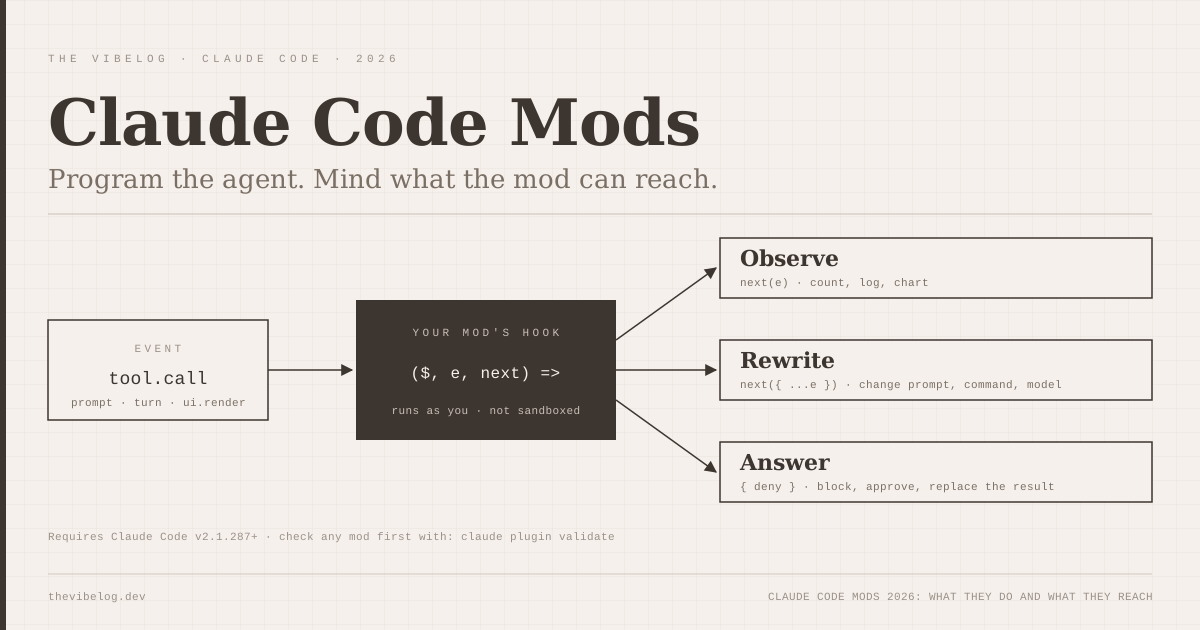
Every hook gets three arguments. $ is the mods API, e is the event as frozen data, and next passes the event on to the rest of the chain, like Express middleware. That gives a hook three choices:
- Observe: call
next(e)unchanged and look at what happens - Rewrite: call
nextwith a modified copy of the event - Answer: return a result without calling
next, such as{ deny: 'Use the file tools.' }
The event list is long. The reference documents events for tool calls (tool.call, tool.check), prompts (prompt.submit, prompt.compose, prompt.section), turns (turn.start, turn.step, turn.complete), sessions, subagents, slash commands and every interface render site from Pane to AskUserQuestion.
Two of those surprised me. turn.step lets a mod change the model or effort level for a single request, which means you could route easy steps to a cheaper model mid-turn. prompt.section lets a mod rewrite or drop a section of the system prompt. Those are powerful levers, and they are exactly the ones you want to know about in someone else’s mod.
There are guardrails on runtime. A hook gets 10 seconds of its own execution per event, $.fs.read and $.fs.write cap at 4 MiB per file, and $.process.run times out after 30 seconds by default.
A mod is middleware for the agent loop, and it sees every event that matters.
What Claude Code Mods Can Do in Practice
Anthropic ships three sample mods in its claude-code-playground repository, and they show the range better than any feature list:
token-weatherdraws a forecast of your context window above the prompt, from “Clear” at under 25% full to “Compact soon” above 90%blast-radiusholds a risky shell command such asrm -rfor a force push, measures what it would change, and shows proceed and cancel buttonsreplay-theateradds a/replaycommand that steps through every file edit Claude made in the last turn
blast-radius is the one I would actually install. It does what PreToolUse settings hooks were always used for, blocking dangerous commands, but with a real interface that shows you what the command would touch instead of a blunt refusal.
You do not have to write mods by hand either. Claude Code ships a built-in plugin-authoring skill, so you can describe the mod you want in a session and Claude writes it. That is a sensible design, and it also means mods will multiply quickly. Most of them will be written by an agent and reviewed by nobody.
Ideas I expect to see on GitHub within a month: cost meters that read $.session.usage(), team policy guards that block edits to migration files, and model routers that send simple steps to a cheaper model. With GPT-6.1 Sol and Claude Sonnet 5.5 now at the same $2 list price but very different cost per task, per-step routing is the obvious first target.
The useful mods are small: one guard, one meter, one command that saves you a few minutes a day.
Claude Code Mods Security: What a Mod Can Reach
This is the section to read before installing anything. Anthropic’s documentation is unusually direct about it. Once a mod loads, it can:
- Act on your machine as you: read and write files anywhere your account can, start programs and make network requests
- Read your secrets: environment variables and settings files, including API keys stored in either
- See your session: every prompt you send and every tool call Claude makes
- Change your session: rewrite prompts or tool calls, or submit a prompt as if you typed it
- Act without asking: approve a tool call before you are asked
- Spend your usage: call a model on your plan or API key
Three details in the admin docs go further than the headline warning.
First, Claude Code’s sandbox does not cover mods. If you turn on sandboxing, it isolates the Bash commands Claude runs, and a process that a mod starts runs outside it.
Second, deny rules apply to Claude’s tool calls, not to the mod’s own file access. The admin page gives the example directly: with Read(.env) denied, a mod can still read that file with $.fs.read.
Third, the built-in sec-default guard does not load for everyone. It loads on machines with managed settings and for users signed in with a Team or Enterprise plan. If you use Claude Code on a personal plan or with an API key and no managed settings, no guard runs ahead of your mods. Where the guard does load, a user’s mod cannot approve a call that a deny rule refuses, and it cannot change managed hooks, the system prompt or managed instructions.
A mod that approves tool calls can also approve a call an ask rule would have prompted for. In auto mode, the docs say a call the mod approves runs without a classifier check. That is the single sentence I would want every developer to read before installing a mod from a stranger’s repository.
This is the same supply-chain shape I wrote about in the private MCP server security guide, with one difference. An MCP server gets the access you give its tools. A mod gets your whole session.
Treat a mod like a VS Code extension with root on your agent: useful, and only from authors you would trust with your shell.
How to Review a Claude Code Mod Before Installing It
Anthropic built a reasonable inspection tool, and it is the step most people will skip. Clone the plugin and run:
claude plugin validate ./some-modThe output lists the events the mod handles and every mods API method it calls, without running it. Claude Code refuses to load a mod that uses the API in a way this command cannot read, so the list is reliable.
What I would look for in the calls: line:
| Call in the output | What it means for you |
|---|---|
$.process.run, $.process.spawn | Starts programs as you, outside the sandbox |
$.http.fetch | Makes network requests, so data can leave your machine |
$.env.get, $.settings.read | Reads environment variables and settings that may hold keys |
$.prompt.submit | Can send prompts, optionally as your own words |
$.model.complete | Spends your plan or API usage |
(Source: Manage mods for your organization, code.claude.com docs, October 2026.)
In the hooks: line, tool.check means the mod can approve or deny tool calls before a prompt appears. prompt.submit and tool.call mean it sees, and can change, everything you type and everything Claude does.
A cost meter that only calls $.session.usage() and $.ui methods is low risk. A “productivity” mod that combines tool.check, $.env.get and $.http.fetch deserves a full read of its source.
If a mod causes trouble, claude --safe-mode starts a session with installed mods turned off, and "disableAllHooks": true in ~/.claude/settings.json stops them everywhere.
Thirty seconds with claude plugin validate tells you most of what you need to know about a mod’s risk.
Claude Code Mods for Teams: The Admin Controls
For teams, the controls live in managed settings. The options that matter:
allowManagedModsOnly, set on thesec-defaultguard, stops every mod a user brings while letting your organisation’s mods loaddisableSideloadFlagsrejects--plugin-dirat startup, which closes the “just load this folder” routeprependPluginsruns your own policy mod before every user mod, so it can refuse mods by what they call
The policy mod pattern is the clever part. Each time another mod is about to load, a mod in prependPlugins receives a plugin.register event listing that mod’s API calls, and can return { refuse: reason }. Anthropic’s example refuses any user mod that calls $.process.run.
One trap is easy to miss. The docs warn that if your plugin.register hook throws or times out, the check fails open and the mod loads. Add a .catch handler that refuses instead, as the docs show. Security teams that have spent the year dealing with AI-generated code vulnerabilities will want that default changed on day one.
Teams should start with allowManagedModsOnly on, then allow specific mods once someone has reviewed them.
Should You Use Claude Code Mods?
Yes, carefully. Mods are the most capable extension point any terminal coding agent has shipped, and Anthropic documented the risks more honestly than most vendors would. Rebuilding /diff and AGENTS.md support as mods shows Anthropic intends this as the main way Claude Code will be extended.
My recommendation: write your own small mods first, or ask Claude to write them, so you learn the event model on code you understand. Install third-party mods only after reading the claude plugin validate output. On a team, turn on allowManagedModsOnly before someone installs a mod that quietly approves every tool call.
If you are still choosing between agents, my Claude Code vs Cursor 3 comparison covers the broader picture. Mods widen the customisation gap in Claude Code’s favour, and they come with a security cost you need to manage.