Codex Cloud was the developer announcement from OpenAI’s DevDay that I keep coming back to, mostly because of one line from the launch: you can finally close your laptop and your agents will keep working. That is a real change for Codex, and it puts Codex Cloud head to head with Claude Code on the web, which has been running sessions in Anthropic’s cloud for a while.
The short version: the two products now do the same core job, and the differences are in the edges. Codex Cloud reaches more plans and more git hosts. Claude Code’s cloud sessions have finer network controls and a better path between cloud and terminal.
I read OpenAI’s DevDay recap on the developer forum, the launch coverage from The Decoder, BenchLM and Emergent, Szymon Paluch’s walkthrough of the new environments, and Anthropic’s Claude Code cloud documentation. I have not run a side-by-side benchmark of the two, so this is a comparison of what each product does and how it is set up, not of output quality.
What Is Codex Cloud After DevDay 2026?
Codex Cloud runs Codex tasks in reusable, hosted environments that keep working when your machine is off, and you can follow them from a phone, browser or desktop. OpenAI announced the relaunch on September 29, 2026.
Codex has had cloud tasks for some time, and OpenAI’s docs now label the older version “Codex Cloud (Legacy)”. What changed at DevDay is how the environments work. According to OpenAI’s forum post, reusable environments mean “less setup and faster starts, with your repo, dependencies, scripts, and settings already in place.” Teams can share environments with approved settings and permissions.
Each task gets its own isolated workspace built from that environment template. Paluch’s walkthrough describes the defaults: Codex opens pull requests but does not merge them, and a human approves the merge.
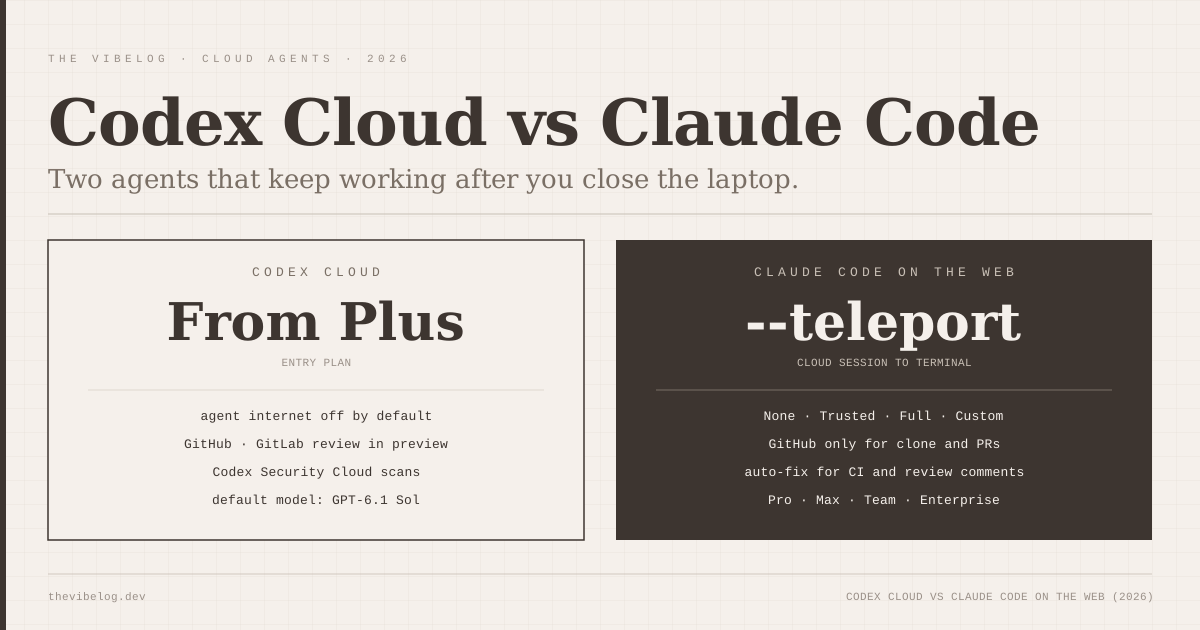
Network access follows a two-stage model. Setup scripts run with internet access so they can install dependencies. The agent itself has internet off by default, and you can turn on limited or unrestricted access with an allowlist of domains.
Codex Cloud is available on ChatGPT Plus, Pro, Business, Edu, Healthcare and Enterprise, according to The Decoder and BenchLM. Free and Go plans do not get it, and Paluch notes that API-key sign-in does not include cloud features.
The Rest of the Codex DevDay Launch
Codex Cloud shipped alongside four other Codex changes that matter if you are choosing a cloud agent:
- Codex CLI refresh. Voice steering, a new
/agentsview for tracking several tasks, and git worktree support for parallel agents. Paluch reports that CLI 0.159.1 made GPT-6.1 Sol the default model. - Code Review. Summaries, diffs and questions about a change inside the desktop app. GitHub review is generally available and GitLab merge request support is in preview, according to BenchLM and Paluch.
- Codex Security Cloud. Scheduled or on-demand vulnerability scans of GitHub repositories, with deduplication and proposed fixes. The Decoder lists it for Pro, Business, Enterprise and Edu.
- Ultrafast. A speed tier, not a new model, with up to 8x faster token generation in Codex and 6x in the API. In the API it costs about six times standard rates, which The Decoder puts at $60 input and $300 output per million tokens for GPT-6 Astra.
The Ultrafast detail that matters for Codex users is the allowance math. According to Szymon Paluch’s DevDay pricing analysis, Ultrafast draws down plan limits at 8x the standard rate and bills purchased credits at 6x. In Codex it is available to Enterprise customers and the new $500 per month Pro 500 plan, which carries 25 times the Plus allowance.
I like the speed, but faster token generation does not make an agent finish eight times sooner. BenchLM points out that agents spend much of a task waiting on tools, network calls and tests. For background cloud tasks you are not watching, Ultrafast is the least useful part of the launch.
How Claude Code on the Web Works
Claude Code cloud sessions run in isolated, Anthropic-managed virtual machines, keep going after you close your laptop, and can be started or steered from any device. Anthropic’s documentation lists five ways in: claude.ai/code in a browser, the Code tab in the Claude mobile app, the Desktop app’s Cloud option, claude --cloud in a terminal, and routines that run on a schedule.
Environments work much like Codex’s. Each one stores a network access level, environment variables and a setup script. If the setup script finishes in roughly five minutes, Anthropic snapshots the filesystem and later sessions start from that snapshot with dependencies already on disk.
The network model has four levels, and this is more granular than Codex’s on/off switch:
| Level | What the session can reach |
|---|---|
| None | No outbound access through the session’s network |
| Trusted (default) | Package registries, GitHub, cloud SDKs and other allowlisted domains |
| Full | Any domain |
| Custom | Your own allowlist, optionally including the defaults |
(Source: Claude Code docs, Configure cloud environments, October 2026.)
One caveat from the docs: even at None, Claude Code can still talk to the Anthropic API, which Anthropic notes may allow data to leave the VM.
Credentials are handled carefully. In Anthropic-hosted environments, GitHub credentials stay encrypted on Anthropic’s servers and never enter the VM, because a proxy attaches them on the server side. On Pro and Max, API keys you add to an environment work the same way.
Claude Code cloud sessions are available on Pro, Max and Team plans, and for Enterprise users with premium seats or Chat + Claude Code seats. There is no separate compute charge; sessions share your normal rate limits.
Codex Cloud vs Claude Code Cloud Sessions: Side by Side
Here is how the two compare on the points I would check before committing a team:
| Feature | Codex Cloud | Claude Code cloud sessions |
|---|---|---|
| Entry plan | ChatGPT Plus | Claude Pro |
| Agent network default | Off (setup has internet) | Trusted allowlist |
| Network options | On/off with domain allowlist | None, Trusted, Full, Custom |
| Git hosts for PRs | GitHub; GitLab review in preview | GitHub, plus GHES on Team and Enterprise |
| Move session to terminal | Handoff between surfaces | claude --teleport pulls session and branch |
| Auto-fix PRs on CI and review | Automatic code review | Auto-fix pushes fixes for CI and comments |
| Scheduled security scans | Codex Security Cloud | Not a built-in product |
(Sources: OpenAI DevDay recap, The Decoder, BenchLM, Szymon Paluch, Claude Code docs. October 2026.)
Three of those rows decided it for me in different directions.
Git hosting is the hardest constraint. Anthropic’s docs say cloning and pull request creation require GitHub. You can send a GitLab or Bitbucket repository as a local bundle, but the session cannot push back to that remote. If your company lives on GitLab, Codex is the only one of the two that is moving toward native support.
Terminal handoff is where Claude Code is ahead. claude --cloud "fix the flaky auth test" starts a cloud session for your current repo, and claude --teleport pulls a finished session, its branch and its full conversation into your terminal. A commenter on OpenAI’s own Codex Cloud announcement asked for exactly that kind of integration between the CLI and cloud, rather than a handoff.
Pull request follow-up is the other gap. Claude Code’s auto-fix watches a PR and responds to CI failures and review comments, pushing a fix when one is clear and asking when a comment is ambiguous. Codex’s automatic review is a reviewer, not a fixer, and Paluch notes those reviews do not post to the repository without your approval.
Security: Which Cloud Coding Agent Is Safer?
Both products make one thing much easier, which is running an agent on code you do not trust, away from your laptop’s SSH keys and browser cookies. After this week’s AI coding agent security disclosures, where a single .git/config key ran code in seven local agents, that matters more than any feature in the table above.
A disposable VM does not make an agent safe, though. It shrinks the blast radius to whatever the environment can reach.
Paluch’s setup advice for Codex applies equally to Claude Code: treat the environment like a service account, include only the credentials needed to build and run tests, and keep production database keys out. Both products open pull requests rather than merging, so branch protection on main is your last gate.
Codex’s internet-off default for the agent is the stricter starting point. Claude Code’s Trusted default is more practical, since installs and GitHub just work, and its credential proxy keeps git tokens out of the sandbox entirely.
Neither cloud agent is safe by default for production secrets; both are much safer than running an untrusted repository on your own machine.
Pricing: What Cloud Agents Actually Cost
Neither company charges separately for the cloud machine. Both bill through your existing plan’s usage, so the real question is how fast a background task burns your allowance.
On the OpenAI side, Codex Cloud starts with Plus, Pro 200 has reopened at $200 per month, and Pro 500 costs $500 per month for 25 times the Plus allowance. According to Paluch, citing Engadget and The Decoder, new Pro 200 subscribers now get 10 times the Plus allowance in Codex instead of 20 times, and existing subscribers keep the old allowance until October 29, 2026.
On the Anthropic side, cloud sessions share rate limits with all your other Claude and Claude Code usage, so three parallel cloud sessions consume roughly three times as fast.
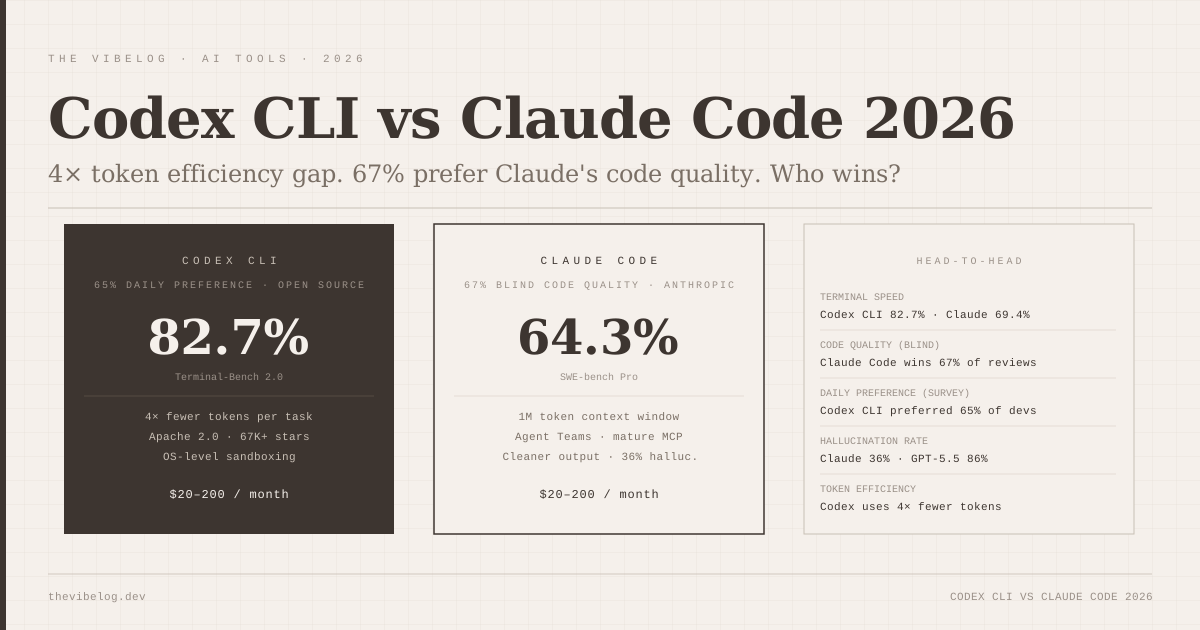
The model under the agent drives cost more than the plan does. I covered this in the GPT-6.1 Sol vs Claude Sonnet 5.5 comparison: at identical list prices, Artificial Analysis measured GPT-6.1 Sol at about $0.13 per task against $0.42 for Sonnet 5.5 at low effort. GPT-6.1 Sol is now Codex’s default, so for long unattended tasks Codex Cloud will probably stretch a plan further, while Claude Code tends to spend more tokens per task in exchange for stronger agentic results.
Codex Cloud or Claude Code on the Web: My Pick
Choose Codex Cloud if your team is already on ChatGPT Business or Enterprise, uses GitLab, or wants scheduled security scanning in the same product. Plus-tier access also makes it the cheaper way to try cloud agents at all.
Choose Claude Code on the web if you already use Claude Code in the terminal. The --cloud and --teleport flow, per-environment network levels and PR auto-fix make it the better fit for a developer who moves work between laptop and cloud several times a day. My earlier Codex CLI vs Claude Code comparison covers the local side of the same decision.
The honest answer for most developers is that the cloud product should follow the local tool. Both companies have now built the same thing, a container that runs your agent while you sleep, and the deciding factor is which agent you trust to work unsupervised on your repository.