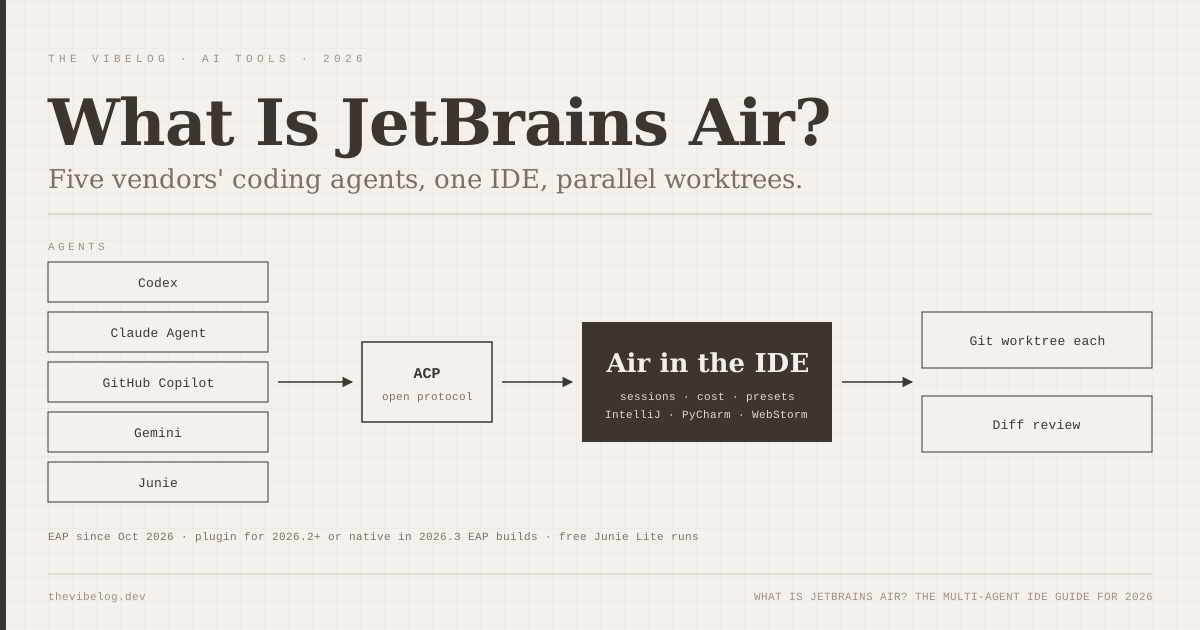
JetBrains Air is the clearest bet any IDE company has made that developers will not pick one AI coding agent, and this week it moved from a separate app into IntelliJ IDEA, PyCharm, WebStorm and the rest of the JetBrains IDEs. The Early Access Program announced by JetBrains lets you run Codex, Claude Agent, GitHub Copilot, Gemini and JetBrains’ own Junie in parallel sessions, each with its own worktree, cost counter and diff.
I read the EAP announcement, the IntelliJ IDEA documentation for Air, and the six months of Air release posts that led here. What JetBrains shipped is less an AI assistant and more a control room for other companies’ agents. That is a smart position for an IDE vendor, and it comes with real gaps you should know about before you change your workflow.
What Is JetBrains Air?
JetBrains Air is an open system for agentic software development that runs coding agents from multiple vendors inside JetBrains tools and gives teams one place to review, govern and pay for their work. JetBrains introduced the full system on September 22, 2026, and Unite.AI’s coverage quotes the company calling multi-vendor support “a foundational design principle”.
Air has three parts:
- Air in JetBrains IDEs: delegate tasks to agents, run them in parallel, review what they changed. Early Access since October 2026.
- Air Teams: shared cloud environments, scheduled automations and team projects. Available to JetBrains business customers.
- Air Governance: policy, auditing, cost management and AI usage controls across a company. This is the new name for JetBrains Central.
There is also the standalone Air desktop app, which launched as a public preview for macOS in March 2026 and added Windows in June. The IDE version is the more important release for most developers, because it puts agents next to the debugger, the database tools and the refactoring engine you already use.
The key detail is that Air is not a model provider. It does not route your prompts to a JetBrains model unless you choose Junie or JetBrains AI. It starts and manages agents you already have.
JetBrains Air is an agent manager built into the IDE, not a new AI model, and that difference shapes everything about how you pay for it and how well it works.
How JetBrains Air Works Inside the IDE
The EAP organises agent work into sessions. JetBrains’ documentation describes a session as a “unit of work” that tracks progress, file changes, commits and cost. You can run several sessions at once across different projects and see their state at a glance.
Each session can run in a temporary Git worktree, so two agents editing the same repository do not overwrite each other. When a session finishes, you review the diff, ask an agent to review local changes, annotate the diff, or have an agent resolve merge conflicts.
Three features stood out to me in the docs.
IDE context instead of exploration. The IntelliJ IDEA documentation says agents receive “project information from the IDE instead of exploring the project step by step, which can reduce the number of tokens a task consumes.” This is the part that only an IDE vendor can do well. A terminal agent spends its first minutes running grep and ls to build a map that IntelliJ already has indexed.
Per-session cost visibility. Every session shows what it cost. When you run Claude Agent on one task and Codex on another, you see both bills in the same place. I have not seen another tool make this as easy across vendors.
Presets. You can save an agent, model, effort level and access level as a named preset. Something like “Codex, high effort, read-only” for code review and “Claude Agent, medium effort, full access” for refactors is the kind of setup that turns into team convention fast.
There is also a small ergonomic touch: double-tap Ctrl opens a prompt window with your current context.
Air’s real advantage over terminal agents is that the IDE already understands your project, so agents can skip the expensive discovery phase.
Which Agents Work With JetBrains Air?
JetBrains names five agents in the EAP announcement: Codex, Gemini, GitHub Copilot, Claude Agent and Junie. Anything else connects through the Agent Client Protocol.
ACP is the piece that makes this work. Zed Industries published it in 2025 as an open standard for how editors and coding agents talk to each other, and in January 2026 Zed and JetBrains launched a shared ACP registry. An agent author registers once and the agent appears in every ACP-compatible client. The registry already listed Claude Code, Codex CLI, GitHub Copilot CLI, OpenCode and Gemini CLI at launch.
The standalone Air app has been widening the list all year. JetBrains’ July update added GitHub Copilot, OpenCode, Pi, Cline and other ACP-compatible agents, and it added support for local models through runners like Ollama and LM Studio, bridged by an ACP-compatible agent.
| Agent | Vendor | How you pay for it in Air |
|---|---|---|
| Junie Lite | JetBrains | Free runs with a JetBrains Account |
| Claude Agent | Anthropic | Your Claude subscription or API key |
| Codex | OpenAI | Your ChatGPT plan or API key |
| GitHub Copilot | GitHub | Your Copilot plan |
| Gemini | Your Google account or API key | |
| Any ACP agent | Various | Whatever that agent uses, including local models |
(Source: JetBrains, “A New Agentic Experience: JetBrains Air in IDEs – EAP Now Open”, October 2026, and Air documentation.)
One privacy detail matters for regulated teams. JetBrains says no data leaves your machine until you authenticate an agent or a JetBrains AI plan, and third-party agent traffic goes directly to that provider rather than through JetBrains.
If an agent speaks ACP, it runs in Air, which means your agent choice is no longer tied to your editor choice.
How to Install JetBrains Air in IntelliJ, PyCharm or WebStorm
There are two routes during the EAP.
- Plugin route. Install the JetBrains Air plugin from JetBrains Marketplace. The documentation requires IntelliJ IDEA or another IntelliJ-based IDE on version 2026.2 or later.
- Native route. Install a 2026.3 EAP build of your IDE, where Air ships built in. JetBrains lists CLion, IntelliJ IDEA, PyCharm, WebStorm and RustRover among the supported IDEs.
After that, sign in with your JetBrains Account to get the free Junie Lite runs. Then pick an agent that is already installed on your machine, such as Codex or Junie, or add one from the ACP registry.
Two practical notes from the docs. First, Air does not replace or disable the existing AI Assistant, so you will have both in the IDE for now. Second, Air is still under active development, so expect rough edges and settings that move between builds.
If you are new to delegating whole tasks rather than chatting with an assistant, the agentic coding guide explains the workflow Air is built around.
Installing Air takes a plugin and a sign-in; the real setup work is deciding which agents and presets your team will standardise on.
JetBrains Air Pricing in 2026
Air in IDEs does not have its own price tag during the EAP. What you pay depends on the agents you run.
- Junie Lite runs are free after you sign in with a JetBrains Account
- Bring your own subscription or key: use your existing Claude, OpenAI, Google or GitHub Copilot access
- JetBrains AI subscription: supported but not required for third-party agents; Unite.AI reports that JetBrains AI credits are billed at public API rates
- Cloud runs need a JetBrains AI subscription and are currently available to organizations with AI seats
That model is friendly to individuals. If you already pay for Claude Max or ChatGPT Pro, Air adds no new bill. Compare that with switching editors, where you would usually pay for the editor’s own AI plan on top.
The catch is that the cost visibility only helps if you look at it. Running four agents in parallel quadruples your usage, and the subscription limits on your Claude or Codex plan will drain at that rate.
For individual developers, JetBrains Air costs nothing extra beyond the agent subscriptions you already have; teams pay when they want cloud runs and governance.
What Air Teams and Air Governance Add
The IDE plugin is the part individual developers will touch. The other two pieces are aimed at companies.
Air Teams is described as “a shared workspace where engineering teams run coding agents and reuse what works.” It has four building blocks: automations triggered by events or schedules, such as code reviews, bug fixes and dependency updates; shared cloud environments with tools, dependencies and credentials already set up; cloud tasks that run agents without tying up a laptop; and team projects that hold members, environments and connectors together. Projects use shared service accounts and AI credits managed by project admins.
Air Governance, formerly JetBrains Central, sits above that with policy, audit and cost reporting.
This is the same direction Anthropic and OpenAI are taking with scheduled cloud agents. The difference is that JetBrains is selling the coordination layer, not the model, so a team can mix vendors under one admin console.
Air Teams and Air Governance are built for organisations, and Air Teams is currently limited to JetBrains business customers, so solo developers can ignore both for now.
JetBrains Air vs Cursor, Claude Code and Codex
Air is not trying to beat Cursor or Claude Code at being an agent. It is trying to be the place you run them.
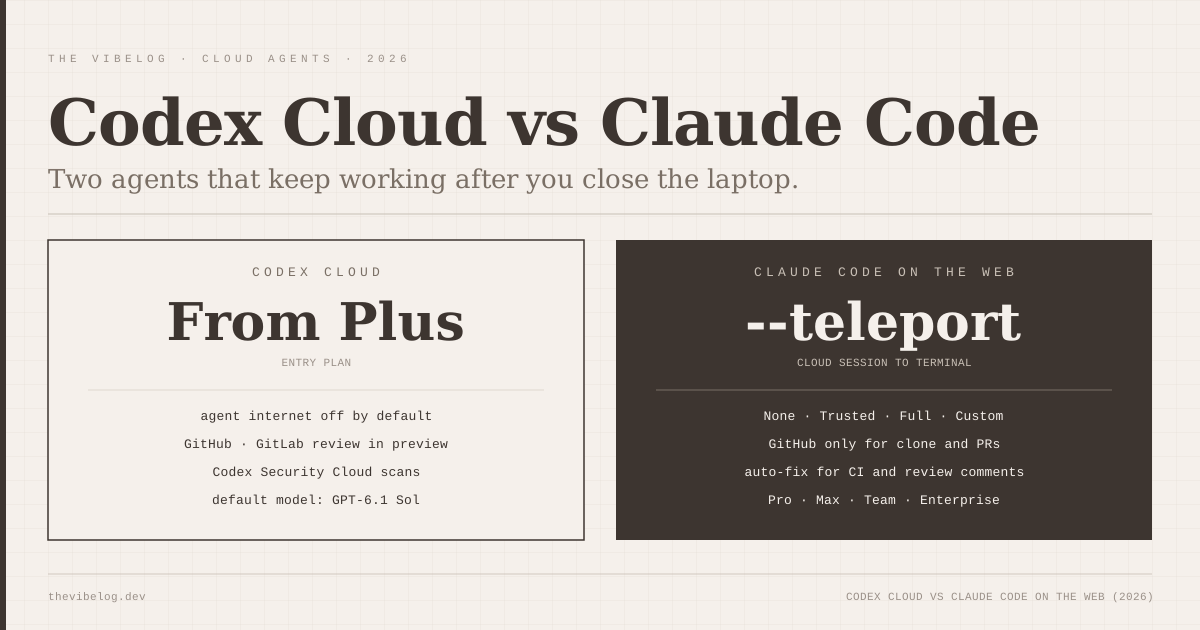
That matters because the other big tools have each built their own multi-agent surface. Cursor 3 has its own parallel agents inside its own editor, and the Claude Code vs Cursor 3 comparison covers how that compares with a terminal-first workflow. Anthropic and OpenAI both run agents in the cloud now, which I compared in Codex Cloud vs Claude Code on the web.
Here is how I would split it:
- Stay in Cursor if you are a TypeScript or Python developer already happy with a VS Code-style editor and one vendor’s agents.
- Use Claude Code or Codex directly if you work mostly in the terminal, or you want the newest agent features the day they ship. A wrapper is always a little behind the native client.
- Use JetBrains Air if your team lives in IntelliJ or PyCharm, writes a lot of Java or Kotlin, or wants to compare agents from different vendors on the same task without switching tools.
JetBrains is also hedging the other way. Its Java and Kotlin by IntelliJ IDEA extension, an LSP-based plugin that brings IntelliJ’s Java and Kotlin intelligence to VS Code and Cursor, reached Release Candidate this month. It needs an IntelliJ IDEA Ultimate subscription after a 30-day trial once 1.0 ships. JetBrains wants its code intelligence wherever developers are, even outside its own IDEs.
Air is the right choice for JetBrains-native teams and multi-vendor shops; developers committed to a single agent will still get the newest features first from that agent’s own client.
What JetBrains Air Still Lacks
Four gaps stood out in the EAP materials.
It is early access. The plugin is labelled under active development. Do not standardise a whole team on it before the 2026.3 stable release.
Cloud and mobile are for organisations. Cloud runs need JetBrains AI seats, and mobile steering is listed as coming soon. Individual developers get local sessions only, while Codex Cloud and Claude Code on the web already let you close the laptop and keep working.
Wrappers lag. When Anthropic or OpenAI ships a new agent feature, Air gets it only when the ACP adapter supports it. Features like Claude Code mods, which run inside Claude Code itself, will not necessarily show up in an Air session.
Two AI surfaces in one IDE. Air sits beside AI Assistant rather than replacing it. Expect some confusion about which panel to use until JetBrains merges them.
If you are weighing which model to put behind these agents, the Mistral Large 4 breakdown covers the newest open-weight option, which any ACP agent with a configurable model can in principle use.
JetBrains Air is worth installing now if you use JetBrains IDEs and pay for at least one agent; wait for the stable 2026.3 release before rolling it out to a team.