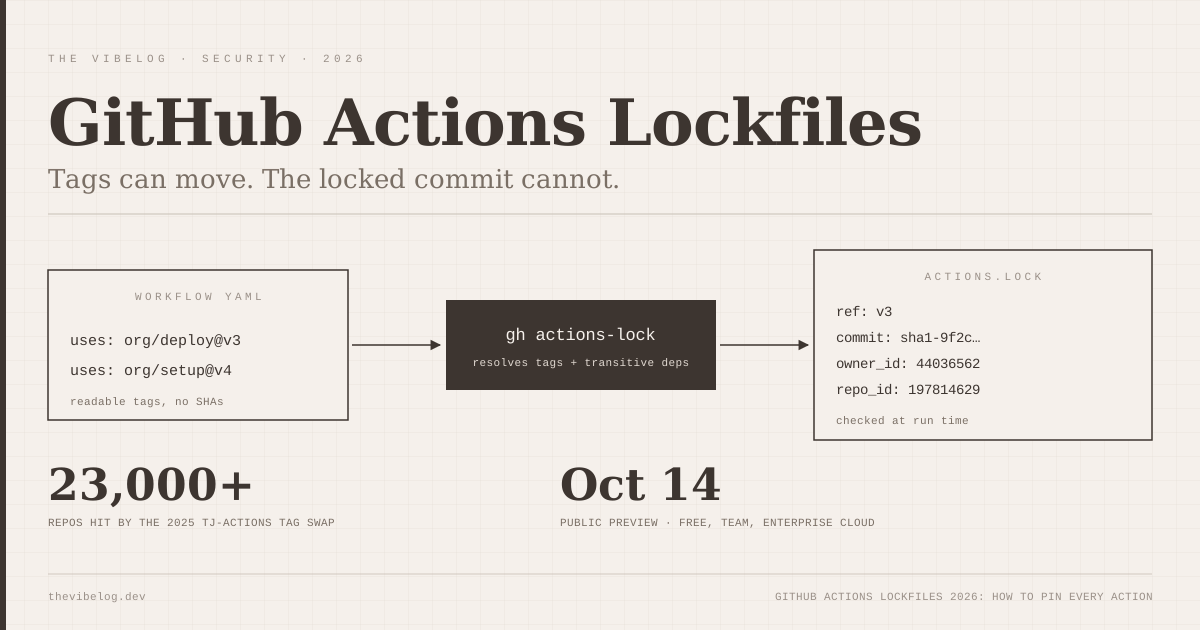
GitHub Actions lockfiles shipped in public preview on October 14, 2026, and they close the gap that let a single moved Git tag dump CI secrets from thousands of repositories last year. Run one CLI command and every action your workflows call, including the actions those actions call, gets pinned to an exact commit in a file called .github/workflows/actions.lock.
This is the feature I have wanted since March 2025. It is also easy to half-adopt in a way that gives you a false sense of safety, so here is how it works, how to set it up, and the gaps GitHub’s own docs admit to.
Why GitHub Actions Needed Lockfiles
A version tag on a GitHub Action is a mutable pointer, and attackers have already used that. When your workflow says uses: some-org/some-action@v4, GitHub resolves v4 at run time. Whoever controls that repository can move the tag to any commit they like.
That is exactly what happened with tj-actions/changed-files. According to the GitHub Advisory Database entry for CVE-2025-30066, an attacker retroactively repointed several version tags to a malicious commit between March 14 and 15, 2025. The injected script read secrets from the runner’s memory, double base64-encoded them and printed them to workflow logs, which are public on public repositories. The advisory cites more than 23,000 affected repositories and rates it CVSS 8.6.
Nobody in those 23,000 repositories changed a line of code. Their workflows ran something different because a tag moved.
GitHub’s long-standing advice was to pin third-party actions to a full 40-character commit SHA. That works, but it has two problems I have hit repeatedly:
- It only pins the top layer. If a composite action you pinned calls another action by tag, that inner reference still floats.
- Nobody can read it. A workflow full of
@8f4b7f84864484a7bf31766abe9204da3cbe65b3comments is miserable to review, so teams quietly stop doing it.
The lockfile is GitHub’s answer to both, and it borrows the pattern every package manager settled on years ago.
How a GitHub Actions Lockfile Works
The lockfile records the commit each action reference resolved to, and GitHub Actions runs that commit instead of re-resolving the tag. Your workflow files keep human-readable references like @v4. The lockfile holds the truth.
Per the workflow dependency lockfiles documentation, the file has a version header, a workflows section mapping each onboarded workflow to the dependencies it uses, and a dependencies section with four fields per reference:
| Field | What it stores | Why it matters |
|---|---|---|
ref | The tag or branch the workflow uses, such as v3.1.0 | Keeps the human-readable version reviewable |
commit | The exact commit the ref resolved to | This is the code that actually runs |
owner_id | Numeric ID of the source owner | Survives renames and squatted names |
repo_id | Numeric ID of the source repository | Checked at run time to confirm identity |
(Source: GitHub Docs, Workflow dependency lockfiles, October 2026)
The numeric IDs are the part I did not expect, and they are a quiet win. A SHA pin tells you which commit to fetch, but not that it came from the repository you think it did. If an organisation is renamed and someone registers the old name, a string reference can point somewhere new. The repo ID cannot.
A few enforcement rules from the docs are worth memorising:
- The locked commit must exist on a branch of the source repository.
- Allowed-actions policies are evaluated against the locked commit, not the tag.
- Transitive dependencies, meaning actions your actions use, are recorded. Reusable workflows are the exception: they are covered by the lockfile in the repository where they are defined, not by the caller’s lockfile.
- The file is generated. GitHub’s docs say it “should never be edited by hand.”
GitHub also says outright that for repositories with a lockfile, SHA pinning in workflow files is “no longer necessary.” You can go back to writing @v4 and stop maintaining 40-character hashes.
The short version is that tags become documentation and the lockfile becomes the contract.
How to Set Up Workflow Lockfiles With gh actions-lock
You generate and maintain the lockfile with a GitHub CLI extension, not with a setting in the web UI. The gh-actions-lock README lists the commands. Install it once:
gh extension install github/gh-actions-lockThen, from the repository root:
# Scan every workflow in .github/workflows, pin each resolvable action,
# and write .github/workflows/actions.lock
gh actions-lock

# Check without writing anything (use this in CI)
gh actions-lock --verify
The README documents a handful of other modes you will need sooner or later:
| Command | Use it when |
|---|---|
gh actions-lock | First onboarding, or after adding a new action |
gh actions-lock --verify | In CI. Writes nothing and confirms branch or partial-version pins are still in that ref’s history |
gh actions-lock --verify-local | Offline pre-commit check that every ref has an entry. It does not verify trust |
gh actions-lock --relock | A ref moved legitimately and you want the new commit |
gh actions-lock --accept-moved | Also re-resolve pins whose old commit is no longer reachable upstream |
(Source: github/gh-actions-lock README, October 2026)
Three behaviours from the README shape how you should use it.
Locked pins are sticky. A normal run only resolves refs that are not in the lockfile yet. Already-locked pins, including transitive ones, are re-checked but not silently updated.
Writes are all or nothing. If the tool hits an error it cannot fix, it changes no workflow and no lockfile entry. You will not end up with a half-written lock.
--accept-moved deserves a pause. The tool flags a pin as suspicious when its locked commit is no longer reachable upstream. That is precisely what a force-pushed tag looks like, which is the tj-actions pattern. --relock refuses those; --accept-moved accepts them. I would treat any pull request that needed --accept-moved as a security review, not a routine bump.
Adding the verify step to CI
The README recommends --verify in CI over --verify-local, because only --verify checks that pins are still trustworthy upstream. The README does not ship a sample job, so this is a minimal version of what I would add, adapted from the documented flags:
name: lockfile
on: [pull_request]
permissions:
  contents: read
jobs:
  verify:
    runs-on: ubuntu-latest
    steps:
      - uses: actions/checkout@v4
      - run: gh extension install github/gh-actions-lock
        env:
          GH_TOKEN: ${{ github.token }}
      - run: gh actions-lock --verify
        env:
          GH_TOKEN: ${{ github.token }}
Pair it with a CODEOWNERS entry for .github/workflows/actions.lock so a security-minded reviewer sees every lockfile diff. A lockfile that anyone can regenerate and merge without review protects you from drift, but it does not protect you from a teammate, or a coding agent, locking the wrong commit.
Making it mandatory
According to the GitHub changelog announcement, administrators can turn on a Require lockfile policy at enterprise, organisation or repository level, also in public preview. Once a workflow is onboarded, Actions requires a lockfile entry for every dependency and runs the recorded commits even if a tag or branch moves.
That is the setting that turns this from a good habit into an actual control.
Dependabot, Local Actions and Other Edges
Dependabot already understands lockfiles, which removes the biggest maintenance objection. The Dependabot docs for action updates say that when a workflow is in a lockfile, Dependabot updates the matching entry in the same pull request, “so the pinned commit in the lockfile always matches the updated reference in the workflow file.” There is no extra configuration.
That one detail matters more than it looks. SHA pinning failed in practice because updates were painful. Here, a version bump is still one reviewable PR.
Same-repository actions get new syntax. The README introduces uses: $/path for an action or reusable workflow in the same repository, resolved at the running commit, so it needs no lockfile entry. On fix runs the tool migrates existing ./path references to $/path unless you pass --no-migrate-local-actions. Workflows that still use local-path actions are skipped during onboarding, which the README calls a short-term gap.
If you have a monorepo with a dozen local composite actions, expect that migration to be the noisiest part of your first lockfile PR.
What GitHub Actions Lockfiles Do Not Protect
A lockfile freezes code. It does not vet it. GitHub’s changelog says this plainly: locking does not establish whether a dependency is safe, so review dependencies before you lock them.
There are other gaps worth naming before you tell your security team the problem is solved:
- Per-workflow onboarding. Workflows you have not onboarded get none of these guarantees. Run the full-directory command and turn on Require lockfile, or you will have a half-locked repository.
- Runtime downloads. In the community discussion that preceded the launch, commenters pointed out that a commit SHA does not cover content a composite action fetches at run time, such as a release binary, an install script or an
aptpackage. The lockfile pins the action, not what the action downloads. - Docker image actions. The docs page does not mention container image digests, so do not assume
docker://references are covered. - GitHub Enterprise Server. The extension does not support GHES yet.
- Preview churn. The README warns that the lockfile format, flags and behaviour may change between releases while it is pre-1.0.
That same community thread is a nice example of GitHub listening. The original proposal put a dependencies: block inline in each workflow YAML, and several commenters argued for a separate file so it could have its own code owners. The shipped design is a separate repo-wide file.
Why This Matters More With AI Coding Agents
I would roll this out even on a solo project, and coding agents are a big part of why.
Agents now open a lot of pull requests that touch .github/workflows. They add a lint step, swap a setup action, copy a snippet from a README. Each of those is a new third-party dependency that runs with your repository token. As the AI coding agent supply chain attacks guide covers, attackers are already seeding packages and configuration aimed at agents, and a floating action tag is one more place to hide.
With a required lockfile, an agent that adds a new action has to produce a lockfile diff too, and that diff lands in front of whoever owns actions.lock. That is a much better review surface than hoping someone notices a new uses: line in a 300-line YAML change. If you are already running automated AI code review in GitHub Actions, add the lockfile verify job to the same required checks.
My Rollout Checklist
If I were turning this on for a team this week, this is the order I would do it in:
- Install the extension and run
gh actions-lockon a branch. - Read the generated
actions.lock. Look for anything you did not know you depended on, especially transitive actions. - Commit it with the workflow changes, including any
./to$/migrations. - Add
CODEOWNERSfor.github/workflows/actions.lock. - Add the
--verifyjob and make it a required check. - Turn on Require lockfile at repository level, then organisation level once a few repos are clean.
- Let Dependabot handle version bumps and review those PRs like dependency upgrades.
The setup cost is small, and the payoff is concrete. It is the difference between “we hope that tag still points where it did” and a reviewed, recorded commit that runs every time.
GitHub Actions lockfiles are still a preview, and the edges around runtime downloads and Docker are real. They are still the biggest supply chain improvement Actions has shipped since OIDC, and I would not wait for general availability to start using them.