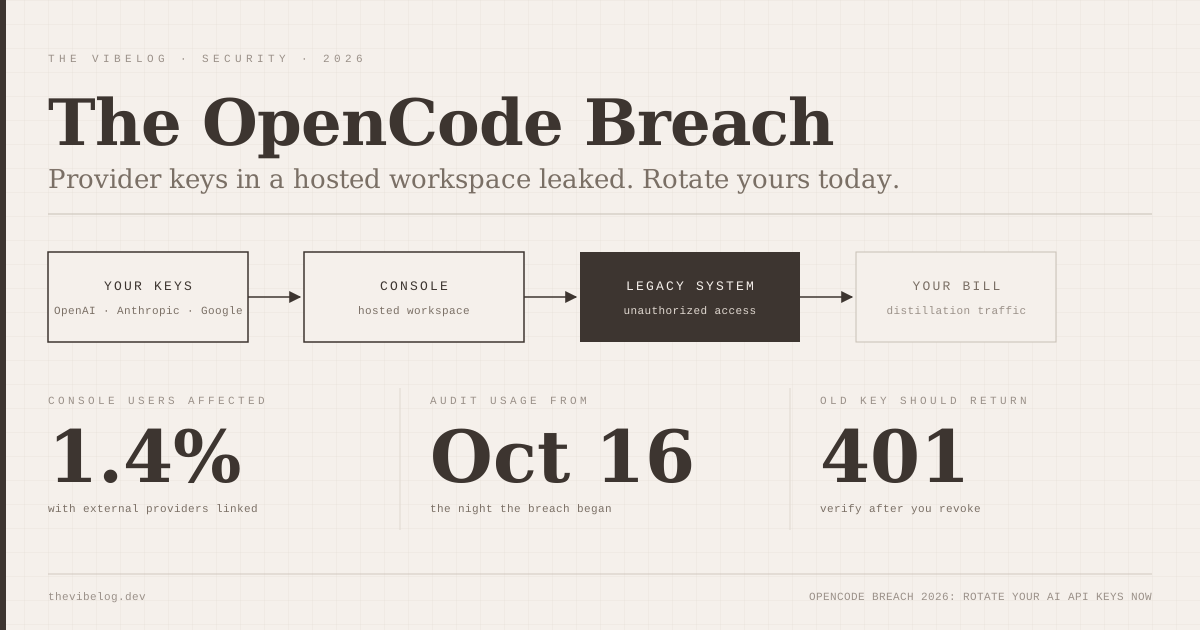
The OpenCode breach is the clearest warning yet that your coding agent’s hosted dashboard is also a key vault. On October 17, 2026, OpenCode told customers that an attacker had reached a legacy system and that third-party provider keys saved in OpenCode Console workspaces may have been exposed.
OpenCode says about 1.4% of Console users were affected. Some of them are already reporting charges on their Anthropic and Google accounts that they did not make.
If you got the email, stop reading after the next section and rotate your keys. If you did not, the rest of this post is about why this keeps happening and the setup that limits the damage next time.
What Happened in the OpenCode Breach
OpenCode says it “identified unauthorized access to a legacy system that we were in the process of decommissioning.” That line comes from the customer email, titled “Action Required: Potential provider key breach”, which security researcher Matt Johansen posted to X at about 15:30 UTC on October 17, according to a timeline compiled on DEV Community.
The email continues: “Third party provider keys (eg OpenAI, Anthropic) saved in your workspace may have been exposed.” It asks users to revoke and replace those keys through each provider’s dashboard, update any applications using them, and review recent usage.
At about 18:08 UTC the company confirmed on X that it “had a security breach last night related to a large scale distillation attack.” Co-founder Dax Raad posted shortly after that his personal accounts were being attacked too.
Here is what OpenCode has said publicly, as reported by OfficeChai and Notebookcheck:
| Question | What OpenCode has said |
|---|---|
| Who was affected | About 1.4% of OpenCode Console users, only those with external providers linked |
| What was exposed | Third-party provider keys saved in Console workspaces (OpenAI, Anthropic, Google named) |
| How the attacker got in | Unauthorized access to a legacy system being decommissioned |
| Who was notified | Every affected user by email; no email means not impacted |
| Status | ”The incident is ongoing so we cannot share more details at this point” |
| Remediation partners | Working with Anthropic, OpenAI and Google |
(Source: OpenCode customer email and X posts, as reported by DEV Community, OfficeChai and Notebookcheck, Oct 17–18, 2026)
The coverage disagrees on one detail. OfficeChai says the emails went out on the morning of October 18, while the screenshots and DEV timeline put them on October 17. Either way, the window you should audit starts on October 16, the night OpenCode says the breach began.
The bottom line: OpenCode has confirmed the exposure but not the mechanism, the duration, or how many accounts 1.4% represents.
Who Is Affected, and What Is Still Unknown
OpenCode’s own rule is simple. If you received the email, you are in the affected group. If you did not, OpenCode says you were not impacted.
I would not treat that as the end of it, for one reason. OpenCode has two very different places your keys can live, and the statement only covers one of them.
The hosted OpenCode Console is the workspace layer: members, budgets, service accounts and connected providers. That is what was breached.
The open-source CLI is different. According to OpenCode’s providers documentation, keys you add with the /connect command are written to ~/.local/share/opencode/auth.json on your own machine. The DEV write-up points out that OpenCode has said nothing either way about local keys in this incident.
There is no reason to think a server-side intrusion reached files on your laptop. But “no statement” is not the same as “confirmed safe”, and rotating a key costs you five minutes.
Several things are still unknown as of October 19:
- How the attacker reached the legacy system, and how long access lasted
- Whether every exposed key was actually taken and used
- How many accounts the 1.4% figure represents
- Whether the reported charges are all linked to this breach
On that last point, the user reports are specific. Notebookcheck cites one user with $400 in unauthorized charges on an Anthropic account and another with about €200 of Google usage whose project was then suspended for “excessive abuse.” One commenter said OpenAI and Anthropic usage alerts arrived before OpenCode’s email did. These are user reports, not figures from OpenCode, so treat them as signals rather than totals.
This is not OpenCode’s first security issue this year. OfficeChai notes CVE-2026-22812, a critical remote code execution flaw caused by an unauthenticated local HTTP server, which was patched in version 1.1.10. The outlet says the two incidents appear unrelated.
If you used OpenCode Console with your own provider keys at any point, rotate them today regardless of whether the email reached you.
What a Distillation Attack Means for Your API Keys
A distillation attack collects huge volumes of output from a strong model to train a cheaper model that imitates it. The attacker does not need your code or your data. They need your quota.
That is why stolen keys are so valuable for this. Distillation at scale means millions of requests, and every frontier lab rate-limits and monitors individual accounts. A pile of stolen keys from many unrelated developers spreads that traffic across hundreds of billing accounts, each one looking like a moderately busy customer.
Which is also why the bills land on you. The tokens are real, the requests are authenticated, and from the provider’s point of view your key made them.
One caution on the label. OpenCode called this a distillation attack, but it has not published indicators or a post-mortem. The DEV author notes that the distillation motive in their own explanation is a hypothesis. RuntimeWire adds that the 1.4% figure, on its own, does not measure exposure or loss.
What matters for you is the same either way. A leaked frontier-model key is a blank cheque until you revoke it, and the people who want those cheques are now organised enough to empty them overnight.
How to Rotate Exposed AI API Keys After the OpenCode Breach
This is the checklist I would run, in this order. It takes about 15 minutes for a typical setup with two or three providers.
1. Revoke and replace every key you saved in OpenCode Console
Create the new key first, then revoke the old one, so nothing you depend on breaks mid-rotation. The DEV write-up recommends exactly that order for Gemini keys in Google AI Studio. Do it for OpenAI, Anthropic, Google, and any other provider you linked.
2. Update everything that used the old key
That means your local .env files, CI secrets, deployed services, and the Console workspace itself if you keep using it. The most common mistake after a rotation is a forgotten cron job that keeps failing quietly or, worse, a second copy of the old key that you forgot to revoke.
3. Prove the old key is dead
Do not assume the dashboard click worked. Send one request with the old key and check for an authentication error. For Anthropic:
curl -s -o /dev/null -w "%{http_code}\n" https://api.anthropic.com/v1/models \
  -H "x-api-key: $OLD_ANTHROPIC_KEY" \
  -H "anthropic-version: 2023-06-01"
A revoked key should return 401. Anything else means it still works.
4. Review usage back to October 16
Check each provider’s usage page for requests you did not make, filtered by key where the dashboard allows it. Unfamiliar models are the giveaway. If you only ever call Sonnet and the logs show a wall of Opus traffic at 3 a.m., that is not you.
5. Put a spend ceiling on the new keys
This is the step most people skip, and it is the one that turns the next leak from a $400 surprise into a $20 one. On the Anthropic side, workspaces in the Claude Console let you scope API keys to a single workspace and cap that workspace’s monthly spend, with alerts at thresholds you choose. Anthropic’s docs note you cannot set limits on the Default Workspace, so create a dedicated one per tool.
Rotation alone fixes this incident; spend limits are what protect you from the next one.
Securing AI Coding Agent Keys Beyond OpenCode
OpenCode is the tool in the headlines this week, but the pattern is everywhere. Hosted dashboards for coding agents, model routers, and gateways all ask you to paste a provider key so they can bill your account on your behalf. Every one of those is now a target for anyone who wants frontier-model tokens without paying for them.
I covered the code-execution side of this in the AI coding agent security roundup and the dependency side in the guide to AI coding agent supply chain attacks. Key exposure is the third leg, and honestly the one I see developers take least seriously, because a leaked key feels like a billing problem rather than a security one.
Here is the setup that limits the blast radius:
| Practice | Why it helps | Effort |
|---|---|---|
| One key per tool | You know exactly what to revoke when that tool is breached | Low |
| Per-workspace spend caps | A stolen key hits a ceiling instead of your card limit | Low |
| Keep keys local where possible | A vendor breach cannot leak what the vendor never stored | Medium |
| Reference keys from env vars | No plaintext keys in config files you might commit | Low |
| Usage alerts per key | You hear about abuse before the invoice | Low |
(Source: OpenCode providers docs, Anthropic workspaces docs, DEV Community breach write-up)
OpenCode itself supports the “keep it local” option. Its providers documentation lets custom providers read options.apiKey from an environment variable with {env:...} syntax or from a file with {file:...}, so the key never has to sit in a hosted workspace.
Claude Code takes a different approach for teams that sign in with a Claude Console account. Anthropic’s docs say it creates a dedicated Claude Code workspace and mints a per-user API key there at sign-in. That key stops working when the member is removed from the workspace or organization, and it is the only workspace that supports per-user monthly spend limits. That is a better default than a long-lived shared key pasted into a third-party dashboard.
If you are weighing OpenCode against Claude Code for other reasons, the OpenCode 2.0 vs Claude Code comparison covers permissions, sandboxing and pricing. This breach does not change the CLI’s feature set. It does change how I would connect it: local keys or environment variables, never a hosted workspace holding an uncapped production key.
The same thinking applies if you route Claude Code through a cheaper model. Today’s DeepSeek V4.1 Flash 1017 guide uses a DeepSeek key in a local environment variable, which is the pattern I would recommend for any third-party endpoint.
What I Would Do This Week
If you got the OpenCode email, rotate everything you linked, verify the old keys return 401, and audit usage from October 16. If you were billed for traffic you did not make, contact the provider’s support with the dates and the key ID. OpenCode says it is working with Anthropic, OpenAI and Google on remediation, but nobody has published a refund policy.
If you did not get the email, spend 15 minutes on the boring version anyway. List every tool that holds one of your provider keys, give each its own key, and put a monthly cap on each one.
The lesson from this incident is not that OpenCode is uniquely careless. A tool you trusted kept a copy of your credentials in a system it was in the middle of switching off, and that is a normal state of affairs for a fast-moving startup. Design your key setup on the assumption that some vendor holding a copy will eventually lose it.