Every January I do a tool audit. What am I actually using versus what I thought I would use? The gap is always larger than expected.
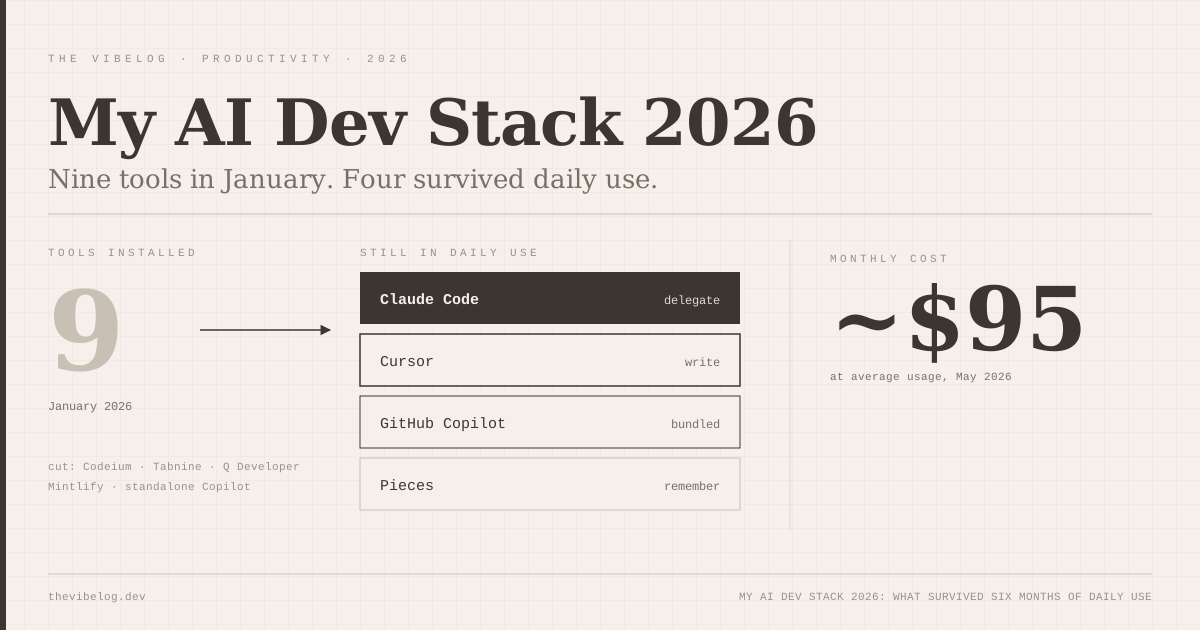
I started 2026 with nine AI-related tools installed across my machine. In May, I am daily-driving four. Here is what survived, what got cut, and why — without the breathless “this tool changed my life” framing that makes these posts useless.
What I kept
Claude Code — $20/month + API usage
The terminal agent is the biggest change to how I work in the last three years. I use it for:
- Complex refactors that touch multiple files
- Understanding unfamiliar code I have inherited
- Writing first drafts of tests for code that has none
- Anything that requires holding a lot of context at once
The April 2026 desktop app redesign made the multi-session workflow genuinely good. I run two or three sessions simultaneously — one working on a feature, one watching for failures in the test suite, one doing a background security scan on a PR. The Routines feature (currently in research preview) lets me schedule automations without babysitting them.
Claude Code is included in every paid Claude plan. Anthropic’s pricing page lists Pro at $20 per month billed monthly, or $17 per month billed annually, with Max starting at $100.
The cost is real. On heavy weeks with large-codebase refactors, the API usage adds up. I budget around $65/month total when I am using it heavily. For a freelancer or someone billing that time to clients, the ROI calculation is straightforward. For someone at a company that does not cover tools, it is a genuine decision.
In practice, it succeeds on complex tasks that other tools in my stack give up on or get wrong. That is a statement about the models behind it as much as the tool, and the models keep changing underneath me.
Cursor — $20/month
Cursor is where I write code. Claude Code is where I delegate. The distinction matters.
Cursor Tab, the autocomplete Cursor has been rebuilding since it acquired Supermaven in November 2024, has a 72% acceptance rate in my actual usage. That number surprised me when I first heard it — I would have guessed 50-60%. Looking back at my sessions, it is accurate. The completions are fast and contextually correct in a way that makes writing code feel like writing with the grain of the wood rather than against it.
The Cursor 3 parallel agents feature is real and useful for the specific task of coordinating work across independent parts of a codebase. I do not use it daily, but when a task naturally splits into parallel workstreams — building a feature while writing tests while updating documentation — it is genuinely faster.
I am paying $20/month. It is worth it. The price has not moved since SpaceX completed its acquisition of Cursor in August 2026, and the Claude Code vs Cursor 3 comparison covers how the two split the work in more depth. Whether it is worth $20/month for someone not doing primarily TypeScript/JavaScript work, I genuinely do not know — I have heard more mixed reports from Python-heavy developers.
GitHub Copilot — included in my GitHub plan
I have not paid separately for Copilot since October. My GitHub organisation plan includes it. I would not add it at $10/month if I had to pay separately, because I already have Cursor doing the same thing better. But it is useful in contexts where Cursor does not reach: specifically, the VS Code terminals I have open for quick edits and the occasional JetBrains project I have not moved to Cursor yet.
One thing changed after I wrote this. GitHub moved Copilot to usage-based billing on June 1, 2026. Copilot Pro is still $10 per month, but premium requests became AI Credits charged on tokens, with $10 of credits included. Code completions still do not consume credits. The GitHub Copilot pricing breakdown walks through what that means for heavy users.
The Copilot agent — take an issue, generate a PR, now called the Copilot cloud agent — I use selectively. For well-defined, small issues (updating a dependency, fixing a lint error, updating a date format) it is fast and reliable. For anything requiring judgment, I do not trust it to work unsupervised.
Pieces for Developers — now paid plans only
Pieces is the tool nobody in the “AI stack” discourse talks about, and it quietly does something nothing else does well: it remembers your development context across sessions.
Every code snippet you work with, every conversation you have with an AI tool, gets saved, tagged, and made searchable. Six months later, when you are wondering “did I already solve this problem?”, you can actually find out. The on-device processing means nothing leaves your machine.
Pricing note: Pieces is now sold only through paid plans. The Pieces pricing page lists Pro at $18.99 per month, with a 7-day trial for new users, and on-device long-term memory is a Pro feature. That changes the math for anyone who, like me, started on it for free.
It is not glamorous. It does not benchmark well. But I have genuinely found things in Pieces that I had forgotten I did, which saved me from solving the same problem twice.
What I cut
Codeium: Good free tool, but once I was paying for Cursor the autocomplete was redundant. Cut in January.
GitHub Copilot standalone subscription: Rolled into the org plan. Not a fair cut, but it illustrates that these tool stacks have significant overlap — you probably do not need all three completion tools.
Tabnine: Tried the enterprise trial. The collaboration features are interesting for large teams but overkill for solo and small-team work.
Amazon CodeWhisperer (now Q Developer): The AWS integration is genuinely useful if you are deep in the AWS ecosystem. I am not. Cut in March.
Mintlify Doc Writer: I thought I would use AI documentation generation more than I do. Turns out I write documentation when it matters and skip it when it does not, and an AI tool does not change that calculus.
The total cost
Four tools. Roughly $95/month at average usage. That sounds like a lot until you compare it to what it would cost to hire the equivalent hours, or what it costs to not bill those hours because the work took longer than it needed to.
The hiring data suggests the market has already decided these tools are part of the job. Indeed Hiring Lab found that 37% of the growth in US software development postings between May 2025 and May 2026 came from jobs with AI in the title, which I dig into in the post on whether AI will replace developers. The question is not whether to use them but which ones to use and how.
What I am watching
Windsurf (formerly Codeium’s IDE) is interesting. The Cascade agent handles multi-step tasks well and the pricing is competitive. I am not switching from Cursor, but if Cursor raises prices or the product stagnates, Windsurf is the clearest alternative.
Update: Cognition, which bought Windsurf in July 2025, renamed it Devin Desktop in June 2026 and replaced Cascade with a new local agent, Devin Local. Plans and pricing stayed the same. The Windsurf review covers what the Cognition acquisition changed.
Claude Code Routines — the scheduled automation feature is in research preview and the ceiling on what it could do is genuinely high. As of October 2026 the routines docs still label it a research preview, with scheduled, API and GitHub triggers on Pro, Max, Team and Enterprise plans, as Anthropic’s launch post described in April. Running a nightly codebase health check, automated PR reviews on a schedule, dependency update PRs filed automatically. If it graduates to general availability at a reasonable usage price, it changes how I think about maintenance work.
Open source models for local inference — I have not found a local model that replaces any of the above for serious work. Ollama makes running models locally approachable, and the models are improving. But the gap between local inference quality and cloud inference quality is still significant enough that I am not making the switch on anything I care about getting right.
The stack that works for you will not be identical to mine. The principle that transfers is this: buy the tools you use every day, cut the ones you use occasionally, and be honest about which category each tool actually falls into.
(Updated October 7, 2026: removed a SWE-bench Verified figure of 80.8% that described an Anthropic model rather than Claude Code and had already been passed by newer models; corrected “autocomplete powered by Supermaven” to reflect that Cursor acquired Supermaven and rebuilt its Tab model; noted that Pieces is now paid plans only; removed an unsourced 340% job-postings statistic; and added later changes: GitHub Copilot’s June 2026 move to AI Credits, SpaceX’s August 2026 acquisition of Cursor, and Windsurf’s June 2026 rename to Devin Desktop.)