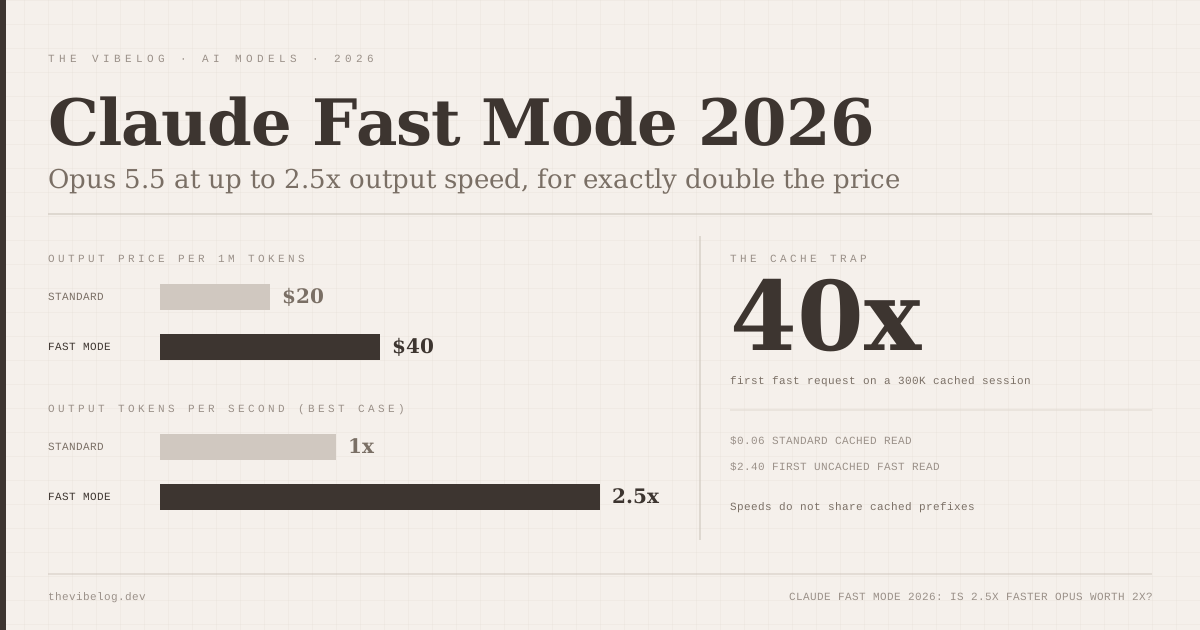
Claude fast mode for Opus 5.5 left research preview on October 15, 2026, and the waitlist is gone. Any API organization in the Start, Build or Scale usage tier can now send speed: "fast" and get what Anthropic calls up to 2.5x higher output tokens per second, at exactly double the price.
That sounds like a simple trade. It is not, because of one line buried in the docs about the prompt cache. Get that wrong and the real premium on a long agent session is closer to 40x than 2x for the first request.
This post covers what changed, what fast mode costs once caching is involved, how it compares with OpenAI’s Ultrafast tier, and when I would actually turn it on. Every number below comes from Anthropic’s and OpenAI’s own documentation, with secondary reporting labelled as such.
What Is Claude Fast Mode?
Claude fast mode is the same Opus model served with a faster inference configuration, priced at a multiplier on standard rates. Anthropic’s fast mode documentation is explicit that there is “no change to intelligence or capabilities” and that it is “not a different model”.
Three facts shape how useful it is:
- The speedup is on output tokens per second (OTPS), not time to first token. A long streaming answer finishes sooner. A request still waits the same time before the first token arrives.
- It supports Claude Opus 5.5, Opus 5 and Opus 4.8. Sonnet and Haiku are not supported.
- It is not available with the Batch API, a Priority Tier commitment, or Claude Platform on AWS. On Microsoft Foundry it works only for Opus 5.5 deployments hosted on Azure.
I like that Anthropic says the speed claim in OTPS terms. “2.5x faster” from a marketing page would suggest the whole request takes 40% of the time. It does not, and the docs do not pretend otherwise.
What Changed on October 15, 2026
Before this week, fast mode needed an access request and the fast-mode-2026-02-01 beta header. According to Anthropic’s release notes, as quoted by MIXED, Opus 5.5 “now has a default fast mode rate limit in the Start, Build, and Scale usage tiers.”
So the practical change is:
- No beta header for Opus 5.5. Old code that still sends it keeps working.
- No access request. Organizations in the free Evaluation tier still cannot use it until they move up a tier.
- Opus 5 and Opus 4.8 stay in research preview, still behind the header and the waitlist.
Fast mode has its own rate limit, separate from standard Opus limits. Exceeding it returns a 429 with a retry-after header, and the response carries six anthropic-fast-* headers showing remaining input and output capacity. Anthropic does not publish a tokens-per-minute figure for the default limit, which is the one thing I would want before building a product on it.
The conclusion for API users is simple: fast mode on Opus 5.5 is now a production feature you can ship behind a flag, not an experiment you apply for.
Claude Fast Mode Pricing: Double, Then Some
Fast mode pricing on Opus 5.5 is $8 per million input tokens and $40 per million output tokens, against the standard $4 and $20. Anthropic’s pricing page says the rate is flat across the full context window and that prompt caching and data residency multipliers stack on top.
| Opus 5.5 rate (per 1M tokens) | Standard | Fast mode |
|---|---|---|
| Base input | $4 | $8 |
| 5-minute cache write (1.25x) | $5 | $10 |
| Cache read (0.05x) | $0.20 | $0.40 |
| Output | $20 | $40 |
| US-only inference (1.1x) | $22 output | $44 output |
(Source: Claude Platform Docs, Pricing and Fast mode, October 2026)
The cache multipliers matter more than the headline. Opus 5.5 cache reads are priced at 0.05x base input, so a cached agent session is cheap at either speed. The trap is moving between speeds.
The cache miss that costs more than the premium
The docs state it twice: “Requests at different speeds do not share cached prefixes.” Switching from standard to fast, or falling back from fast to standard after a 429, throws away your cached prefix.
The Claude Code fast mode docs spell out the consequence: the first time you enable fast mode in a conversation, you pay the full fast mode uncached input price for the entire context.
Here is that arithmetic on a 300,000-token agent session:
- Next standard request, cached: 300,000 × $0.20 / 1M = $0.06
- First fast request after switching: 300,000 × $8 / 1M = $2.40
That is 40x more for one request. It happens once per conversation, so toggling off and on again later does not repeat it, but it is the reason Anthropic tells you to enable fast mode at the start of a session rather than halfway through.
The API has the same behaviour with a sharper edge. On a fast mode 429, the SDK retries up to twice by default. If you write a fallback to standard speed instead, that fallback is also a cache miss. On a long context, “just fall back” can cost more than waiting a few seconds for fast capacity.
My takeaway: decide the speed per session or per workload, not per request.
Is Fast Mode Worth It? The Per-Turn Math
Price is half the trade. The other half is how many seconds you get back.
Artificial Analysis measures standard Claude Opus 5.5 at 97.5 output tokens per second on Anthropic’s API at max effort. If fast mode hit its full 2.5x ceiling, that would be roughly 244 tokens per second. Treat that as a best case. Anthropic says “up to”, and nobody has published an independent fast mode measurement yet.
Take an illustrative agent turn with a warm cache: 200,000 cached input tokens, 3,000 new input tokens and 2,000 output tokens.
| Opus 5.5 speed | Cost per turn | Output streaming time | Turns per $10 |
|---|---|---|---|
| Standard | $0.092 | ~20.5 s | ~108 |
| Fast (2.5x best case) | $0.184 | ~8.2 s | ~54 |
(Source: my arithmetic from Claude Platform Docs pricing and Artificial Analysis output speed, October 2026)
That is about 12 seconds saved per output-heavy turn for about 9 cents. A hundred such turns in a day means roughly 20 minutes less staring at a stream, for $9.20 extra.
Whether that is worth it depends on what the waiting costs you. If you are watching the stream and the next decision is yours, 20 minutes a day is real money at any engineering salary. If the agent is running unattended in CI, you are paying double for a speed nobody sees.
Two caveats keep the table honest. Turns with short outputs, like a tool call that returns 80 tokens, gain almost nothing, because the time to first token dominates. And thinking tokens count as output, so a high effort setting makes fast mode more valuable per turn and more expensive at the same time.
Claude Fast Mode vs OpenAI Ultrafast
OpenAI sells speed differently. Its API pricing page lists three relevant tiers for GPT-6 Astra: Standard, a “Fast” tier at 2x (the page notes that Priority processing was renamed Fast mode on July 30, 2026), and Ultrafast at 6x standard.
| Model and tier | Input / 1M | Output / 1M | Price vs standard | Speed claim |
|---|---|---|---|---|
| Claude Opus 5.5 fast mode | $8 | $40 | 2x | Up to 2.5x OTPS |
| GPT-6 Astra Fast | $20 | $100 | 2x | Not stated on pricing page |
| GPT-6 Astra Ultrafast | $60 | $300 | 6x | Up to 8x (per OpenAI docs, via OrcaRouter) |
| GPT-6.1 Sol Ultrafast | $12 | $60 | 6x | Up to 8x (same tier) |
(Source: OpenAI API pricing, Claude Platform Docs, OrcaRouter’s reading of OpenAI’s Ultrafast docs, October 2026)
According to OrcaRouter’s summary of OpenAI’s Ultrafast documentation, the tier is described as “up to 8x faster speeds than Standard mode”, supports only US data residency and global processing, and starts at 500,000 tokens per minute for tiers 1 to 3.
- GPT-6 Astra Ultrafast $300
- GPT-6.1 Sol Ultrafast $60
- GPT-6 Astra standard $50
- Claude Opus 5.5 fast mode $40
- Claude Opus 5.5 standard $20
Source: Claude Platform Docs and OpenAI API pricing (Oct 2026)
Claude fast mode is the cheap way to buy speed; Ultrafast is the expensive way to buy a lot of it. At $40 output, fast Opus 5.5 still costs less per output token than standard GPT-6 Astra at $50. GPT-6.1 Sol Ultrafast at $60 is the interesting rival, because Sol is a strong coding model in its own right, as covered in the GPT-6.1 Sol vs Claude Sonnet 5.5 comparison.
For a full rate card across vendors, the AI model pricing tracker lists standard prices with sources.
How to Use Fast Mode in Claude Code
Claude Code has had /fast for a while, and the October 15 change does not alter how it bills. The Claude Code docs still label fast mode a research preview.
- Toggle: run
/fast, press Space, then Enter. A↯icon appears next to the prompt. Or set"fastMode": truein user settings. - Billing on subscriptions: Pro, Max, Team and Enterprise users pay for fast mode from usage credits only. It is not included in plan limits, and the docs note it “draws directly from usage credits, even if you have remaining usage on your plan.”
- Team and Enterprise: fast mode is off by default and an Owner must enable it. Admins can deploy
fastModePerSessionOptIn: trueso every session starts at standard speed, or block it withfastMode: falsein managed settings.CLAUDE_CODE_DISABLE_FAST_MODE=1turns it off entirely. - Rate limits: when you hit the fast limit, Claude Code falls back to standard speed automatically, greys out the icon, and re-enables fast mode after the cooldown.
- Not on Bedrock, Google Cloud or Foundry through Claude Code, and it needs a direct availability check to
api.anthropic.com, which can fail behind an LLM gateway.
The cloud session detail surprised me: /fast on in a Claude Code cloud session applies to that session only, while in the local CLI the toggle persists across sessions by default. If several people on a team run parallel sessions, per-session opt-in is the setting I would deploy first. Persistent fast mode across five concurrent sessions is how a usage credit budget disappears by Wednesday.
Fast mode also stacks with effort. The docs suggest fast mode plus a lower effort level for straightforward tasks, which cuts both thinking time and streaming time. For cost control beyond speed, the guide to reducing Claude API costs covers caching and model routing.
When I Would Turn Fast Mode On
Fast mode makes sense when a human is waiting on long output:
- Live debugging and rapid iteration, where each turn produces a sizeable diff and you read it immediately
- Pair-programming style sessions in Claude Code, started with fast mode on from the first prompt
- User-facing products on Opus 5.5 where a long answer streams to a customer and perceived speed matters
It does not make sense for:
- Unattended agents, CI jobs and batch work, which is also why the Batch API excludes it
- Short-output workloads like classification or tool routing, where time to first token dominates
- Long sessions you want to speed up halfway, because the uncached fast price on the whole context lands on the first fast request
There is also a cheaper speed lever. Claude Sonnet 5.5 at $2 and $10 is often fast enough without paying for a speed tier, and the Claude Opus 5.5 vs GPT-6 comparison covers where Opus actually earns its premium. For agent sandboxing news from the same week, see the breakdown of Perplexity’s open-source SPACE sandbox.
My view after reading the docs end to end: fast mode is good value for interactive Opus work, as long as you treat speed as a session-level decision. Paying 2x for a 2.5x faster stream is a fair trade. Paying 40x on one request because you flipped a switch mid-session is not.