Framer has always been the website builder for designers who want code-quality output without writing code. The 2026 AI additions — Wireframer, on-page editing, built-in analytics, one-click translation — make it faster to reach that output. They do not change what Framer fundamentally is.
That is not a criticism. Framer knowing what it is and doing it well is worth more than trying to become a full-stack app builder. In a landscape where every platform is adding AI features and calling them transformative, Framer’s additions are more honest: they save you time on the work Framer already does.
What Changed in Framer AI in 2026
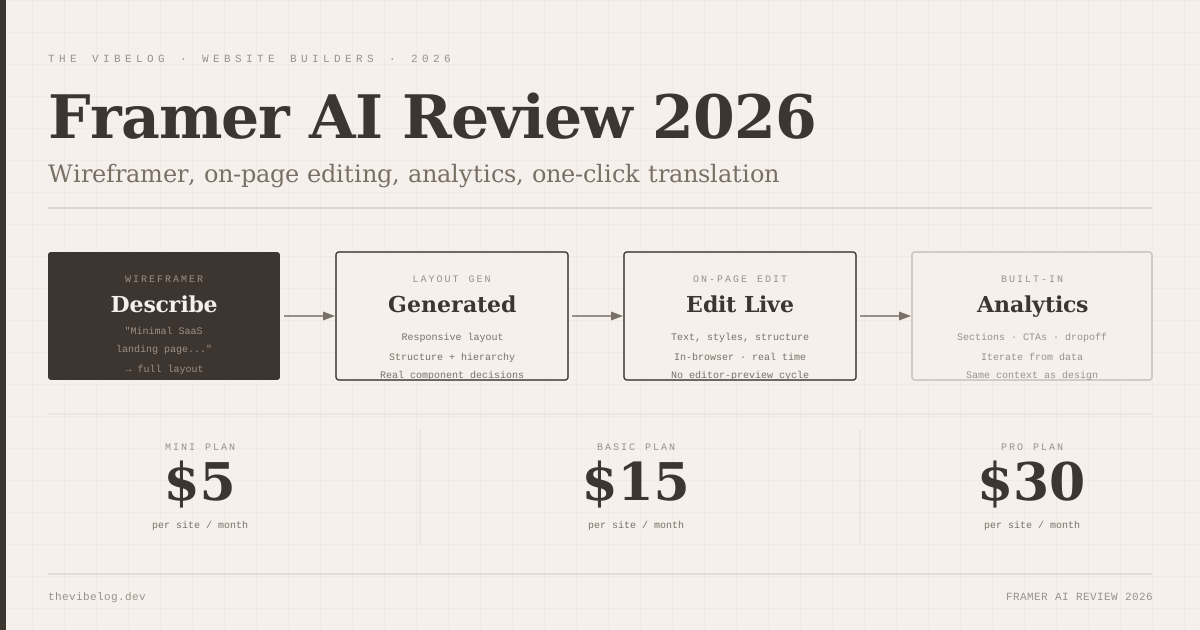
The headline addition is Wireframer. Describe your site concept — “Minimal SaaS landing page for a developer tool,” “High-conversion product page with social proof,” “Modern startup portfolio” — and Framer generates a complete, responsive layout. You get structure, component placement, spacing, and starter content. You do not get a blank canvas.
The purpose of Wireframer is to remove the hardest part of starting a new site: going from nothing to something with enough shape to react to. A blank Framer canvas requires knowing what layout decisions to make. Wireframer makes the first set of decisions and gives you something concrete to push back against, modify, or build from. That is a different and more useful starting point than a white screen.
On-Page Editing is the other significant addition. You can now edit live pages in the browser directly — text, styles, structure — without opening the Framer editor. Changes are reflected in real time. For content updates, small style adjustments, and text corrections, this is faster than the editor-preview-publish cycle.
Wireframer: The Blank Canvas Problem, Solved
The blank canvas problem in design tools is well understood. The first decision is always the hardest, and a default answer — even an imperfect one — is more useful than no answer.
Wireframer generates layouts that are genuinely usable as starting points. I tested it with several prompts across different site types, and the outputs were more considered than I expected — column structure, hierarchy, section organisation, and hero patterns that match what the prompt described. The content is placeholder (proper Lorem Ipsum and obviously staged data) but the structural decisions are real.
The specificity of the prompt matters significantly. “SaaS landing page” produces a generic layout. “Landing page for a developer tool that competes with Postman, targeting backend engineers who value clean design” produces something with a different visual density and hierarchy. The more precise the brief, the more tailored the output. This is the same pattern that applies to every AI generator, and the investment in prompt quality pays off here.
The output quality is meaningfully better than what you get from starting with a Framer template in terms of customisability. Templates are someone else’s design choices locked into a structure that constrains your own. Wireframer output is a layout that reflects your brief, with Framer’s full flexibility available to override any of it.
Analytics Built Into the Builder
The analytics integration is the addition I find most interesting from a workflow perspective, even though it gets less coverage than Wireframer.
Framer embeds analytics directly into the platform, surfacing data on visitor behaviour alongside the design tools. You can see which sections are getting attention, where users are dropping off, which CTA buttons are getting clicks — and iterate on the design in response, without switching to an external analytics tool.
The feedback loop this creates is meaningfully different from the standard workflow where analytics live in a separate system. When design decisions and performance data are in the same context, the iteration between “let’s try this layout” and “here is what happened” gets shorter. For marketing sites where conversion rate matters, that tighter loop has real value.
The analytics are not GA4-level sophisticated. You are getting the data you need to make design decisions, not user-level attribution analysis or funnel building. For most agency client sites and marketing sites, that is the right level of detail. If you need deeper analytics, you still integrate an external tool. But for the design-level questions — is this section getting seen, is this CTA getting clicked — Framer’s built-in data is sufficient and faster to access.
Workshop: Custom Components Without Code
Workshop is Framer’s built-in tool for creating custom interactive components — visual effects, cookie banners, tabs, carousels, modal overlays — without writing React code. You use Framer’s visual component editor, which generates the underlying implementation.
This sits at the boundary between designer and developer capabilities. A designer who wants a specific interaction that no existing Framer component covers can build it in Workshop without learning React. A developer working in Framer can use Workshop to build reusable components that non-developers can then use and customise in the editor.
The result is that the gap between “what Framer can do” and “what a specific designer can do with Framer” is smaller than it was. Workshop is not unlimited — complex data-driven interactions, API calls, authentication flows still require developer involvement. But for presentation-layer interactions, it covers a lot.
AI Translation: One Click, Whole Site
Framer’s AI Translation translates the entire site into a selected language with one click. No plugins, no export/import, no string management. Select the target language, run the translation, review the output.
I tested this with English-to-French translation on a six-page marketing site. The translation was accurate and natural for business content — not literal, not awkward. The formatting survived intact: headings stayed headings, buttons stayed buttons, linked text kept its links.
The same honest caveat applies here as to any AI translation: for brand voice-sensitive copy, high-stakes content (legal, medical, financial), or nuanced persuasive writing, human review is still the right call. The Framer translation will be correct but not necessarily precisely attuned to a brand’s specific French voice. For the typical small business or SaaS company website, the translation output is functional and ready to use.
The multilingual output deploys as separate locale paths in the site — /fr, /de, /es — which is the correct approach for SEO and URL structure. Framer handles the locale routing automatically.
Pricing: Per Site, Not Per User
Framer’s pricing model is worth explaining explicitly because it is different from most SaaS tools and the difference matters for agencies.
Plans are per site, not per user. Mini at $5 per month, Basic at $15 per month, Pro at $30 per month — these are the costs to publish and host one Framer site. A free plan exists with Framer branding. CMS plans are available for content-driven sites that need the CMS.
For agencies managing multiple client sites, this means each client site is a separate subscription, and the total cost scales linearly with the number of active sites. Ten client sites at Basic is $150/month. That is competitive with Webflow’s per-site agency pricing and significantly cheaper than hand-coded hosting at scale.
For individual creators with one portfolio site, the $5 Mini or $15 Basic plan is one of the cheapest professional hosting options in the market. The production quality of a Framer site at that price point is hard to match elsewhere.
What Framer Is Not in 2026
Framer is a website builder. The following things are not available natively and are not going to be available any time soon, based on the product direction:
There is no database you control. Framer’s CMS is a content management layer for sites, not a user data store for applications. There is no user authentication. You cannot build a product that requires users to create accounts, log in, or have associated data. There is no backend logic. API calls are possible from Framer components in some configurations, but Framer does not run server-side code.
If you are comparing Framer to Lovable or Bolt.new for a project that involves user accounts, the comparison is the wrong frame. They are in different categories. The full comparison of AI builders by capability covers the right tools for each use case.
Framer is also not Webflow for professional CMS use cases. Webflow’s CMS is more powerful, its editor gives more control over layout at the component level, and its relationship with enterprise publishing workflows is more developed. Framer’s CMS is sufficient for a blog or a simple content site; for a large publication with editors, authors, custom content types, and complex templating, Webflow is the right choice.
Where Framer wins: design quality at speed. A Framer site built by someone who knows the tool looks designer-made. The AI additions accelerate how fast you get there from a prompt, not just from a blank canvas. For the use case it is built for — marketing sites, portfolios, SaaS landing pages, agency deliverables — Framer 2026 is the strongest option in the market.
Verdict
The 2026 Framer AI additions are genuinely useful in the specific context Framer is built for. Wireframer solves the blank canvas problem. On-page editing reduces the friction of small updates. Analytics in the builder create a tighter iteration loop. Translation removes a workflow that previously required third-party tooling.
Framer is not competing with Lovable, Bolt.new, or v0 for app development. It is competing for the design-led website market and, in that market, it is ahead. If you are building marketing sites, landing pages, portfolio sites, or agency deliverables in 2026, Framer with its 2026 AI additions is worth evaluating seriously. The output quality and the per-site pricing make it the strongest choice in the design-led builder category.
For anyone building beyond a website — user auth, databases, application logic — look elsewhere.