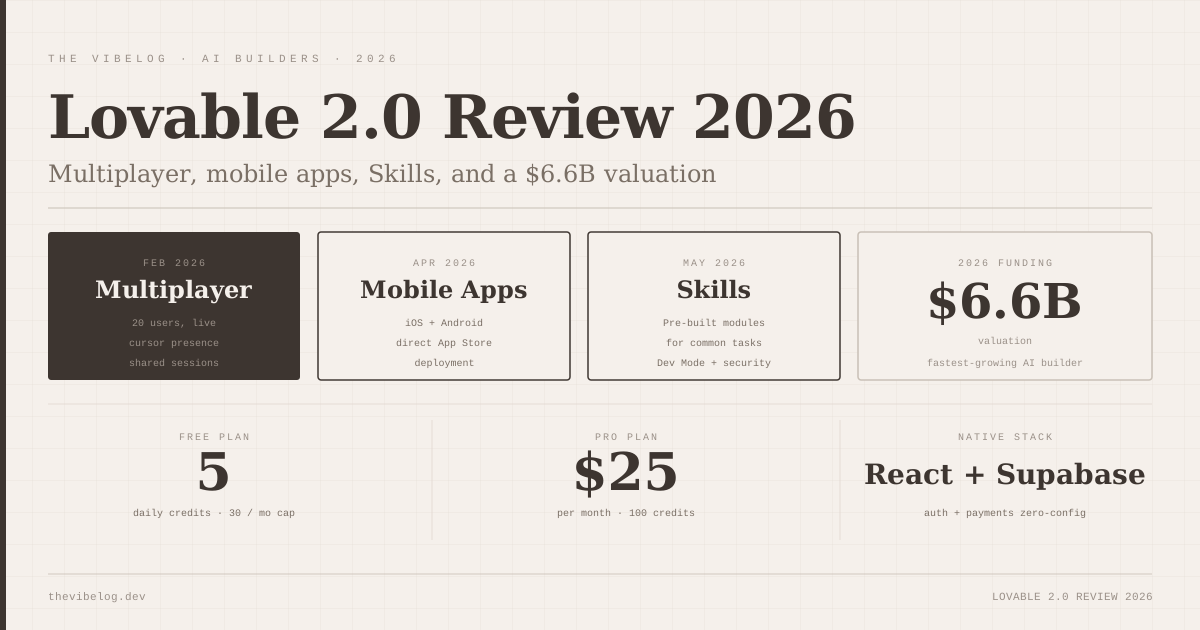
Lovable raised at a $6.6 billion valuation in 2026, which means investors believe AI-assisted full-stack app building is a category, not a gimmick. The question worth actually answering is whether the product deserves the attention or just the money.
I have been using Lovable since before the 2.0 release, and I have shipped three real projects on it. Here is an honest account of what changed with 2.0, what still frustrates me, and who should use it.
What Lovable 2.0 Actually Added
The 2.0 release was not a single launch — it was a sequence of distinct features shipped across February through May 2026, each one addressing a specific gap in the original product.
In February, Lovable shipped real-time multiplayer editing: up to 20 collaborators working in the same project simultaneously. Pro users get personal workspaces; Teams users get the full 20-person workspace. This is the headline feature, and it is the most significant architectural change Lovable has made.
In April, Lovable launched iOS and Android apps, covered by TechCrunch. You can build, edit, and manage projects from your phone or iPad.
In May, they shipped Skills — reusable instruction sets that capture repeated workflows — and visual style editing, which lets you edit any styling directly without prompting the AI.
Dev Mode also landed alongside 2.0: direct code editing inside Lovable, without needing to sync to GitHub first. And they added a security scanner that surfaces Supabase vulnerabilities at publish time.
That is a lot of product in roughly three months. Whether all of it holds up in practice is what the rest of this review is about.
Lovable 2.0 Multiplayer: Real Collaboration or a Checkbox Feature?
The multiplayer feature is real. I tested it with two collaborators on a client project, and the synchronisation worked exactly as advertised — changes appear immediately, no conflicts, no manual refreshes. For a design review session where a non-technical stakeholder wants to point to a component and say “make that button smaller,” the collaborative model is genuinely useful.
The limitation is that Lovable’s core model is still AI-mediated. You are not collaborating on code directly — you are collaborating on prompts and a live preview. Multiple people can each prompt the AI and see results in real time. That is a different workflow from, say, two developers editing the same file in a shared IDE. Whether that distinction matters depends entirely on who you are building with.
For teams where the collaborators are a developer plus a non-technical co-founder or designer, the model works well. The developer can handle the complex prompting while the designer points to the preview and describes visual changes. The visual style editing feature (more on that below) was clearly built for this exact use case.
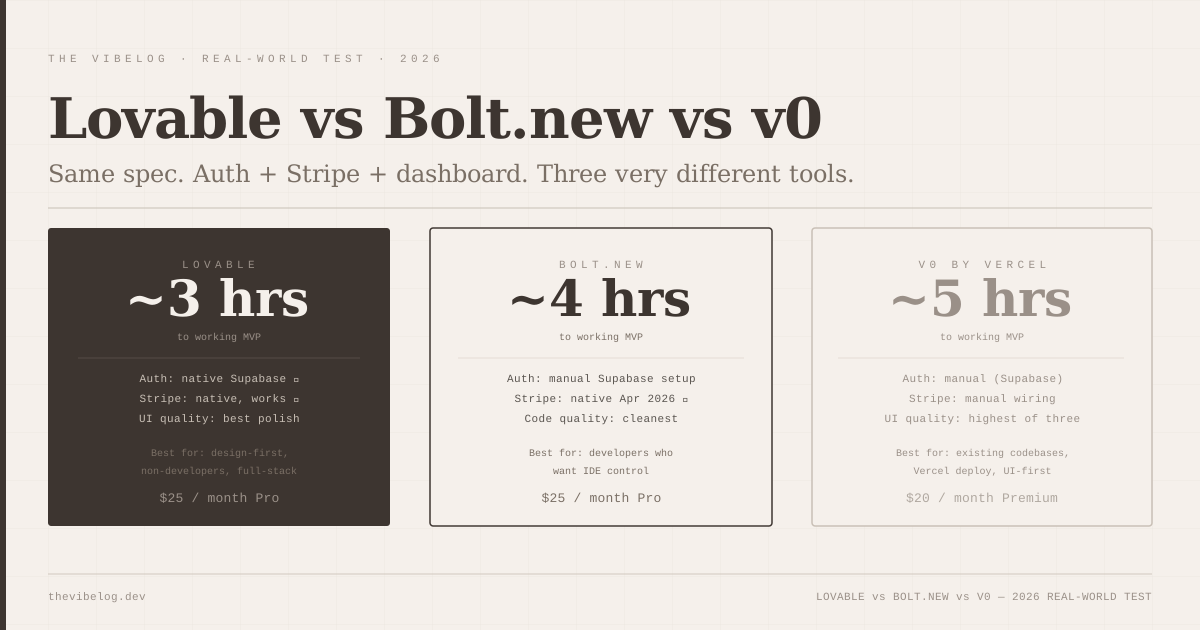
For all-developer teams who want to work on the same codebase together, the Lovable 2.0 multiplayer is not the right mental model. Those teams should look at the Lovable vs Bolt.new vs v0 comparison — Bolt’s IDE model is more appropriate for developer-only collaboration.
Skills: The Feature That Actually Changes Daily Usage
Skills are Lovable’s answer to a real problem: if you add Stripe to every project the same way, you should not have to describe it from scratch every time.
A Skill is a reusable instruction set that you create once and apply to future projects. You can build them manually in workspace settings, upload existing ones, or — and this is the part I find genuinely useful — ask Lovable to recognise a repeated workflow and save it as a Skill automatically.
The practical value is significant for anyone building multiple projects. Auth setup, payment configuration, dashboard patterns, form validation flows — all of these can be captured once and applied consistently. This addresses one of my persistent frustrations with AI app builders: the inconsistency between projects when you rebuild the same components from scratch each time.
The workflow for sharing Skills within a team is straightforward. One person builds and refines the Skill, uploads it to the workspace, and everyone on the team has access. For agencies or consultancies building similar apps for different clients, this is the most valuable thing Lovable 2.0 added.
I have built two Skills so far — a Stripe configuration that matches my standard pricing model, and a dashboard layout I use on most client projects. Both have cut meaningful time off project startup. The credit savings are real: fewer iterative prompts to get to the same starting point.
Dev Mode: Useful, But Not What Developers Were Asking For
Dev Mode lets you edit code directly inside Lovable without syncing to GitHub first. You get a code editor view alongside the live preview, and changes are reflected immediately.
This is a genuine improvement over the previous workflow, where any code edits required exporting to GitHub, editing externally, and managing the sync. I used to avoid touching generated code for as long as possible because the friction was high enough to make it not worth it. Dev Mode reduces that friction.
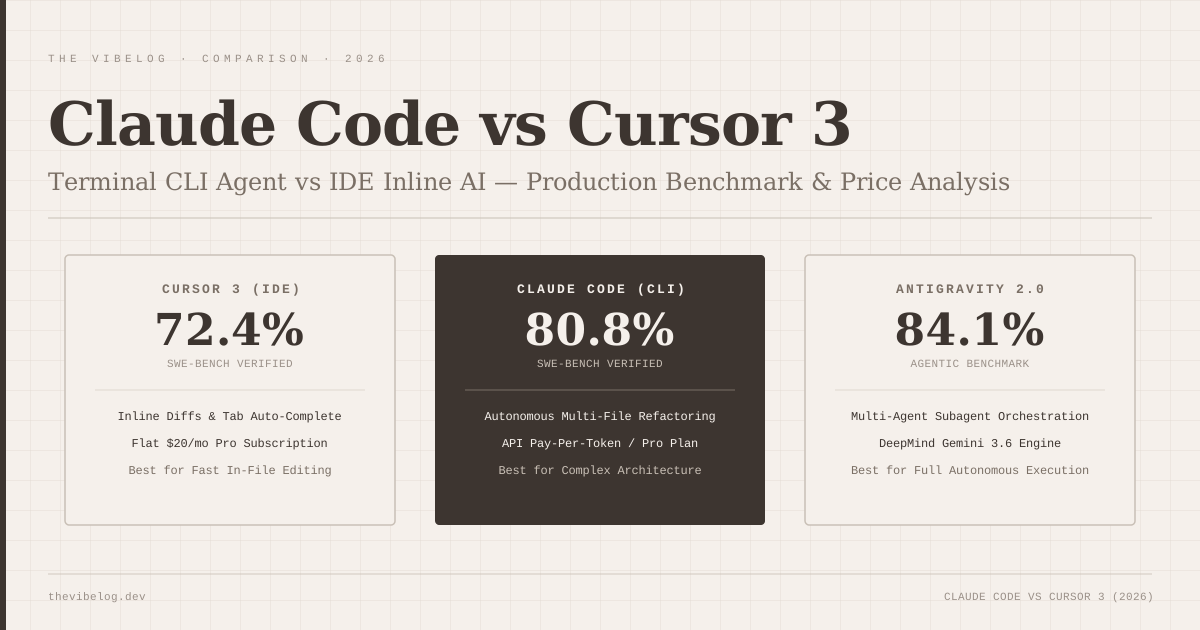
That said, I want to be honest about what this is and is not. Dev Mode is not Bolt.new. You do not get a file tree, a real terminal, or the full IDE experience. You get a code editor for the file you are currently viewing, and the ability to save changes directly. For a developer who wants real visibility into the full project structure and the ability to run commands, Bolt remains the better choice.
Where Dev Mode is genuinely valuable is for targeted fixes. When Lovable generates something that is 90% right and you need to change one function, you can do it without leaving the product. Previously, a task that small was not worth the GitHub sync overhead. Now it is.
The Security Scan Feature
When you click Publish with a Supabase integration active, Lovable now runs a security scan before the deployment completes. If it finds vulnerabilities — exposed tables, missing row-level security policies, overly permissive access patterns — it surfaces them with the option to fix before proceeding.
This is the right place to put a security check. Developers who build fast do not always go back and audit their Supabase configuration before shipping. Having the scanner fire at the moment of publishing catches the gap at exactly the right time.
I tested this on a project with intentionally misconfigured RLS policies. It caught two issues, explained them clearly, and generated the corrected policies on request. The scan is not exhaustive — it checks the Supabase layer, not the full application — but for the class of vulnerabilities that most frequently affect Lovable-built apps, it covers the common failures.
The vibe coding in production analysis documented that AI-generated code produces approximately 1.7x more issues than human-written code. A publish-time security check does not fully close that gap, but it directly addresses the most common category of vulnerability in AI-generated full-stack apps: database access control.
The Mobile App: Practical for Project Management, Limited for Building
The iOS and Android apps launched in April 2026 to TechCrunch coverage. I downloaded both on the day they launched.
The mobile app is genuinely useful for one specific workflow: checking on a project and making small updates when you are away from a desk. If a client messages you about a text change or a colour issue, you can fix it from your phone in two minutes. That is a real use case.
For building from scratch — starting a new app, working through a complex feature — the mobile experience is not where I would choose to work. The interaction model of prompting an AI to build complex full-stack functionality works better when you can see a large preview, review code if needed, and context-switch across tabs. That said, Lovable is already targeting non-developers who may have no strong desktop preference. For that audience, a mobile app that lets them build on an iPad is a meaningful expansion of where the product can be used.
The app has over 10,000 custom domains now connected to Lovable projects — the domain management is available in the mobile app, which is where it is most convenient to manage small operational tasks.
Full-Stack Capabilities: What Has Not Changed
The core Lovable proposition has not changed in 2.0 and continues to work as well as it ever has.
React plus Tailwind plus native Supabase integration. Auth works with zero configuration — email/password signup, session management, row-level security, all correct on the first prompt. Describe your pricing in plain English and Lovable generates checkout, webhooks, and the subscription status table in Supabase automatically. I have tested Stripe integration end-to-end on three projects and it has worked correctly each time.
GitHub sync is available when you need to hand a project off to a developer or continue with external tooling. Export to repo, keep building with normal tools. The generated code is React with Supabase client conventions throughout — readable, if opinionated.
Lovable now runs on Claude Sonnet 3.7. The generation quality on complex full-stack features is noticeably improved over the models Lovable was using a year ago. Multi-component UI generation in particular has gotten better: coordinated state, consistent styling, and fewer iterations needed to get to a working result.
Pricing: Still the Credit Limit Conversation
Free tier: 5 daily credits, 30-credit monthly cap. Pro: $25 per month, 100 credits per month, with top-ups at $15 per 50 credits.
This is where I am going to be direct, because most reviews of Lovable avoid the subject.
The credit system creates real friction on iterative projects. If you are building something with multiple stakeholders who have strong opinions about UI — the kind of project where you go back and forth on a component design ten times before everyone is satisfied — the credit drain is a genuine problem. On a busy week, I have exhausted a meaningful chunk of the monthly Pro allowance on a single feature.
The visual style editing in 2.0 is partly a response to this problem. When you can make styling changes directly rather than prompting the AI each time, you save credits. A button colour change used to cost a credit. Now it costs nothing. For teams doing heavy visual iteration, this changes the credit economics noticeably.
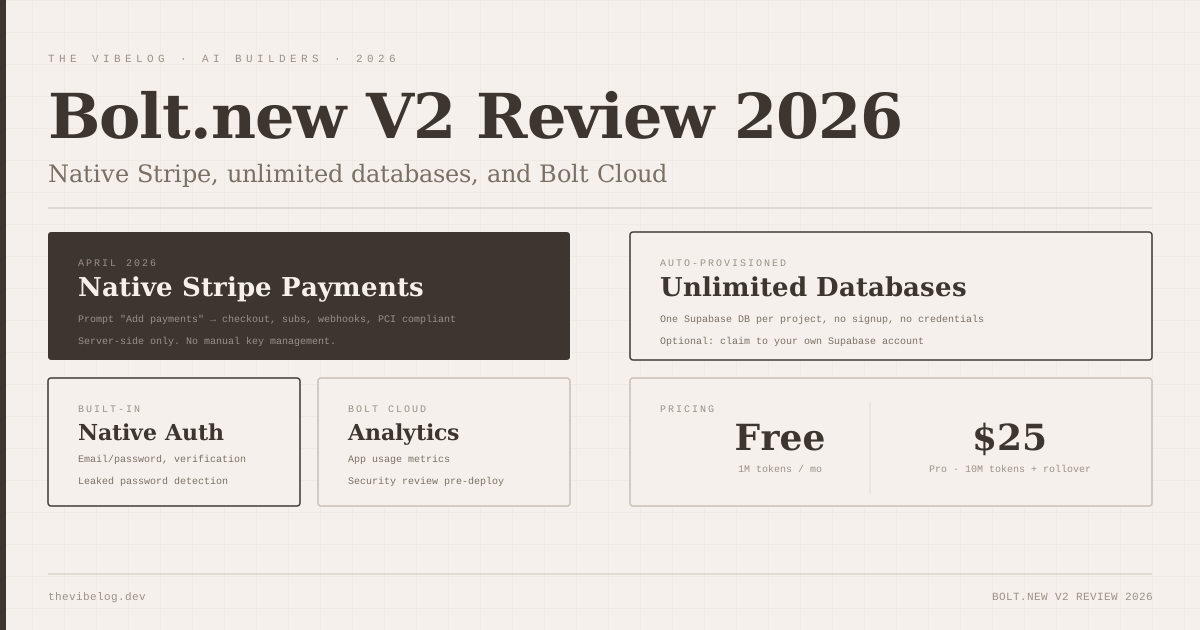
Top-ups at $15 per 50 credits are reasonable in isolation. The issue is when you are at the end of the month, the credits are gone, and the project is not finished. The cap feels arbitrary in those moments. Bolt.new’s token-based model with rollover is more forgiving for heavy months, which is worth knowing if credit management anxiety is going to change how you work.
Lovable 2.0 in 2026: Who It Is Actually For
Lovable 2.0 is the best product available for a specific profile: a non-developer, or a developer who wants to work at the product level rather than the code level, building a full-stack app that needs auth, payments, and database — and needs it fast.
The multiplayer feature makes it genuinely viable for small teams with mixed technical backgrounds. The Skills system makes it the right choice for anyone building similar apps repeatedly. The mobile app expands where you can work. The security scanner addresses the most common class of deployment mistakes. Dev Mode reduces the friction of targeted code edits.
The credit limits are a real constraint and the developer experience is still opinionated. If you are a developer who wants to see every file, understand the structure, and have full IDE control, Bolt.new remains the better fit — the detailed breakdown of that tradeoff is in the Lovable vs Bolt.new vs v0 comparison.
If you want to go from a product description to a deployed full-stack app in an afternoon, and you want the output to look like it was designed rather than generated, Lovable 2.0 is ahead of everything else in that category. The $6.6 billion valuation is the market making a prediction about where AI-assisted building is going. Based on what shipped in the first five months of 2026, that prediction is not obviously wrong.