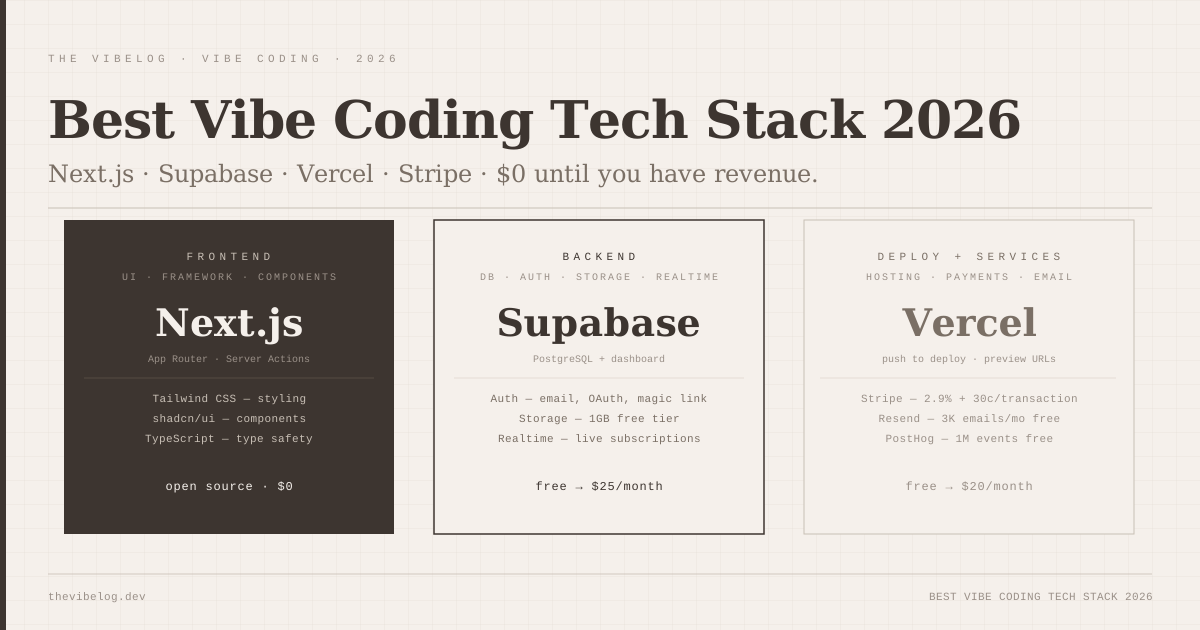
Every successful vibe-coded product I have seen in the past year runs on roughly the same stack. Next.js on the frontend. Supabase on the backend. Vercel for hosting. Stripe for billing. Resend for email. shadcn/ui for components. The specific choices vary at the margins — some teams prefer Clerk over Supabase Auth, some deploy to Cloudflare instead of Vercel — but the core is consistent enough that you can now name it.
This consistency is not accidental. These tools emerged as defaults because they work well together, have generous free tiers, and — critically — have enough community resources and documentation that AI coding tools produce reliable code for them. The stack is self-reinforcing: the more teams use it, the more AI training data it generates, the more reliably AI tools produce working code for it.
Understanding what each layer does and why it was chosen saves you from picking alternatives that are technically equivalent but substantially harder to vibe-code against.
Why the Stack Matters More Than the Prompts
The most common mistake in vibe coding setups is treating the tech stack as a separate decision from the prompting workflow. It is not. When you prompt an AI tool to add authentication to your app, the quality of the output depends heavily on what authentication system you are using. A prompt for Supabase auth produces more reliable output than a prompt for a custom JWT implementation, because Supabase auth has more training examples and more community debugging history.
The same holds for every layer of the stack. shadcn/ui components appear in millions of AI-generated codebases, which means the AI knows exactly how they work, what props they accept, and what the common customisations look like. A custom component library has none of that. The technical capabilities might be identical — the prompting experience is not.
This is why the vibe coding stack converged on specific tools rather than the most technically capable tools. It converged on the tools that AI models are most reliably trained on. Choosing outside that set is a decision to trade prompting reliability for some other benefit, and it should be a deliberate tradeoff, not a default.
The Frontend Layer: Next.js, Tailwind, shadcn/ui
Next.js is the React framework that covers the full range of rendering strategies: server-side rendering, static generation, client-side rendering, API routes, and Server Actions in a single project. For vibe coding, this matters because most features require a mix of these approaches — a static marketing page, a server-rendered dashboard, a few API endpoints, and some client-side interactivity — and having all of them in one framework means fewer integration seams for the AI to get wrong.
The App Router architecture (introduced in Next.js 13, now standard in 2026) maps closely to how AI tools structure generated code. Server Components for data fetching, Client Components for interactivity, Server Actions for form submissions without building explicit API endpoints. The patterns are predictable enough that AI tools generate them reliably without much architectural guidance.
Tailwind CSS and shadcn/ui work together as a complete UI system. Tailwind handles styling through utility classes — no separate CSS files to maintain, no naming conflicts, instant AI-generated classes that look correct because the AI has seen millions of examples. shadcn/ui provides accessible, customisable component primitives built on Radix UI: forms, dialogs, dropdowns, tables, cards. You copy the components you need into your codebase, which means you own them and can modify them. AI tools know shadcn/ui in detail — generating a data table, a multi-step form, or a modal confirmation dialog produces code that actually works.
The practical consequence: the time between “add a user settings page” and a working, styled, accessible settings page is measured in minutes, not hours.
The Backend: Why Supabase Is the Default
Supabase is PostgreSQL with a REST and GraphQL API, auth, file storage, realtime subscriptions, and a dashboard, all on one platform with a free tier that covers most MVPs.
The dashboard matters for vibe coding specifically because it is a UI for your database. You can see the schema, browse records, write SQL queries, and inspect stored files without knowing SQL. When an AI tool generates a database migration and something goes wrong, you can inspect the result directly. This makes debugging AI-generated data layers significantly faster than debugging against a CLI or API.
The client library (@supabase/supabase-js) is structured in a way that maps closely to how AI tools generate code for it. Auth calls, data queries, file uploads — the patterns are consistent enough that AI-generated Supabase code is reliable in a way that custom backend code is not. A prompt like “add a query that gets all posts for the current user with their author information” produces correct Supabase code because that exact pattern appears in thousands of community examples.
The free tier is genuinely useful for MVPs: 500MB database, 1GB file storage, 50,000 monthly active users for auth, unlimited API requests. Most products do not hit these limits until they have paying customers. The Pro tier starts at $25/month, which is the correct time to upgrade — when you have revenue, not before.
The one real limitation is that Supabase runs PostgreSQL and does not give you direct access to the underlying server. For most applications this is fine. For applications with complex database requirements — custom extensions, specific indexing strategies, very large datasets with unusual query patterns — you eventually need more direct database control. That is a later problem for most products.
Hosting: Vercel and When to Consider Alternatives
Vercel and Next.js are made by the same company, which is both its main advantage and the thing to be aware of. The deployment integration is the smoothest of any option because Vercel built it for Next.js. You connect your GitHub repository, Vercel detects the framework, and every push to main deploys to production. Preview URLs for every pull request. Zero configuration required.
For vibe-coded products this is valuable because deployment friction is a productivity killer. The faster you can get from “the AI generated this” to “this is running at a real URL” the faster you can verify it works.
The pricing structure: the Hobby plan is free, covers one personal project, with 100GB bandwidth per month. The Pro plan is $20/month per team, adds production-grade SLAs, 1TB bandwidth, and team collaboration. Enterprise is custom.
Where Vercel becomes expensive is at high traffic. The Pro plan’s bandwidth and serverless function execution costs at scale are higher than running the equivalent workload on AWS or GCP. Teams consistently find that Vercel is cheapest up to a few thousand monthly active users, then becomes more expensive than self-managed alternatives as scale increases.
Cloudflare Pages is the alternative worth knowing. It deploys Next.js apps, has a genuinely free tier for most use cases, and its edge network is faster for geographically distributed users. The limitation is that some Next.js features (specific App Router patterns, certain server-side operations) have inconsistent support on Cloudflare’s runtime. For products that primarily use the parts of Next.js that Cloudflare supports, it is a direct cost improvement over Vercel at scale.
Auth, Payments, and Email — The Services Layer
These three are almost always needed for any product with users and revenue, and the choices here involve real cost tradeoffs.
Authentication. Supabase includes auth at no additional cost. It handles email/password, magic links, OAuth providers (Google, GitHub, Apple, etc.), and JWT session management. For most products, Supabase auth is sufficient. Clerk is the premium alternative: $25/month plus usage-based pricing for production, with better user management UI, MFA flows, organisation management, and a dashboard your users can interact with. If you are building a product where auth complexity is real — B2B SaaS with per-organisation permissions, multiple user roles, enterprise SSO — Clerk is worth the cost. For an MVP or consumer product, Supabase auth is fine.
Payments. Stripe is the default. 2.9% + 30¢ per transaction with no monthly fee. The AI coding tooling around Stripe is mature enough that generating a checkout flow, a subscription management page, and a webhook handler for payment events produces working code on most attempts. The Lovable vs Bolt.new vs v0 comparison covers how each platform handles Stripe integration specifically. The important thing to understand: Stripe generates no income in development, charges no fee on failed payments, and the test mode is a complete simulation. Your vibe-coded payment flow can be fully tested without touching real money.
Email. Resend is the current default for transactional email among vibe coders: free up to 3,000 emails per month, simple API, and React Email for building templates in the same component model as your frontend. The alternative is Postmark, which has better deliverability metrics and no free tier ($15/month minimum). For any product sending fewer than 3,000 emails per month, Resend is free. For a product where email deliverability is critical — transactional notifications, password resets, account alerts — the $15/month for Postmark is the right call.
AI Coding Tools: Which to Use When
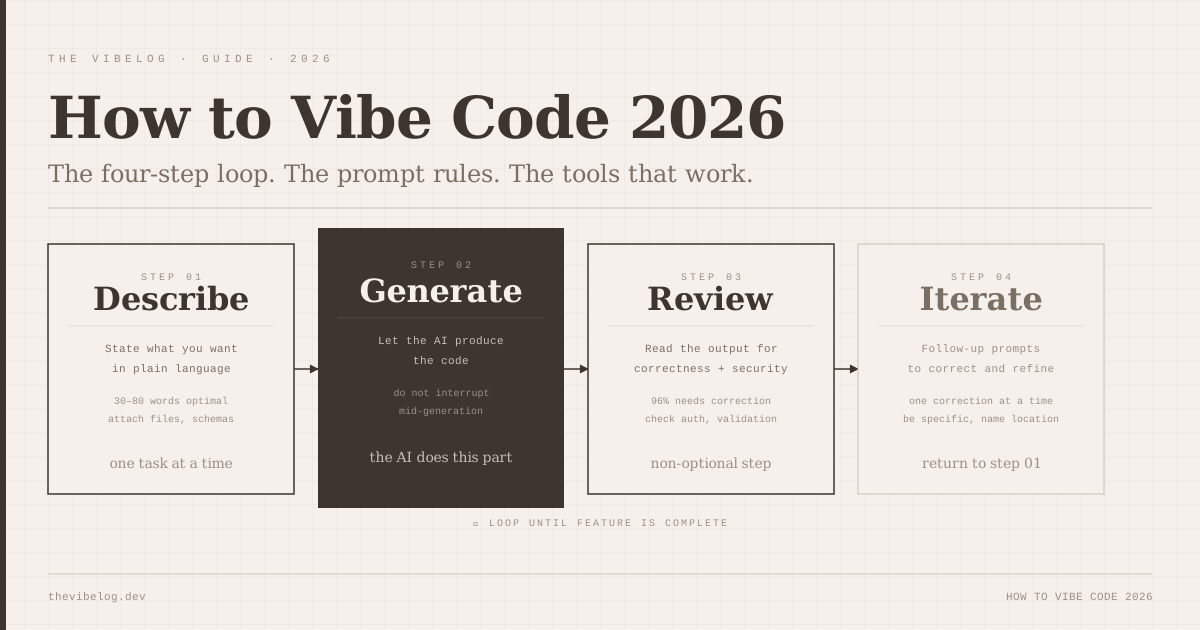
The stack above is what runs the product. The AI coding tools are what help you build it. As covered in the how to vibe code guide, different tools perform differently across different tasks.
Cursor is the daily driver for most professional vibe coders. It is VS Code with AI built in — tab completion that understands your codebase, a chat panel that can read multiple files and suggest cross-file changes, and Composer mode for generating new files and features. If you are already using VS Code, the transition to Cursor has zero friction.
Claude Code handles the tasks that require understanding the full codebase — large refactors, debugging issues that span multiple files, understanding why a feature works the way it does when you did not write it. It runs in the terminal and has a 1 million token context window, which is large enough to hold most entire codebases at once.
Bolt.new and Lovable are better for greenfield projects than for ongoing work. They are excellent for generating the initial version of a new product — everything from data model to deployed application — and become less useful as a codebase grows and the context they need exceeds what they can see.
The workflow most professional teams have settled on: Bolt.new or Lovable for initial generation of new features or new projects, then Cursor for daily iteration, Claude Code for complex cross-file changes and debugging.
The Free Tier Reality — What Everything Actually Costs
For a production MVP serving early users: $0 until you have revenue.
Vercel Hobby: free. Supabase: free. shadcn/ui: free. Next.js: free. PostHog analytics: free up to 1M events. Sentry error tracking: free up to 5K errors per month.
The first costs appear when your product works. Stripe charges per transaction — you only pay when users pay you. Supabase Pro at $25/month when you exceed free tier limits (typically around 500+ daily active users with significant database activity). Vercel Pro at $20/month if you need team collaboration or production SLAs.
A product with 200 users and $2,000 monthly revenue typically runs on $0–$50/month in infrastructure. That ratio — infrastructure cost as a tiny fraction of revenue — is the point of the stack. You are paying for the services when the product’s revenue covers them, not before.
When to Diverge From the Stack
The default stack is right for most products and wrong for some specific ones.
If you are building something that requires real-time collaborative editing (like a Figma competitor or a collaborative document editor), Supabase’s realtime subscriptions have limits that will require you to think carefully about the architecture. PartyKit or a custom WebSocket server might be necessary.
If you are building something with high compute requirements — video processing, machine learning inference, large file manipulation — Vercel’s serverless functions have a 10-second execution limit in some configurations and are expensive at volume. A dedicated compute layer (a long-running server on Railway, Fly, or AWS) is the right call.
If you are building a mobile-first product, Next.js is a web framework and does not produce native mobile apps. The Google AI Studio 2026 Android app generation (covered separately on this blog) is the current answer for vibe-coded native Android. For cross-platform mobile, Expo with React Native has decent AI tool support.
None of these are reasons to avoid the stack — they are specific conditions where parts of it need to be replaced. For the majority of web applications, the Next.js / Supabase / Vercel core will take you further than you expect before you hit a genuine limitation.
Stack composition from Context Studios vibe coding stack guide, DataCamp vibe coding tech stack analysis, and KDnuggets tech stack for vibe coding, 2026. Pricing from official Vercel, Supabase, Clerk, Resend, and Stripe pricing pages as of May 2026. Supabase recommendation from Supabase vibe coders solutions page.