The term has been in use for eighteen months. Most guides still explain what vibe coding is rather than how to do it well. This one skips the definition and starts with the workflow — the four steps, the prompt techniques, the review habits, and the tools that work in 2026.
Vibe coding is now the default working mode for 92% of US developers, according to the 2026 State of Vibe Coding report from Taskade. What separates the developers getting 81% productivity gains from the ones who are frustrated and reverting to writing everything by hand is not which tool they use. It is how they use it.
What Vibe Coding Is — Quickly
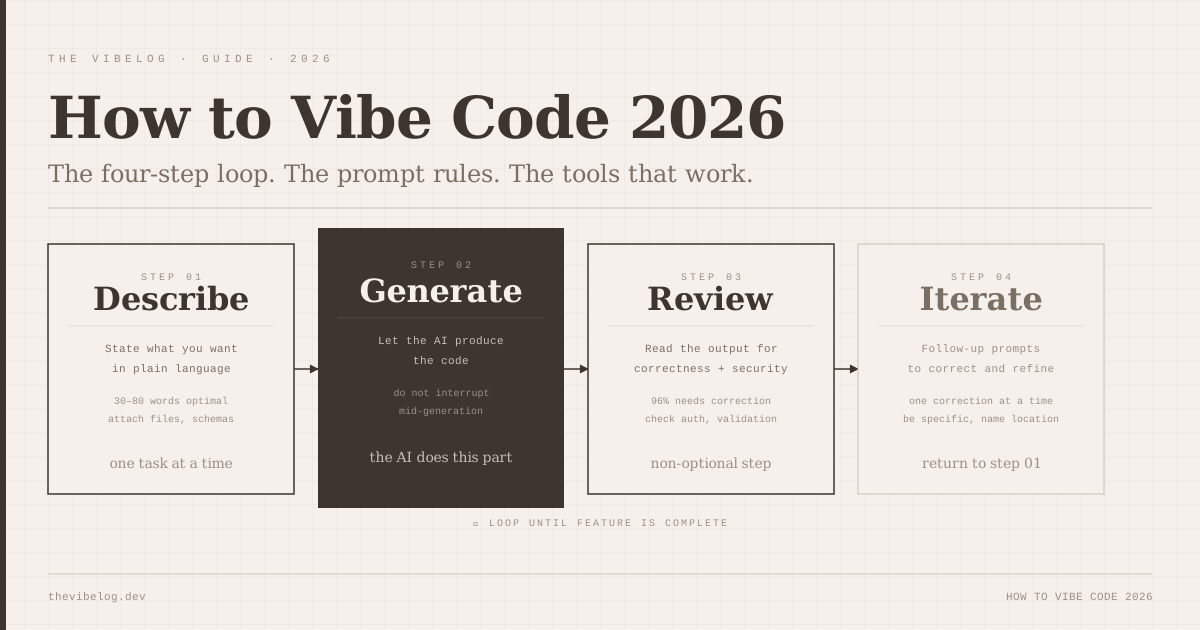
Vibe coding is a workflow, not a tool. You describe a feature or problem in natural language. An AI tool generates code. You review the output. You iterate with follow-up prompts until the result is correct. That is the entire loop.
The reason it works is that the bottleneck in most development is not typing — it is knowing what to type and translating that knowledge into syntax, structure, and boilerplate. AI tools remove most of that translation step. The knowledge still has to come from somewhere, which is why experienced developers get more out of vibe coding than beginners do and why the review step is not optional.
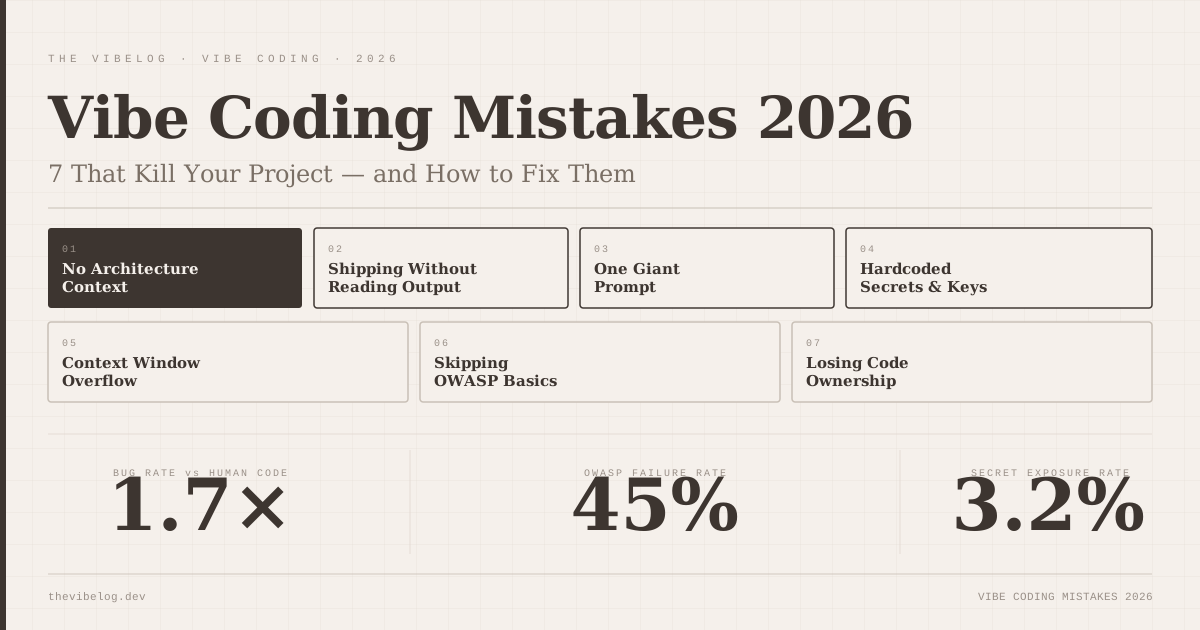
What vibe coding is not: a way to avoid understanding what you are building. The developers getting the best results are the ones who can read the output and catch what the AI got wrong. The ones who cannot are the ones shipping 45% OWASP-vulnerable code, as documented in the AI-generated code security analysis.
Which Vibe Coding Tool to Start With in 2026
The tool you start with depends on what you are trying to build and how much existing programming knowledge you have. Using the wrong tool for your level adds friction without improving output.
Lovable — for non-developers and design-first builders. Describe an app in plain language and Lovable generates a full-stack React application with Supabase auth, database, and Stripe payments. Zero configuration required. If you have never written code before and you want to ship something, this is the starting point.
Bolt.new — for people with some coding background who want IDE-style control. Bolt.new gives you a file tree, a code editor, a terminal, and a live preview in the browser. You can see and edit every file the AI generates. The native auth and database provisioning mean you can build production-grade apps without external accounts.
Cursor — for developers who want to stay in a full IDE environment. Cursor is VS Code with AI built throughout: tab completion, a chat panel that reads your entire codebase, and composer mode for multi-file edits. The familiarity of the VS Code interface means the learning curve is nearly zero if you already code.
Claude Code — for complex, multi-file, multi-step tasks. Claude Code runs in the terminal, connects to your entire codebase, and handles refactoring, debugging, and architecture changes that require understanding how dozens of files relate to each other. The comparison of Codex CLI vs Claude Code covers the specifics of when each is stronger.
For a first project, Lovable or Bolt.new. For ongoing professional work, Cursor or Claude Code.
The Four-Step Vibe Coding Workflow
This is the loop. Every productive vibe coding session runs through it repeatedly.
Step 1 — Describe. Write what you want in plain language. Be specific about inputs, outputs, and behaviour. Be short about everything else. 30–80 words is the range where AI tools perform best on an initial specification. “Build me a contact form that sends to admin@example.com and stores entries in a database” is better than three paragraphs of context the AI does not need yet.
Step 2 — Generate. Let the tool produce the code. Resist the urge to interrupt mid-generation. Do not add follow-up prompts before reviewing the first output — you will stack corrections on top of problems you have not seen yet.
Step 3 — Review. Read the code. Not every line of every file, but enough to understand what was produced and whether it is doing what you asked. Look specifically at: input validation, error handling, any code that touches external APIs or databases, and authentication logic. These are the areas AI tools get wrong most often. According to Softr’s 2026 best practices guide, 96% of developers report AI-generated code is not functionally correct without review — this step is not a formality.
Step 4 — Iterate. Follow-up prompts are where most of the real work happens. “The form submits correctly but doesn’t clear the fields after submission” is a precise correction that the AI can act on. “This doesn’t work” is not. Be specific about what is wrong and what the correct behaviour should be.
The loop repeats until the feature is complete. A single feature might take 3–10 iterations depending on complexity. If you find yourself past 15 iterations on a single feature without convergence, stop and describe the problem fresh from scratch — sometimes the conversation history itself is the problem.
How to Write Vibe Coding Prompts That Work
Prompt quality determines output quality more than which tool you use. The same feature described in two different ways can produce excellent code from one prompt and broken code from the other.
Initial prompt rules:
- Keep initial specs to 30–80 words. Longer prompts introduce ambiguity and the AI will make assumptions about the parts you over-specified.
- State what the function takes in, what it returns, and how it should fail. “Returns null if not found” or “throws an error with the message X” is more useful than “handles errors correctly.”
- Attach relevant context files — database schemas, API documentation, your existing style guide — rather than describing them in the prompt. The AI reads files more reliably than it processes long natural-language descriptions.
Follow-up prompt rules:
- One correction per prompt. Stack corrections (“fix the form AND add validation AND change the colour scheme”) produce output that is partially correct in three different ways.
- Reference specific locations: “In the
handleSubmitfunction, add validation for empty fields before the API call” is better than “add validation to the form.” - When the output drifts significantly from what you want, start a new prompt rather than continuing to correct. A long conversation with many corrections accumulates context that the model tries to reconcile — fresh context often produces better results.
Security prompt rules:
- Never paste API keys, database credentials, or authentication tokens into prompts. Treat your AI tool’s chat interface as a semi-public channel.
- If the AI generates code that uses environment variables, check that it uses them correctly — AI tools sometimes generate code that references the variable name but does not actually read it from the environment.
- For any code touching user data, explicitly ask: “Is there any SQL injection risk in this query?” or “Does this endpoint validate the user’s session before executing?” The AI will often find problems it did not mention unprompted.
Your First Vibe Coding Project: What to Build
The failure mode for beginners is picking a scope that is too large. “Build me a SaaS product” is not a vibe coding project. “Build me a page where I can paste a URL and it saves it to a list with a tag” is.
Good first projects:
- A personal bookmark manager with tagging and search
- A habit tracker that stores data locally and shows a streak count
- A markdown note-taking app that saves to browser storage
- A CSV file processor that filters rows by a column value and downloads the result
- A daily word count tracker with a bar chart visualisation
Each of these has one clear data model, one or two interactions, and no external authentication requirements. You can review the entire codebase in 20 minutes. When something breaks, the scope is small enough that you can identify where the problem is.
Do not share these publicly until you have reviewed them. 45% of AI-generated code contains OWASP Top-10 vulnerabilities per the AI code security analysis. For personal use only, security matters less. For anything other people will use, review security before shipping.
The Review Step — What 96% of AI Code Actually Needs
96% of developers say AI-generated code is not functionally correct out of the box. That means almost every generation needs at least one of the following:
Functional corrections: Does it do what you asked? Test the happy path first — the exact scenario you described. Then test edge cases: empty input, invalid input, concurrent requests, network failures. The AI usually handles the happy path; edge cases are where it misses.
Logic errors: AI tools produce code that looks correct syntactically but does the wrong thing logically. A function that adds instead of subtracts. A comparison that uses = instead of ===. A condition that is inverted. Reading the code is the only way to catch these.
Security gaps: Input that is not validated before being used in a database query. Authentication checks that can be bypassed. API endpoints that do not require authentication. Look specifically at any code path where user input reaches a system that stores or retrieves data.
Integration issues: Code that uses an API but ignores the response format. Code that assumes a library works one way when the version installed works differently. Code that imports a module that is not in your dependencies. These are caught by running the code and reading the errors.
The review step does not need to be a full security audit for every feature. It needs to be enough for you to catch what is wrong before you build more features on top of broken code.
Common Beginner Mistakes in Vibe Coding
Stacking prompts without reviewing. Generating code, immediately sending a follow-up, then another, then another before reviewing any of it. You end up with multiple layers of corrections applied to a broken base. Review between every significant generation.
Prompts without specifics. “Make it better” / “Fix the styling” / “Add error handling” — these work but produce generic output. “Add a red border to the email input field when it contains an invalid email format, and show an error message below it in 12px red text” produces exactly what you want.
Skipping the file attachment. Describing your database schema in natural language is harder for the AI to use than attaching the actual schema file. Describing your component structure is harder than attaching the component file. When context exists as a file, attach the file.
Building without testing. Running the generated code in a browser or terminal after every generation. This sounds obvious but beginners often skip it to keep moving quickly. Running the code reveals the functional errors that reviewing the code alone misses.
Over-trusting on security. The AI will generate code that appears to handle security correctly but contains vulnerabilities. “This endpoint has authentication” is not the same as “this endpoint’s authentication cannot be bypassed.” Ask explicitly and look at the implementation.
When Vibe Coding Breaks Down
Vibe coding has real limits that are worth knowing before you hit them.
Architectural decisions embedded in requirements. When what looks like a feature request actually contains an unstated decision about how the whole system should work, the AI will make that decision without flagging it. The feature is built; the architectural choice was made implicitly.
Large, interconnected codebases. Past a certain codebase size, diff-based AI tools (those that only see the current file or the files you attach) lose context. A change in one module breaks an assumption in a distant module that the AI did not see. Claude Code’s full-codebase context and Greptile’s code graph approach exist specifically to address this.
Performance optimisation. AI tools generate functionally correct code reliably. They generate performant code much less reliably. Database queries that work but do not scale. Components that re-render unnecessarily. Code that technically works and is too slow for production at any meaningful load.
Highly specific business logic. Code that encodes complex domain rules — specific financial regulations, medical logic, legal requirements — is where the AI’s lack of domain knowledge produces plausible-looking but incorrect output. The more specific the business domain, the more important it is that someone with domain knowledge reviews the output.
None of these are arguments against vibe coding. They are arguments for knowing which layer of the stack you are responsible for and not outsourcing the judgment calls to a tool that does not have judgment.
Workflow best practices from Softr vibe coding best practices guide and WebsitePlanet prompt engineering guide, 2026. Developer adoption statistics from Taskade State of Vibe Coding 2026. Productivity data from second talent vibe coding statistics 2026. Tool comparisons from roadmap.sh best vibe coding tools 2026.