The specific problem Base44’s migration tool solves is one every technical founder or operator has hit at least once: you built something on the wrong platform, or outgrew the platform you started with, and now the cost of moving is either the data or the rebuild or both.
A WordPress site with five years of content. A Salesforce CRM with thousands of contacts and custom field mappings. A Shopify store with a product catalog, customer history, and order data. A Lovable MVP that proved the concept and now needs features the platform cannot provide. The reason you have not moved is not that the destination is wrong — it is that the migration is painful enough to make staying feel rational.
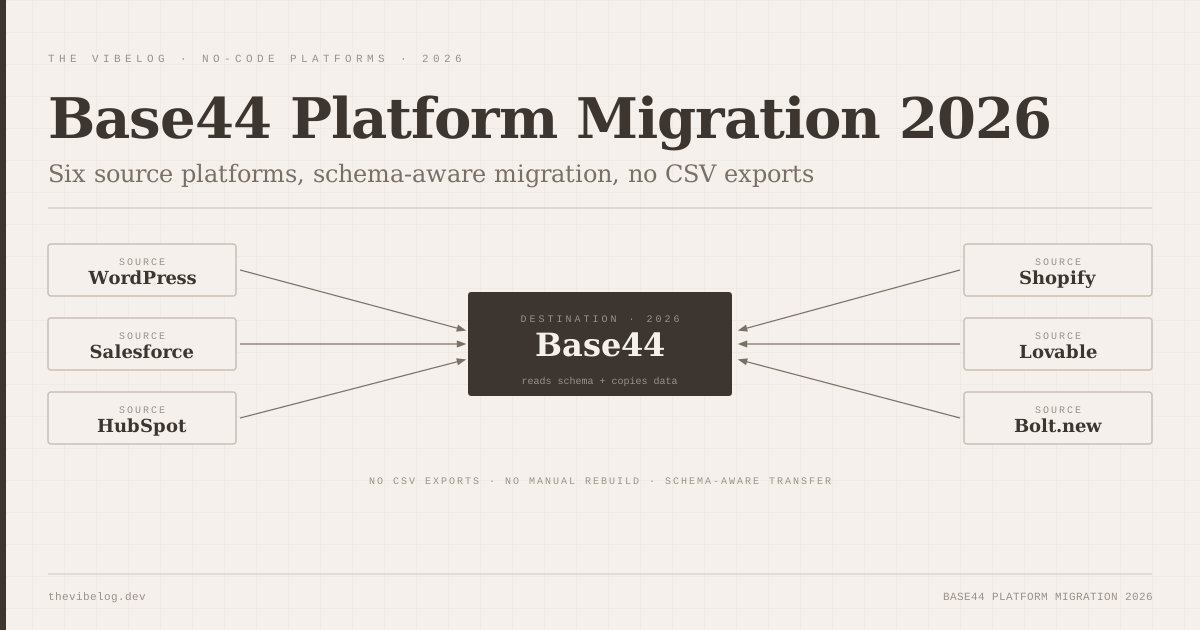
Base44’s migration feature, which launched in 2026, is built specifically for that moment. Connect the source platform, select what to bring across, and Base44 reads the schema and copies the data. No CSV exports, no manual reimport, no rebuilding the data structure from scratch.
What the Migration Actually Does
The claim that makes me look twice at any migration tool is “reads your schema.” That means different things depending on implementation. Some tools read your schema and produce a generic table structure. Others understand the relationships, the field types, the business object model.
Based on available documentation and testing reports, Base44’s migration reads schema AND data — not just data into a generic store, but the structure of how that data is organised and related. When you migrate a Shopify store, you are not just getting a CSV of products; you are getting a product entity in Base44 that carries the relationships between products, variants, collections, and orders, mapped into Base44’s entity model.
The six supported sources in 2026: WordPress, Salesforce, HubSpot, Shopify, Lovable, and Bolt.new. The workflow is consistent across all six: connect the source via OAuth or API key, see what data is available to migrate, select what you want, run the migration.
For WordPress, this means posts, pages, custom post types, categories, and plugin data where applicable. For Salesforce, it means leads, contacts, accounts, opportunities, and custom objects with their field mappings. For Shopify, products, orders, and customer data. For Lovable and Bolt.new, the database entities and data the app had created in operation.
Migrating From Vibe-Coded MVPs: Lovable and Bolt
The Lovable and Bolt.new migration paths are the most interesting because they address a pattern that has become common in 2026: a team builds a working MVP on an AI builder, gets early users, and then realises they need custom logic the AI builder cannot provide.
Lovable and Bolt.new are excellent at generating the initial application — auth, database, UI, payments. They are less suited to the second phase where specific business logic, complex data relationships, and workflow automation needs become the primary development work. That is exactly what Base44 is designed for: building on top of existing business data with custom logic and workflow automation.
Migrating from a Lovable app to Base44 means: connect the Supabase backend that Lovable provisioned, select the tables and data you want to bring, run the migration. Base44 reads the Supabase schema, maps it to Base44 entities, and copies the data. You arrive in Base44 with your existing users, their data, and the relationships between them — and then you build the custom features that Lovable could not give you.
This is a different use case from what the Lovable vs Bolt.new comparison covers. That comparison is about which AI builder to use for creating a new application. Base44 is about what to do after the AI-built MVP proves the concept and needs to grow into something more specific.
The Infrastructure Upgrade: February 1, 2026
Before the migration feature and the other 2026 additions landed, Base44 required a mandatory infrastructure upgrade for all users with a February 1, 2026 deadline.
The upgrade delivered faster load times, improved stability, and support for the new features arriving in 2026 — including migration. It was a behind-the-scenes platform modernisation rather than a feature addition visible to end users, but it is worth noting as context for why so many new capabilities arrived simultaneously in 2026.
Apps that had not upgraded by February 1 were placed on the legacy infrastructure, which continued to function but did not receive new features. The migration tool, mobile app creation, and analytics dashboard improvements all require the upgraded infrastructure.
Native Mobile App Creation: iOS and Android from Base44
The mobile app addition in 2026 lets you build and publish native iOS and Android apps directly from Base44, with deployment handled through the platform rather than requiring separate Xcode or Android Studio setups.
Base44’s positioning for this feature is the same as its overall platform positioning: you describe what you want the app to do, and the platform builds it on top of your existing data and workflow logic. If you have migrated a Salesforce CRM into Base44 and built custom workflow automation on top of it, you can now also build a mobile app for field teams that surfaces that same data and those same workflows.
The constraint is the same one that applies to all managed mobile app creation: deep native feature requirements — custom Bluetooth integrations, specific camera processing pipelines, complex background tasks — need developer involvement. For apps that are primarily data display, form submission, and workflow triggering — which describes most business mobile apps — Base44’s generation covers the requirements.
Debug Mode and Safe Testing Environments
The improved debug mode and isolated testing environments are less dramatic than migration or mobile apps but more relevant to daily development work.
Debug mode in 2026 provides clearer error visibility, stack traces that point to the actual issue rather than a generic error, and better visibility into what an automated workflow or AI-generated action was doing when it failed. For anyone building complex workflows in Base44 — multi-step automations, conditional logic, external API integrations — better debugging is directly proportional to faster development.
Safe testing environments let you run changes and test automations in isolation before pushing them to production. This is a basic requirement for any production system and something Base44 did not handle as cleanly before the 2026 update. Running a test automation that triggers emails to real users is the kind of mistake that erodes trust. Isolated test environments prevent it.
Analytics Dashboard: Upgraded
The analytics dashboard in 2026 shows better insights into app usage and user behaviour than the previous version. Specific improvements include clearer funnels for workflow completion, visibility into which app features are used most, and error rate tracking per workflow.
For Base44’s target users — teams building internal tools and client-facing applications on top of business data — usage analytics on the app layer (not the marketing layer) is what matters. Knowing that 40% of users drop out of a specific workflow, or that a particular data entry form has a high error rate, informs product decisions directly.
The analytics are application-layer analytics, not web analytics. You are tracking what users do inside the application, not where they came from or how they found it. For external marketing analytics, you still integrate an external tool. For understanding how your Base44 application is actually being used, the 2026 dashboard is significantly more useful.
NPM Packages: Coming
The infrastructure upgrade prepares Base44 apps for NPM package support, which is listed as a forthcoming feature rather than a currently available one.
The significance: NPM package support would let Base44 apps use the JavaScript ecosystem’s existing libraries directly — date manipulation, charting, validation, data processing — without waiting for Base44 to build native equivalents. This is the missing layer for teams whose requirements include specific functionality that does not exist in Base44’s built-in tool library.
The upgrade has laid the groundwork; the feature is not live. Watch the changelog.
What Migration Cannot Do Automatically
No migration tool handles everything, and Base44’s migration is no exception. The honest list of what it does not handle automatically:
Custom plugin logic in WordPress: if your WordPress site’s functionality depends on custom plugins that modify how data is stored or displayed, the migration brings the data but not the plugin behaviour. You rebuild that logic in Base44.
Complex Salesforce validation rules and triggers: field-level validation, workflow rules, approval processes, and Apex triggers are Salesforce-specific logic that does not map to Base44’s entity model. The data migrates; the Salesforce-specific automation does not.
Custom Shopify theme logic: your product data, orders, and customers migrate. Your Shopify theme’s custom liquid templates and JavaScript do not. The Base44 application you build after migration will look and behave differently from the Shopify storefront.
Bolt.new or Lovable custom UI components: the data from the app’s database migrates. The specific UI components and the prompts that generated them do not transfer to Base44.
None of these are surprises to anyone who has done a platform migration before. They are the reality of moving between fundamentally different architectures. The value of Base44’s migration tool is eliminating the data transfer pain — the manual export, reimport, and data cleaning that consumes most of the time in a typical migration. The logic and UI rebuild is still work, but it is the right kind of work: the kind that results in a better application for the new platform’s strengths.
Verdict
Base44’s migration feature is the most honest answer the no-code and AI builder space has given to the “what do you do when you outgrow your original platform?” problem.
If you have valuable data in one of the six supported sources and you need to build custom features that your current platform cannot provide, Base44’s migration removes the biggest barrier to moving. You do not have to choose between losing data history and staying on the wrong platform.
The 2026 additions — mobile apps, debug mode, analytics, and the infrastructure upgrade enabling future NPM support — position Base44 as a platform for operational business applications rather than just prototypes. The vibe coding production statistics show that 41% of all code written in 2025 was AI-generated. A significant portion of that code is running in apps that need to grow beyond what the original AI builder can handle. Base44’s migration is built for exactly that moment.
The platform is not the right starting point for greenfield apps — for that, Lovable, Bolt.new, or v0 are better choices. Base44 is the right destination when you have something that works, data that matters, and requirements that have outgrown where you started.