The React Native team officially recommending Expo for all new projects is the kind of statement that ends a five-year debate without fanfare. The “should I use Expo or bare React Native?” question that used to generate long forum threads has a clear answer now: Expo. SDK 56 is the release that makes that recommendation land on solid ground.
I have been building React Native apps since the 0.59 era. The historical argument against Expo was real — the managed workflow limited what you could do with native modules, the ejection story was painful, and Expo’s SDK updates lagged far enough behind React Native that you were always choosing between new React Native features and Expo’s tooling benefits. That argument is largely gone now. SDK 56 closes enough of those gaps that the productivity case for Expo is straightforward.
Expo SDK 56: What Upgraded
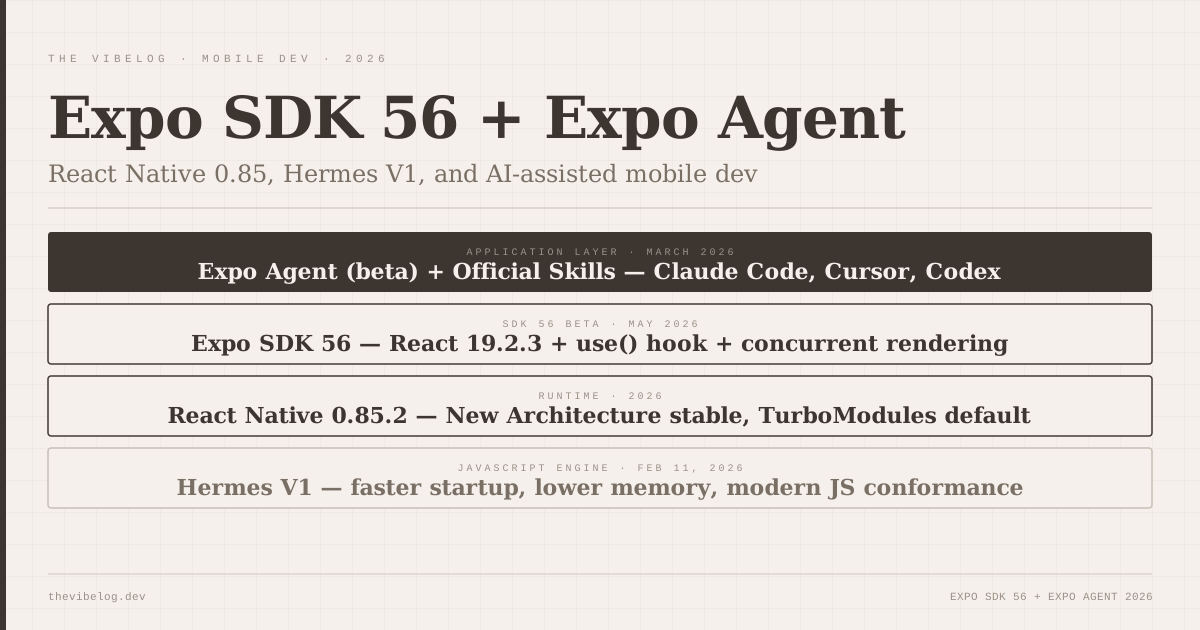
SDK 56 beta landed in May 2026 and upgrades the core runtime to React Native 0.85.2 and React 19.2.3. The release documentation describes it as bringing “the biggest performance wins and API stabilizations in recent Expo history,” which is accurate but underspecific.
React 19.2 is the substantive part. The concurrent rendering improvements, the new use() hook for promises and context, and the useFormStatus and useOptimistic hooks for form handling are all available in Expo’s managed workflow for the first time. These are not experimental APIs anymore — they are stable React patterns that had been missing from most production Expo apps because the SDK hadn’t caught up.
React Native 0.85 itself continues the architecture improvements from 0.84. The New Architecture — the JSI and TurboModules rewrite that Facebook has been rolling out for three years — is stable and the default in 0.85. Synchronous native module calls work correctly. Layout animations are smooth. The frame-drop problems that plagued complex lists and gesture handlers in older React Native versions are substantially addressed.
The combination means SDK 56 apps are meaningfully faster than SDK 53 or 54 apps with no code changes required beyond the upgrade. That is not always true for major version updates, and it is worth being specific about it.
Hermes V1: What the Default JavaScript Engine Change Means
React Native 0.84 shipped February 11, 2026, with Hermes V1 as the default JavaScript engine, replacing the previous Hermes stable release. SDK 56 inherits this.
Hermes is the JavaScript engine Facebook built specifically for React Native. V1 is a significant internal rewrite focused on memory efficiency, startup time, and conformance with modern JavaScript standards. The practical results: faster app startup (cold launch is noticeably snappier on older devices), lower memory usage on apps with complex state, and correct handling of modern JavaScript syntax that earlier Hermes versions handled inconsistently.
For developers who had been using JSC (JavaScriptCore) because Hermes had edge case issues with their specific dependencies, V1 addresses most of the common incompatibilities. If you switched away from Hermes in the past, it is worth testing with V1 before assuming the problem still exists.
Expo Agent: Beta Since March 2026
Expo Agent entered beta in March 2026 and represents Expo’s answer to a specific question: how do you do agentic development correctly in a React Native and Expo context, where the conventions are specific enough that a general-purpose AI agent makes wrong choices?
The general-purpose agent problem is real. Ask Claude Code or Cursor to build a React Native screen with navigation, and the agent will produce something plausible but often wrong in Expo-specific ways — wrong import paths for Expo Router, incorrect usage of Expo’s Image component, native module access patterns that work in bare React Native but are handled differently in managed Expo, and so on. The agents are not bad; they are trained on general React Native patterns, not the current Expo conventions.
Expo Agent addresses this by being Expo-specific. It understands the current Expo Router syntax, the correct way to use Expo’s SDK modules, the patterns that work in the managed workflow versus bare. It is built to produce code that actually runs in an Expo project without requiring a developer to go back and correct the Expo-specific details.
Expo Agent is still in beta. The scope of what it handles correctly is growing but not complete. Complex native module integration, deep Expo Go compatibility requirements, and apps with significant custom native code are still areas where the agent needs guidance rather than full autonomy. For the standard Expo project — a multi-screen app using Expo Router, Expo Camera, Expo Notifications, and standard navigation patterns — the agent handles the common cases correctly.
Expo Skills: Teaching AI the Right Way to Do Expo
The Skills system is the infrastructure that makes Expo Agent (and other AI tools) more reliable for Expo development.
An Expo Skill is an official structured instruction file that describes how to do a specific Expo task correctly. Think of it as a precisely written specification that an AI agent can follow instead of improvising from general training data. The Skills work with Claude Code, Cursor, Codex, and other AI coding tools — not just Expo Agent.
The practical value is significant. When you use Claude Code to build an Expo screen that needs camera access, without a Skill it has to infer the correct Expo Camera API from training data that may be months out of date. With the Expo Skills loaded, Claude Code follows the current Expo Camera conventions directly — correct import, correct hooks, correct permission handling for both iOS and Android.
Official Skills exist for Expo Router navigation, core SDK modules, push notifications setup, authentication flows, and a growing number of common integration patterns. You can also write your own Skills for project-specific conventions and share them with a team.
The agentic coding guide covers the broader pattern of agents working from structured specifications rather than improvised generation. Expo Skills are an implementation of that pattern specifically for the mobile development context.
On-Device AI: TensorFlow Lite, PyTorch, and Cloud APIs
SDK 56 and the broader 2026 React Native ecosystem include native module support for on-device ML model integration. TensorFlow Lite and PyTorch Mobile both have React Native bindings, and Expo’s SDK adds a managed interface for common on-device AI use cases: image classification, voice activity detection, and lightweight text processing.
Cloud AI integrations — connecting to inference APIs for image generation, language models, and audio transcription — are available through standard fetch and axios patterns. The native module layer handles the platform-specific considerations around microphone access, camera frames, and background processing.
The honest qualification: on-device AI adds significant app size. A lightweight TensorFlow Lite model for image classification adds 3-15MB to the bundle depending on the model size. A full voice transcription model can add 50MB or more. For apps where bundle size is a constraint — which is most consumer apps — the decision to include on-device AI needs to be deliberate, not automatic.
Cloud APIs avoid the bundle size problem at the cost of network dependency. Both approaches have their place; neither is universally correct.
The Cursor and Claude Code Integration Story
Expo’s Skills system changes how effective Cursor and Claude Code are for Expo development, and this is worth being concrete about.
Before Skills, using Cursor to build an Expo app in 2026 meant the agent would sometimes use deprecated navigation patterns (React Navigation 5 patterns when Expo Router is current), incorrect module imports, or Android-specific permission patterns that fail on iOS. The errors were not always obvious — the code would look reasonable and fail at runtime.
With Expo Skills loaded in the Claude Code or Cursor context, the agent follows current Expo conventions correctly. The Skills act as a spec that overrides the agent’s generalisation from training data.
The result is that the AI-assisted development experience on Expo in 2026 is substantially better than it was in 2024 — not just because the AI models are better, but because Expo has built the tooling that makes AI models effective specifically for Expo projects.
What SDK 56 Does Not Change
Expo’s managed workflow still has ceilings. If your app needs deep native customisation — custom Objective-C or Kotlin code that integrates with platform-specific APIs Expo does not abstract — you will need to eject or use the bare workflow. That is not a criticism; it is a design decision. The managed workflow trades customisation ceiling for build simplicity.
Expo Agent in beta is not ready to hand full autonomy to for production apps. Use it for scaffolding, for generating common patterns, for setting up navigation and data fetching structures. Review the output and understand what it generated before shipping. The goal is faster development, not unreviewed generation.
The iOS distribution process is still outside what any tool can abstract away. App Store review, provisioning profiles, TestFlight distribution — Expo builds the binary and can submit it, but the Apple developer ecosystem’s requirements are what they are.
Verdict
SDK 56 is the best Expo release in recent memory. The React 19.2 support, the Hermes V1 improvements, and the stability of the New Architecture combine to make Expo projects genuinely faster with no code changes required.
Expo Agent and Skills are the more forward-looking additions. They are not fully mature, but the direction is correct: rather than hoping general-purpose AI agents learn Expo conventions from training data, Expo is building the structured instruction layer that makes AI tools reliable specifically for Expo development.
For any new React Native project in 2026, the recommendation is what the React Native team said it was: start with Expo. SDK 56 is a good version to start on.