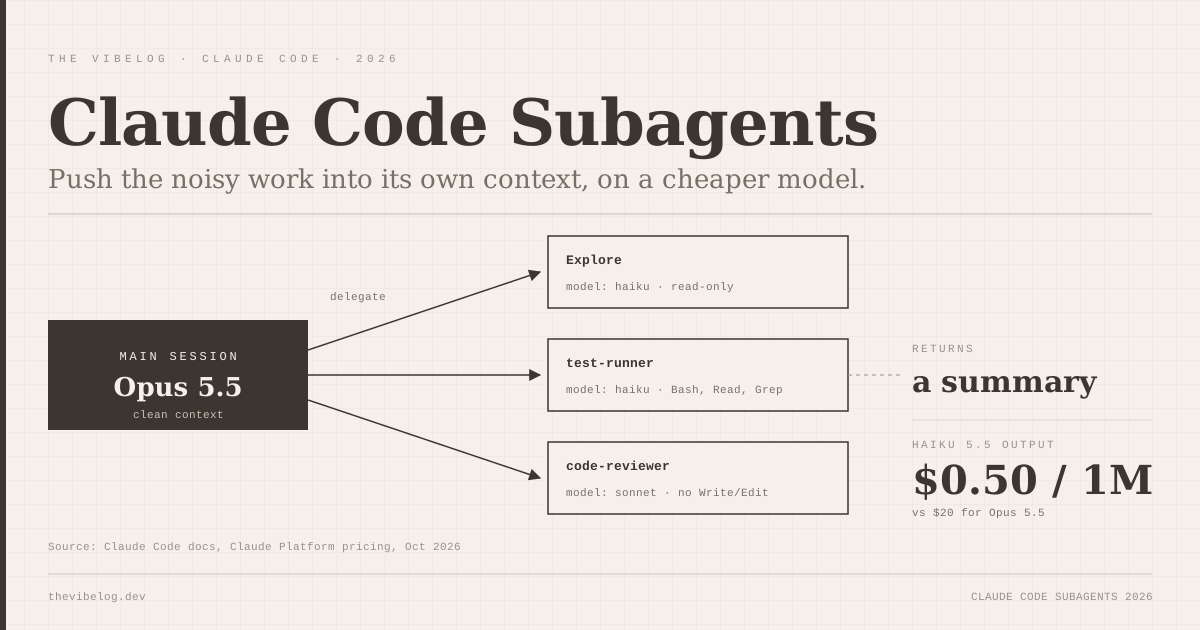
Claude Code subagents are the cheapest performance upgrade most Claude Code users are not using. A subagent is a separate assistant with its own context window, its own tools and its own model. You hand it a noisy job, like running a test suite or grepping a monorepo, and only the summary lands back in your main session.
That matters for two reasons. Your main context stays clean, so the model stops forgetting your earlier instructions halfway through a long task. And the subagent can run on a much cheaper model. On the Anthropic API, Haiku 5.5 output costs $0.50 per million tokens. Opus 5.5 output costs $20.
This guide goes through how subagents work as of Claude Code’s October 2026 docs, the frontmatter fields worth knowing, five subagents I would set up in any repo, and the mistakes that make them more trouble than they are worth.
What Are Claude Code Subagents?
Claude Code subagents are specialised assistants that run in their own context window with a custom system prompt, specific tool access and independent permissions. That is close to word-for-word how the official subagents docs put it.
A subagent does not inherit your conversation history, the files the main session already read, or skills you invoked earlier. It starts fresh with four things: its own system prompt, the task message Claude wrote when delegating, your CLAUDE.md files, and a git status snapshot. When it finishes, the main session gets a summary.
The docs give two reasons to use them. The first is context preservation: search results, logs and file dumps stay in the subagent’s context. The second is constraint: you can restrict tools, permissions and models per subagent, then reuse the same definition across projects.
What a subagent is not is a free worker. Its requests count toward the same usage limits as your main conversation. If you run everything on Opus, five subagents means five Opus bills.
The short version is that a subagent trades a fresh, isolated context for some extra tokens. Used on the right tasks, that trade is very good.
Built-In Subagents in Claude Code
Claude Code ships with several subagents before you write any of your own. The three you will see most are below.
| Subagent | Model | Tools | Use |
|---|---|---|---|
| Explore | Main session’s model | Read-only | Fast codebase search, three thoroughness levels |
| Plan | Main session’s model | Read-only | Research during plan mode |
| general-purpose | Main model, or CLAUDE_CODE_SUBAGENT_MODEL | All subagent tools | Multi-step tasks |
(Source: Claude Code docs, Create custom subagents, Oct 2026)
The Explore and Plan agents skip CLAUDE.md and the git status snapshot, which keeps them lean. There are also helper agents for /statusline (Sonnet) and Claude Code questions (Haiku).
One detail is easy to miss. Explore inherits the main session’s model. If your main session is on Opus 5.5, every codebase search Claude fires off also runs on Opus. The docs give the fix: define your own user or project subagent named Explore with model: haiku, and it overrides the built-in.
You can also switch built-ins off. A permissions.deny entry of Agent(Explore) blocks one type, and CLAUDE_CODE_DISABLE_EXPLORE_PLAN_AGENTS=1 removes both Explore and Plan.
Before you write custom agents, override Explore onto Haiku. It is a one-file change that cuts the cost of every search.
How to Create a Claude Code Subagent
A subagent is a Markdown file with YAML frontmatter. The frontmatter configures it, and the body is its system prompt. Here is a minimal reviewer from the docs, lightly adapted:
---
name: code-reviewer
description: Reviews diffs for correctness, security and readability. Use proactively after code changes.
tools: Read, Glob, Grep, Bash
model: sonnet
---

You are a senior code reviewer. Read the current diff with `git diff`.
Report concrete bugs first, then security issues, then readability.
Quote the file and line for every finding. Do not edit files.
Where you save it decides its scope:
| Location | Scope | Priority |
|---|---|---|
| Managed settings | Whole organisation | 1 (highest) |
--agents CLI flag | Current session | 2 |
.claude/agents/ | Current project | 3 |
~/.claude/agents/ | All your projects | 4 |
Plugin agents/ | Where the plugin is enabled | 5 |
(Source: Claude Code docs, Oct 2026)
When two definitions share a name, the higher-priority location wins. Both agent directories are scanned recursively, but subfolders do not affect identity. Only the name field does, so names must be unique across the tree.
Changes are picked up within seconds. The exception is the very first file in a new agents directory, which needs a restart. If an agent silently fails to appear, the usual causes are a missing name, an opening --- that is not on line one, or a name containing a colon. claude plugin validate <dir> checks the directory for you.
For one-off sessions you can skip files entirely. The --agents flag takes a JSON object keyed by agent name, with prompt standing in for the Markdown body. In -p mode it also accepts a path to a JSON file, which is handy in CI.
Commit project agents to .claude/agents/ so the whole team gets them. Keep personal ones in ~/.claude/agents/.
Subagent Frontmatter Fields Worth Knowing
Only name and description are required. The docs list about twenty optional fields. These are the ones I would actually use:
description: this is how Claude decides when to delegate. Writing “Use proactively after code changes” into it is the documented way to encourage automatic use.toolsanddisallowedTools: an allowlist or a denylist. The denylist applies first, and a tool in both is removed. A specifier likeBash(git push *)indisallowedToolsremoves the whole Bash tool, not just pushes.model:haiku,sonnet,opus,fable, a full model ID such asclaude-opus-5-5, orinherit.permissionMode:default,acceptEdits,auto,dontAsk,bypassPermissionsorplan. If your main session is already inauto,acceptEditsorbypassPermissions, the subagent inherits that and this field is ignored.effort:lowthroughmax, overriding the session’s effort level.isolation: worktree: runs the agent in a temporary git worktree, cleaned up automatically if it makes no changes. Good for anything that edits files in parallel.mcpServers: attach an MCP server only to this agent, so its tool descriptions never enter your main context.memory:user,projectorlocal, giving the agent a persistent notes directory.maxTurns: a hard stop. On reaching it, the output is marked partial and can be resumed.
The mcpServers field is the one I think is most underused. If you only need Playwright for browser tests, attach it to a browser-tester subagent rather than to your whole session. The tool definitions stay out of your main context entirely. The MCP servers guide covers which servers are worth that slot.
Tight tool lists and a cheap model are the two fields that pay off immediately. The rest are worth reaching for when a specific problem shows up.
Choosing a Model for Each Subagent
Model choice is where subagents save real money. The resolution order, per the docs, is: the per-invocation model Claude passes, then the frontmatter model, then CLAUDE_CODE_SUBAGENT_MODEL, then the main session’s model.
- Claude Opus 5.5 $20
- Claude Sonnet 5.5 $10
- Claude Haiku 5.5 (prompts ≤100K) $0.5
The gap is large. On the Claude pricing page, Haiku 5.5 costs $0.10 input and $0.50 output per million tokens for prompts up to 100,000 tokens, rising to $0.50 and $2.50 above that. Sonnet 5.5 is $2 and $10. Opus 5.5 is $4 and $20. Current prices for every major model are on the AI model pricing tracker.
Two traps are worth knowing. First, the alias you type is not always the model you get. The model configuration docs show haiku resolving to Haiku 5.5 on the Anthropic API but Haiku 4.5 on Bedrock, Google Cloud and Microsoft Foundry. If you are on a cloud provider, check /tasks, which shows each subagent’s model.
Second, Haiku 5.5’s price tier depends on prompt length, and a subagent’s prompt includes CLAUDE.md. A bloated CLAUDE.md can push a Haiku subagent over the 100,000-token line on every request. If a subagent does not need your project rules, set omitClaudeMd: true.
To force one model on every subagent, set both CLAUDE_CODE_SUBAGENT_MODEL and CLAUDE_CODE_SUBAGENT_MODEL_FORCE=1 in your settings env. That overrides the frontmatter, which is useful for an org that wants a hard cost ceiling.
My default split: Haiku for search and test running, Sonnet for review and edits, inherit only when the subagent needs to reason as hard as the main session.
Five Claude Code Subagents Worth Setting Up
These are patterns built from the docs’ examples. Each one moves a specific kind of noise out of the main session.
1. Explore override
A file at ~/.claude/agents/explore.md named Explore, with model: haiku and a read-only tool list. It replaces the built-in for every project.
2. Test runner
tools: Bash, Read, Grep, model: haiku, and a prompt that says to run the suite and return only failing test names, assertion messages and file paths. Test output is the single biggest context polluter in most sessions. The Claude Code cost docs list delegating test runs and log processing to subagents as a direct way to reduce token use.
3. Code reviewer
The code-reviewer example above, on Sonnet, with disallowedTools: Write, Edit so it cannot “fix” what it is supposed to report.
4. Read-only database agent
The docs include a db-reader pattern: tools: Bash plus a PreToolUse hook in the agent’s own frontmatter that runs a validation script and exits with code 2 to block any write query. Hooks defined in a subagent only run while that subagent is active. The Claude Code hooks guide explains the exit-code rules.
5. Browser tester
An agent with an inline mcpServers entry for @playwright/mcp. The server connects when the agent starts and disconnects when it finishes, so your main session never carries its tools.
Start with the Explore override and the test runner. Those two cover most of the context bloat in a typical session.
Running, Resuming and Limiting Subagents
There are four ways to invoke a subagent: automatic delegation from its description, natural language (“use the test-runner subagent”), an @-mention such as @agent-code-reviewer, which guarantees that agent runs, and claude --agent code-reviewer, which makes the whole session run as that agent.
By default, subagents Claude spawns start in the background, and their permission prompts surface in your main session with the asking agent’s name. Press Ctrl+B to push a running foreground task into the background. Background subagents get a reduced built-in tool set, though MCP tools stay available.
Each invocation is a new instance. To continue earlier work, Claude resumes a subagent by ID or name with SendMessage, and it keeps its full history. Explore and Plan cannot be resumed.
There are two limits worth knowing. Subagents can nest up to three layers deep by default, controlled by CLAUDE_CODE_MAX_SUBAGENT_SPAWN_DEPTH. And 20 subagents can run at once before you hit “Concurrent subagent limit reached,” adjustable with CLAUDE_CODE_MAX_CONCURRENT_SUBAGENTS.
For guardrails, the hooks reference adds SubagentStart and SubagentStop events that match on agent name. SubagentStop can block an agent from finishing, which is a clean way to require that a test-runner actually ran the tests.
Background by default is the right call. Let subagents run while you keep working, and check /tasks when something looks slow.
Subagents vs Agent Teams: When to Use Which
Subagents live inside one session and report back to it. Agent teams spawn multiple full Claude Code instances that coordinate with each other. Teams are off by default and need CLAUDE_CODE_EXPERIMENTAL_AGENT_TEAMS=1.
The cost difference is the deciding factor. The Claude Code cost docs say agent teams use approximately 7x more tokens than standard sessions when teammates run in plan mode, because each teammate keeps its own context and runs as a separate Claude instance.
I would not reach for teams until subagents clearly fall short. Most “I need parallel agents” problems are really “I need my test output out of my context” problems, and a Haiku subagent solves that for a fraction of the price. The agentic coding guide covers when longer autonomous runs are worth the review burden.
If cost is on your mind more broadly, today’s Anthropic S-1 breakdown shows why: enterprise Claude Code users are now the company’s biggest spenders, and the tooling for controlling that spend is getting more granular every release.
Subagents first, teams second. A well-scoped subagent on Haiku is the best cost-to-benefit change you can make to a Claude Code setup today.