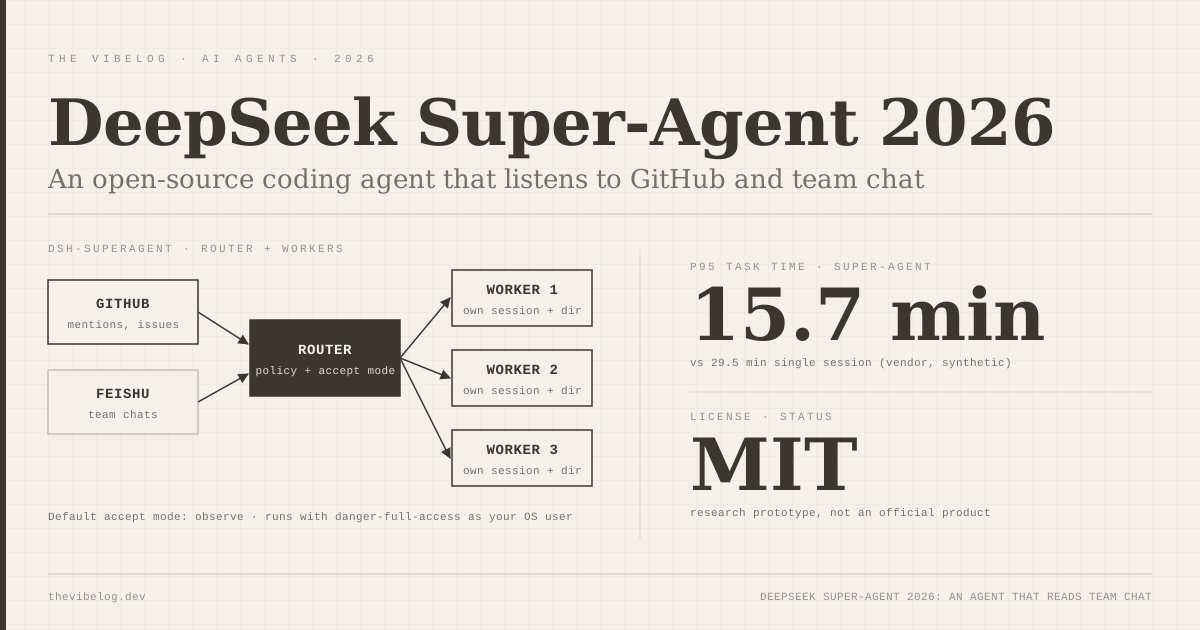
DeepSeek Super-Agent is the most interesting thing DeepSeek has shipped for developers this year, and it is not a model. On November 1, 2026, DeepSeek open-sourced dsh-superagent, an MIT-licensed coding agent that sits in your GitHub repository and your team chat, decides which requests are meant for it, and replies with pull requests.
Bloomberg framed it as a rival to Claude Code, which is quite a turn for a company best known for models like R1, whose benchmarks against Claude 3.5 Sonnet made headlines in early 2025. After reading the README, the setup file and four of the numbered design documents, I think that framing misses what is actually new here. This is not a better terminal agent. It is an attempt to build an agent that runs all day, for a whole team, without becoming the noisiest person in the channel.
It also runs with full access to the operator’s user account by default, which deserves more attention than it has been getting.
What Is DeepSeek Super-Agent?
DeepSeek Super-Agent is a proactive coding agent for one GitHub repository, packaged as a bundle for DeepSeek Harness, DeepSeek’s open-source agent app. According to the dsh-superagent README, it listens to GitHub and, optionally, Feishu, ByteDance’s workplace chat app. When an allowed person asks for work, it opens a work item, works on it in its own agent session and directory, and answers in the original conversation.
The README is unusually blunt about status. It calls the code a “research prototype for reference only, not an official DeepSeek product”, says much of the engineering was done by coding agents, and warns that it “may still contain bugs”. It also says the public version differs from DeepSeek’s internal one.
The design philosophy fits in one line, quoted from the project’s philosophy document: “Take as little human attention as possible, and give as much value as possible.”
That sentence explains almost every design choice that follows. Treat this as a reference design you can read and run, not a product you deploy on Monday.
How the Super-Agent Architecture Works
The code accompanies a design article from the DeepSeek Harness team, published October 31, 2026, titled “Exploring Super-agent Design: Towards a More Autonomous Agent System”. According to IT之家’s summary of the article, a Super-agent has four traits: continuous across channels, efficient across parallel tasks, proactive about environment events, and persistent through long runs.
The architecture has two layers:
- Router. One main session talks to humans, keeps global context and dispatches work.
- Workers. Each ticket gets its own executor session, named
worker-<ticket id>, with its own directory. Workers report to the router instead of replying to people directly.
The design article also describes an independent watchdog session, event-driven processing and a split between compute, state and environment. The README is careful to say some of those ideas are “directions for future development” and not in the prototype.
The part I like most is how the agent decides whether a message is for it. The authorization document separates explicit requests, where an allowed person addresses the agent directly, from inferred candidates, such as an unaddressed bug report in a chat thread. The host enforces allowed lists and rules, and the docs state that messages and quoted documents “cannot change those permissions”. That is the right instinct for an agent that reads untrusted chat text all day.
Accept modes: off, observe and auto
Inferred work is governed by an accept mode:
| Mode | What happens to inferred requests |
|---|---|
off | Nothing inferred becomes a candidate |
observe (default) | Assessed and logged as “would accept”, but never executed |
auto | A positive assessment against a team-written rule starts work |
(Source: dsh-superagent 002 Authorization)
Explicit requests work in every mode. DeepSeek’s advice is to start in observe, read the recorded decisions, and switch to auto only when the agent’s judgement looks right.
Observe mode is the feature other proactive agents should copy. It turns “should the bot have jumped in here?” into an audit log you can review before anything touches your repository.
DeepSeek Super-Agent Benchmarks: What the Numbers Measure
DeepSeek did not publish SWE-bench or Terminal-Bench numbers for Super-Agent, and that is reasonable, because the design is not about raw coding ability. The design article instead tests scheduling.
Per IT之家, each test run fed about 300 synthetic messages, roughly 20 of them work requests, and repeated each setup five times. Intervals and work durations were scaled to a quarter of real time, while model call latency was real. DeepSeek compared the Super-agent against a single session with subagents.
- Single session + subagents, neutral prompt 29.5 min
- Super-agent (Router + Workers) 15.7 min
Source: DeepSeek Harness design article, via IT之家 (Oct 31, 2026)
The Super-agent posted a median completion time of 12.4 minutes and a p95 of 15.7 minutes. The single-session baseline’s p95 was 29.5 minutes. No median was reported for the baseline.
The router stress test is more telling for anyone planning to run this for a busy team:
| Trigger rate | Avg batch size | Latency per request | Inference time per decision |
|---|---|---|---|
| ~1 per minute | 1.0 | 2.5 s | 6.4 s |
| ~40 per minute | 2.8 | 3.9 s | 1.6 s |
(Source: DeepSeek Harness design article via IT之家, vendor-reported)
Batching means the router gets cheaper per decision as the channel gets busier, at a cost of about 1.4 seconds of extra latency.
Here is my caveat. These are synthetic loads in a simplified environment, and the article itself says they measure scheduling and collaboration, not whether the code is any good. Read them as “the router does not fall over”, not as “this agent writes better code than Claude Code”.
The tension DeepSeek is designing around has outside support. The Next Web points to CooperBench, a January 2026 study that found coding agents were on average 30% less successful working as a team than working alone. That study did not test DeepSeek’s agent.
DeepSeek Super-Agent vs Claude Code: Different Jobs
The Claude Code comparison is natural, since DeepSeek’s Harness team was set up to compete with US coding tools. But the two answer different questions.
| Tool | How work starts | Isolation by default | Status |
|---|---|---|---|
| dsh-superagent | GitHub mentions, Feishu chats, team-written rules | None: full access as operator’s OS user | MIT research prototype |
| Claude Code | You prompt it in a terminal, IDE or cloud session | Permission modes; OS sandbox off by default | Supported product |
| Codex Cloud | You start a task; environment runs remotely | Cloud container, agent internet off by default | Supported product |
(Sources: dsh-superagent deployment guide; Claude Code and Codex details per The Vibelog’s earlier verification)
Claude Code waits for you. dsh-superagent waits for your team, and decides who counts. That is closer to what GitHub’s cloud agents and Claude Code routines are reaching for, but with chat as the trigger rather than an issue assignment or a cron schedule.
If you are weighing permission models, the Claude Code auto mode breakdown shows how much classifier machinery Anthropic now puts between an agent and a destructive command. dsh-superagent has nothing equivalent at the OS level. Its controls are about which requests it accepts, not what a worker may do once it starts.
For daily coding, keep your current agent. For learning how a team-wide agent should behave, dsh-superagent is the clearest written design I have seen.
The Security Problem: danger-full-access by Default
This is the section I would read twice before cloning anything.
The deployment guide says both of the bundle’s presets “run with danger-full-access as the operator’s OS user and read messages from subscribed Threads.” It continues: “A worker can execute programs by path and read the operator’s home directory.” The account wrappers that pick GitHub credentials “do not isolate the process.”
Put those two facts together. The agent reads chat messages from colleagues, and possibly from external contributors on GitHub, then executes work with access to everything in your home directory. That is the textbook shape of a prompt injection incident, the same pattern behind several attacks in our AI coding agent security roundup.
DeepSeek’s own mitigations are sensible but manual:
- Dedicated OS account. The guide says to use a dedicated OS account “containing only the agent’s credentials” for isolation.
- Dedicated GitHub user. The setup insists on a separate GitHub account for the agent, “never the operator’s own”.
- Short allowed list. The recommended default lets only the operator’s own GitHub login request work.
- No auto-merge. The setup recommends that people keep merging until the agent’s pull requests “have been right for a while”.
I would add one more: run it in a throwaway VM or container, not on your laptop. The guide’s own wording about home directory access is reason enough.
How to Set Up dsh-superagent
The install is agent-driven. The README tells you to ask your coding agent: “Read SETUP.md in this repository and set up dsh-superagent with me.” The setup file then instructs that agent to ask one question per message, never request secrets in chat, and execute only after you confirm a full plan.
Prerequisites from SETUP.md and package.json:
- Node.js 22.19+ or 24+, pnpm, git 2.32+, tmux, Python 3.8+
- GitHub CLI 2.48 or later, and a repository on github.com (GitHub Enterprise Server is not supported)
- DeepSeek Harness 0.2.1-alpha.2 or later, with a model provider configured
- Optionally
lark-cliand a Feishu bot for chat requests
DeepSeek Harness itself is in public preview, with macOS (Apple silicon) and Windows desktop apps plus a web UI started with npx @deepseek-ai/dsh web. The defaults the setup proposes are worth knowing: a separate superagent profile on port 3082, branch prefix agent/, accept mode observe, and an hourly health check from your main profile.
Then try it narrowly: from an allowed account, comment @<agent login> <request> on an issue. The setup file says a ticket appears on the panel within about a minute.
Model cost depends on your provider. If Harness points at DeepSeek’s API, deepseek-flash is $0.30 per million input tokens and $1.20 per million output at peak, as covered in our DeepSeek V4.1 Flash 1017 breakdown. That is cheap enough that the real cost of a proactive agent is your team’s attention, which is exactly DeepSeek’s point. Compare other providers on the AI model pricing tracker.
Should You Run DeepSeek Super-Agent?
Run it if you lead a team that already lives in GitHub issues or Feishu, you want to study what an always-on agent does to a channel, and you can give it a dedicated VM and GitHub account. Start in observe mode for at least a week.
Skip it if you want a supported coding assistant, need GitHub Enterprise Server, or cannot isolate it from your own credentials. DeepSeek’s own disclaimer tells you not to treat it as production software, and I would take them at their word.
The bigger takeaway is the design pattern. Agents are moving from tools you summon to coworkers that listen, and Google’s move to let any agent into its IDE, covered in our Android Studio AI agents guide, points the same way from the other direction. The teams that get value from always-on agents will be the ones who treat attention as the scarce resource, and DeepSeek has written the clearest rulebook for that so far.