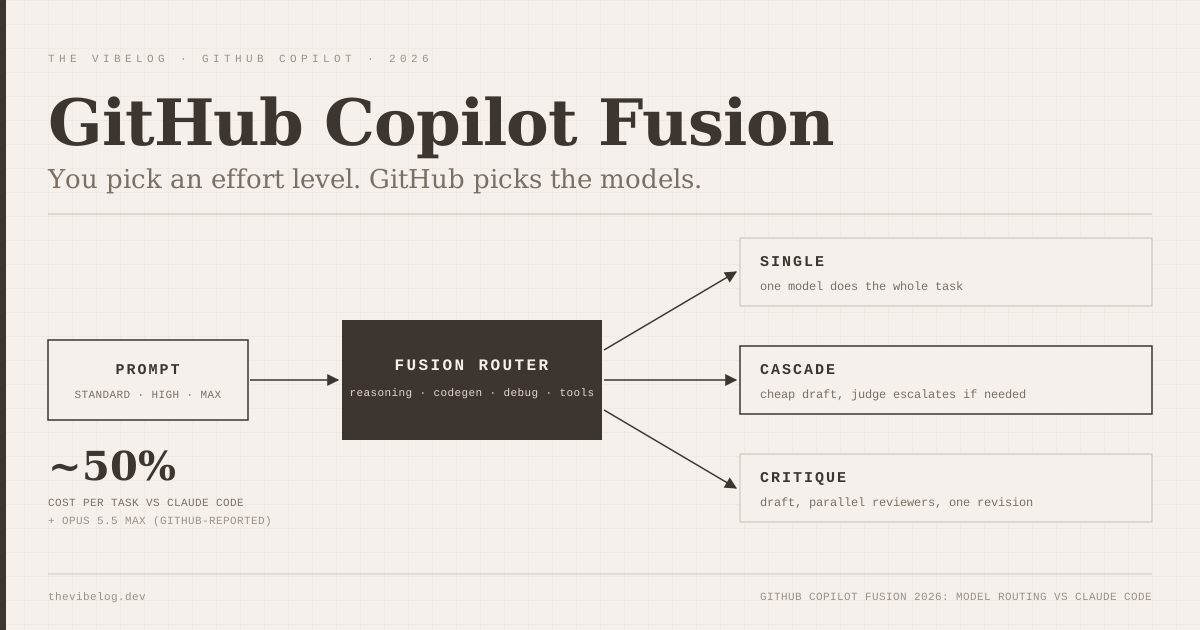
GitHub Copilot Fusion is the most interesting thing GitHub shipped at Universe 2026, because it quietly removes the model picker from the default Copilot experience. You stop choosing between Claude, GPT and Gemini, choose an effort level instead, and let GitHub decide which models touch your prompt and in what order.
GitHub’s headline claim is aggressive. In the Fusion launch changelog, GitHub says Fusion Max scored 60 on the Artificial Analysis Coding Agent Index, within two points of Claude Code running Opus 5.5 Max, at about half the average API cost per task.
That is a vendor-reported number, and I could not find Fusion on Artificial Analysis’ own public pages yet. I went through the changelog, the Fusion docs, the original HydraFusion research post and the Universe keynote write-up. I have not run Fusion on my own repos, so everything below is sourced, and GitHub’s numbers are labelled as GitHub’s.
What Is GitHub Copilot Fusion?
GitHub Copilot Fusion is a runtime router that decides, per prompt, which models run your task and how they cooperate. It went generally available on October 28, 2026, on every Copilot plan, in VS Code, the GitHub Copilot app, Copilot CLI and JetBrains IDEs.
According to GitHub’s Fusion documentation, the router scores each prompt on signals for reasoning, code generation, debugging and tool use, then picks one of three execution patterns:
- Single: one model does the whole task.
- Cascade: an efficient model drafts, a judge accepts the draft or escalates to a stronger model.
- Critique: one model drafts, several models critique in parallel, and the drafter revises using the combined feedback.
The pattern is chosen per prompt, so two follow-ups in the same session can run differently.
The detail I liked most is buried in the docs. Fusion tries to switch models only at natural cache boundaries and when the conversation’s complexity shifts sharply, and it keeps the main conversation on one model when it can so you keep your cached tokens. Reviewer models get only the context they need. Anyone who has watched a prompt cache get thrown away by a careless model switch will appreciate that someone thought about it.
The short version: Fusion is an auto-mode with a real orchestration layer underneath, not just a cheap-model default.
Copilot Fusion Effort Levels: Standard, High and Max
You select an effort level, not a model. There are three you can pick, and a fourth that GitHub uses internally.
| Effort level | What GitHub says it does | Plans |
|---|---|---|
| Fusion Standard | Balances cost, quality and latency, usually one model per task | All plans, including Free |
| Fusion High | Balanced orchestration for substantial, well-scoped tasks, moderate token savings | Pro+, Max, Business, Enterprise |
| Fusion Max | Frontier models for the deepest reasoning, still watches token use | Pro+, Max, Business, Enterprise |
| Fusion Fast | Fast models for VS Code inline chat only, not user-selectable | All plans |
(Source: About GitHub Copilot Fusion, GitHub Docs, October 2026)
The plan split matters more than it looks. If you are on Copilot Pro at $10 a month, you get Standard and nothing above it. High and Max start at Pro+.
GitHub also does not publish the model pool. The docs describe “a mix of versatile models” and stronger reasoning models, chosen from whatever your plan and your admin policies allow. If your enterprise restricts Copilot to data-resident or FedRAMP-compliant models, Fusion only routes among those.
That is the right design for compliance. It also means two developers at two companies can both say “I used Fusion Max” and mean completely different model mixes.
Where Copilot Fusion Came From: Project HydraFusion
Fusion is the general-availability version of Project HydraFusion, a research preview GitHub opened in Copilot CLI on September 4, 2026. That post is where the more useful numbers live, because GitHub compared fixed HydraFusion routing policies directly against Claude Opus 5 on quality and complete workflow cost.
| Benchmark | Quality vs Claude Opus 5 | Estimated cost vs Claude Opus 5 |
|---|---|---|
| TerminalBench 2.1 | +4.9 points | 67% lower |
| DeepSWE | −1.5 points | 36% lower |
| CheckpointBench (GitHub internal) | −0.1 points | 65% lower |
(Source: GitHub, Project HydraFusion research post, September 2026. Vendor-reported, offline runs, all models at medium reasoning.)
- TerminalBench 2.1 67%
- CheckpointBench 65%
- DeepSWE 36%
Source: GitHub, Project HydraFusion research post (Sep 2026)
Read the table carefully. The quality story is “roughly the same as Opus 5”, up on one benchmark and slightly down on two. The cost story is the actual pitch: between a third and two thirds cheaper.
GitHub was also unusually candid about the caveats. The post calls TerminalBench 2.1 “relatively saturated”, says routing policies were tuned by beam search against those same three benchmarks, admits two harness failures in August produced invalid runs, and warns that results may not transfer to real developer workloads. Tuning a router on the benchmarks you then report is not cheating, but it is the kind of thing that inflates numbers, and I would expect the real-world gap to be smaller than the table suggests.
My reading: HydraFusion proved you can match a frontier model’s benchmark quality for a fraction of the cost, on benchmarks GitHub tuned for. Fusion now has to prove it on your codebase.
Copilot Fusion vs Claude Code: The Real Comparison
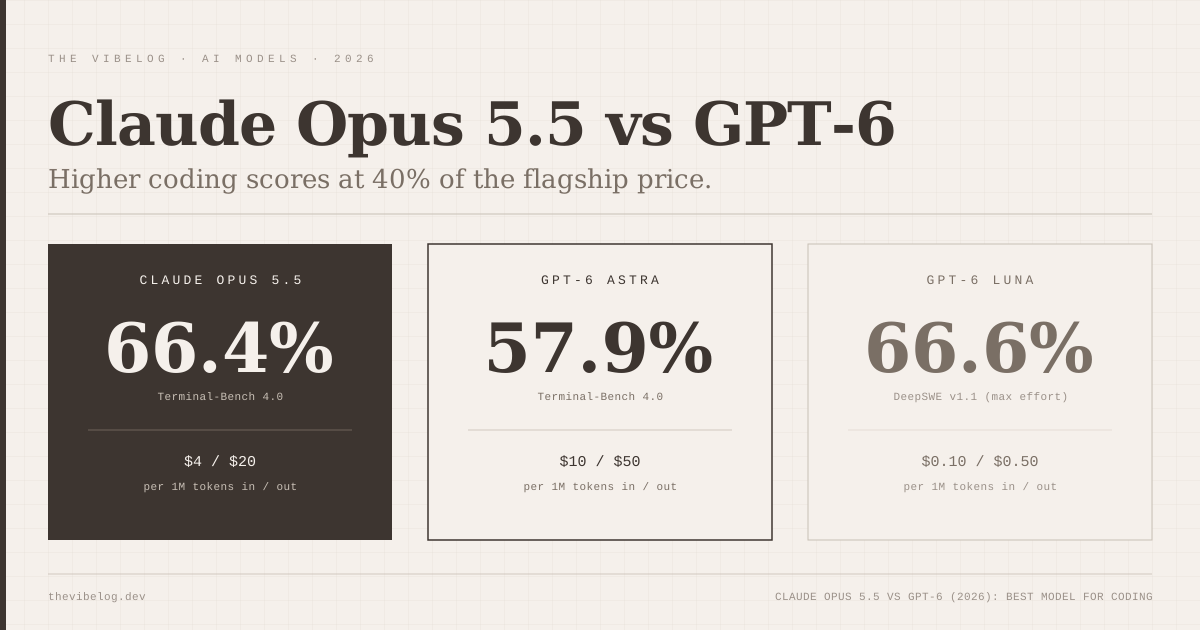
The comparison GitHub chose is telling. It did not benchmark Fusion against Copilot with a single model. It benchmarked against Claude Code with Opus 5.5 Max, which tells you who GitHub thinks it is competing with.
| Setup | Coding Agent Index | Cost and time per task |
|---|---|---|
| Claude Code + Opus 5.5 Max | About 62 (implied) | Baseline |
| GitHub Copilot Fusion Max | 60 | ~50% of API cost, ~50% of tokens, ~40% less time |
(Source: GitHub Copilot Fusion changelog, October 28, 2026. GitHub-reported figures on the Artificial Analysis Coding Agent Index; the Claude Code score is implied from GitHub’s “within two points”.)
There are two honest ways to read that.
The first is that Claude Code with Opus 5.5 still wins on raw capability, by GitHub’s own measurement. For a gnarly refactor or a bug that has eaten your afternoon, two points on an agent index is the difference you are paying for.
The second is that half the cost and 40% less wall-clock time is a big deal for the bulk of agent work, which is not gnarly. Most day-to-day agent work is “add the endpoint, write the test, fix the lint”, and a router that sends those to a cheaper model while keeping a path to a frontier one is exactly what I would build if I were paying the bill.
The structural difference is more important than the score. Claude Code gives you explicit control: you choose the model, and you can push cheap work down yourself by giving Claude Code subagents a cheaper model in their frontmatter. Fusion makes that decision for you and hides the drafts.
The docs are clear that only the final response is shown, intermediate drafts may be discarded, and you find out which models ran by hovering over the effort label afterwards. If you are the kind of developer who wants to know exactly which model wrote a line of code, Fusion will annoy you.
For a broader view of where each tool fits, the Cursor vs Claude Code vs Codex comparison still holds. Fusion makes Copilot more competitive on cost per task, not a different kind of tool. Cursor users weighing a jump should also read the Cursor 3 review for how its own agent workspace handles parallel work.
Bottom line for this section: Claude Code for maximum capability and control, Copilot Fusion for teams that want frontier-adjacent results at roughly half the spend and are fine letting GitHub pick.
How Copilot Fusion Pricing Works
There is no Fusion fee. You pay for each model Fusion calls, at that model’s standard rate, in Copilot AI credits. This is where the “half the cost” claim needs a second look.
The docs warn that Fusion High and Max “can use more than one model”, so a single task may burn more AI credits than Standard would. Critique runs a drafter plus several reviewers. Cascade sometimes pays for a cheap draft and then a frontier rerun. GitHub’s averages say it nets out cheaper, but any individual prompt can cost more than a single-model call.
Two time-limited details matter right now:
- 30% off model costs for paid plans using Fusion, through November 30, 2026, per the docs.
- GitHub Enterprise customers can now get Copilot without a separate seat subscription, paying only for AI credits used, according to the Enterprise access changelog. That model has no monthly credit allowance per seat, and Chat, code review and cloud agents stop when the budget runs out (completions keep working). It is sales-led for now, with self-serve “in the coming weeks”.
For the base plan prices and how AI credits replaced premium requests on June 1, see the GitHub Copilot pricing breakdown. For per-token rates of the models Fusion might route to, the AI model pricing tracker has current list prices.
My advice is boring but correct: turn on Fusion during the discount window, watch your AI credit spend for two weeks against your usual model, and decide with your own numbers instead of GitHub’s averages.
Local Models in Copilot Fusion
The sleeper announcement is that Fusion Standard can now route to models on your own machine. The local models changelog lists two:
- MAI Code 1.1 Flash, downloaded and managed through Windows ML on supported Windows devices.
- Qwen3.8 Flash Next, bring-your-own on any OpenAI-compatible local server, on Windows, macOS or Linux.
It is an opt-in experimental preview, it only works at the Standard level, and in the Copilot app intelligent routing supports only the managed Windows ML model.
GitHub also says plainly that “local inference doesn’t make your session offline”. The routing decision still happens in GitHub’s cloud. If you were hoping this meant air-gapped Copilot, it does not. If you want a fully local agent, the local coding model options covered in the Recursive Flint post are a better fit.
What Copilot Fusion Gets Wrong (So Far)
A few limitations from the docs that will matter in practice:
Discarded drafts can still leave file changes behind. If a draft made workspace edits before being thrown away, Fusion does not undo them automatically. GitHub tells you to review changes before committing, which you should be doing anyway, but it is a sharp edge for a feature whose whole pitch is “do not think about it”.
Fusion does not start subagents. It works separately from Copilot’s subagent system, so the orchestration happens at the model level, not the task level.
Context window is the smallest common denominator. Fusion has no context window of its own, and the displayed limit is a conservative estimate based on the smallest model in the mix.
The model pool is opaque and will change. GitHub says patterns and pools will evolve. That is good for quality over time and bad for reproducibility.
None of these are dealbreakers. They are the costs of handing model selection to someone else, and teams should go in knowing them, alongside the newer risk of a router you cannot audit choosing which model sees your code.
Should You Switch to Copilot Fusion?
If you already pay for Copilot Pro+, Max, Business or Enterprise, yes, try Fusion High as your default during the 30% discount. The downside is small and the data will tell you quickly whether your credit spend drops.
If you are on Copilot Pro, Fusion Standard is a reasonable default for everyday work. You do not get the orchestration-heavy tiers, so do not expect Max-level results.
If you live in Claude Code for hard agentic work, Fusion is not a reason to leave. GitHub’s own number puts it two points behind on the benchmark GitHub picked. It might be a reason to move routine work into Copilot and keep Claude Code for the sessions where capability decides the outcome.
The bigger trend is clear. Bolt.new replaced its model picker with Standard and Max agents in May, and now GitHub has done the same thing for Copilot. Choosing a model is becoming the vendor’s job. Whether that is good for you depends on whether you trust the vendor’s router more than your own judgment, and on whether you can see what it did after the fact.
If you are thinking about where AI coding infrastructure can fail in less visible ways, today’s other post on the Cloudflare GLM-5.3 KV cache leak is a good reminder that the serving layer underneath these routers has its own sharp edges.