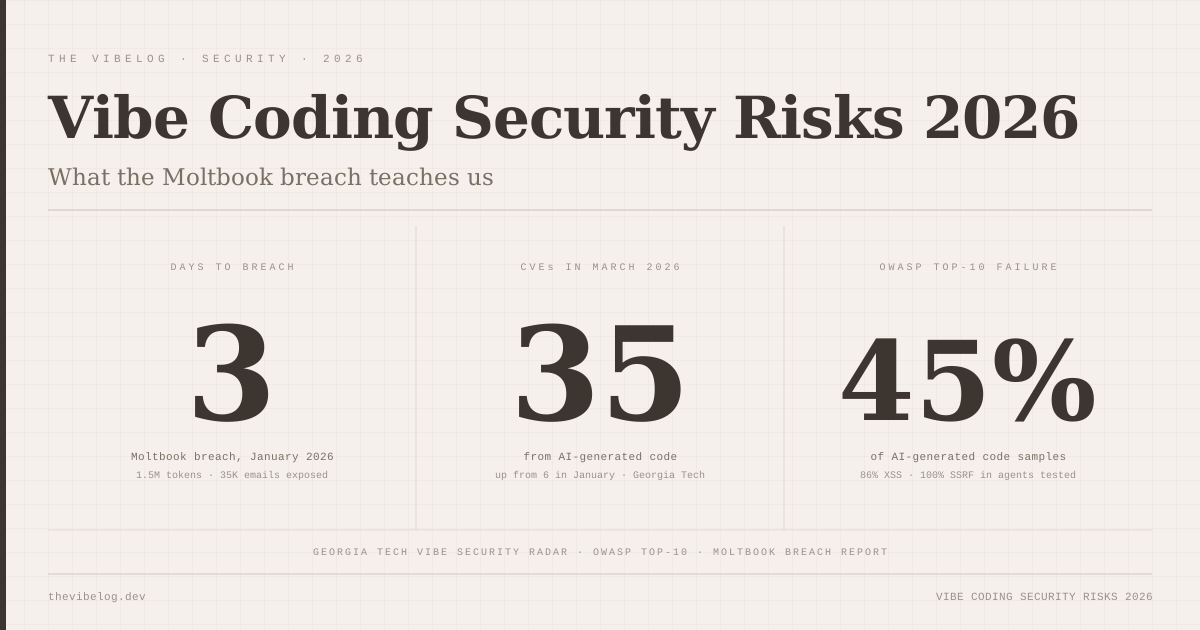
On January 28, 2026, a founder launched Moltbook — a vibe-coded social network built entirely with AI tools — and publicly announced that he had not written a single line of code himself. By January 31st, three days later, the entire production database was exposed. The breach leaked 1.5 million API authentication tokens, 35,000 email addresses, and private messages between users.
The founder was not reckless in any obvious sense. He was using current tools, shipping fast, getting real users. What he was not doing was running any kind of security review on code he had never written and did not fully understand at the implementation level. That gap — between “the AI wrote it, it works, let’s ship” and “has anyone checked what this code does when an adversary touches it” — is the structural problem with vibe coding in 2026.
This post covers the five vulnerability patterns that AI coding tools introduce most consistently, why each one happens at a mechanical level, and what a minimally viable security review looks like before deployment. The data is specific and uncomfortable, but none of this is cause for abandoning the workflow — it is cause for a checklist that you actually run.
Why Vibe Coding Collapses the Security Review Process
Traditional software development has friction points that create security checkpoints whether or not developers plan for them. A developer writing an API endpoint has a mental model of what data it touches, because they wrote the query themselves. A code reviewer asks why there is no auth check on a route. A QA engineer hits an unexpected path during manual testing. None of this is formal threat modeling — it is accumulated scrutiny from multiple humans who each spent time with the same code.
Vibe coding removes most of that. Code goes from prompt to production in a single session, often by a solo developer who did not read every generated file before deploying. The review that does happen focuses on “does this do what I asked” — does the user registration flow work, does the data appear on screen — rather than “what happens when someone sends malicious input to this endpoint.”
The result shows up in the numbers. According to Georgia Tech’s Vibe Security Radar, there were 6 new CVEs directly attributable to AI-generated code in January 2026, 15 in February, and 35 in March. That is nearly a 6x increase in ten weeks, and these are not theoretical vulnerabilities — they are logged, catalogued CVEs in production software that real users encountered.
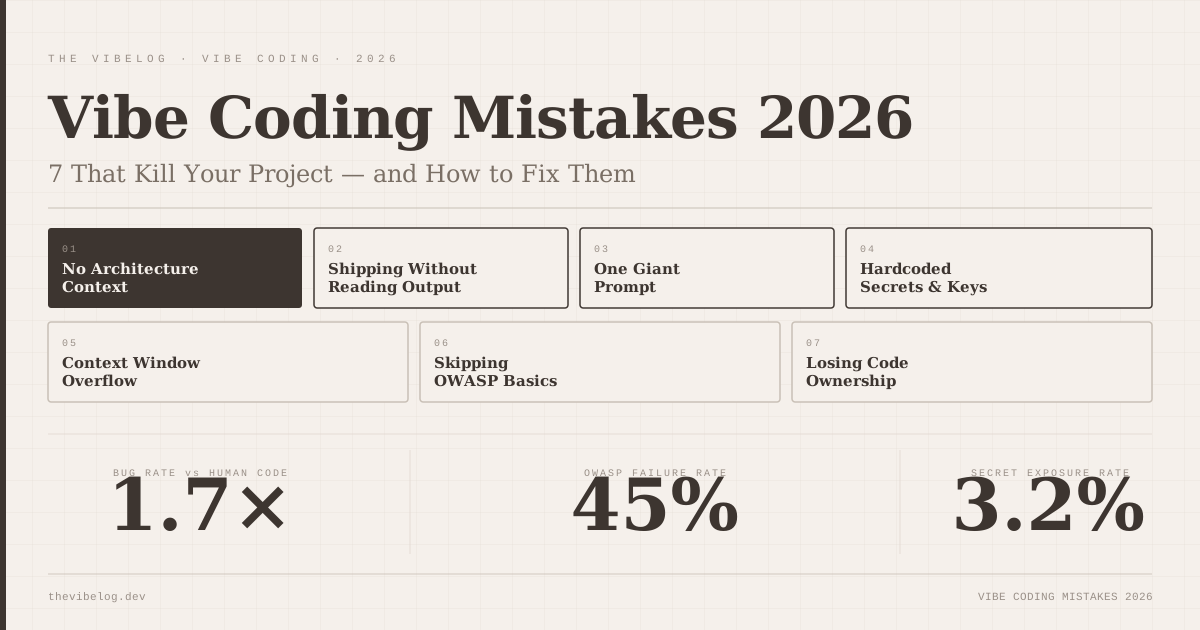
A separate 2026 study testing code across five major LLMs found that 45% of AI-generated code samples fail OWASP Top-10 security checks. Nearly half. The five patterns below account for the majority of those failures.
I have been auditing AI-generated code since early 2025, first on internal tooling and then on client projects, and the patterns are consistent across every tool I have tested. The vulnerability is not in any specific model — it is in the workflow that skips the review.
SQL Injection in Vibe Coded Apps: AI Interpolates Where It Should Parameterize
SQL injection is the oldest web vulnerability in the OWASP Top-10, and AI coding tools reproduce it reliably because the vulnerable version is simpler to read and simpler to generate. When you ask an AI to write a query that looks up a user by email, it produces code that works in testing. The problem is how it builds the query.
Vulnerable pattern — what AI typically generates:
// DO NOT USE — vulnerable to SQL injection
const query = `SELECT * FROM users WHERE email = '${userEmail}' AND active = true`;
const result = await db.query(query);
This passes every test you write if your test inputs are normal email addresses. In production, userEmail can be ' OR '1'='1' --, and that query now returns every active user in the database. A more targeted payload can drop tables or exfiltrate the entire schema.
Fixed pattern:
// Parameterized query — user input never touches the query string
const query = 'SELECT * FROM users WHERE email = $1 AND active = true';
const result = await db.query(query, [userEmail]);
The fix is not complicated. The parameterized form sends the query and the user input as separate payloads — the database engine treats the input as data, not as SQL syntax, regardless of what it contains. The AI generates the interpolated version because interpolation is how you write a string in JavaScript, and the AI is optimizing for the solution that most directly matches the request. It is not thinking about adversarial inputs unless you prompt it to.
Every database call in a vibe-coded app needs manual inspection for this pattern. Search the codebase for backtick template literals containing SQL keywords — `SELECT , `INSERT , `UPDATE , `DELETE — and treat every match as a review candidate.
XSS Vulnerabilities: 86% of Tested AI Code Samples Were Affected
Cross-site scripting (XSS) vulnerabilities appeared in 86% of AI-generated code samples tested across five major LLMs in 2026. That number stood out to me the first time I read it. It is not a marginal failure rate — it means the baseline assumption for any AI-generated component that renders user content should be “this probably has XSS.”
The pattern is consistent: user-supplied data gets passed to a render function without sanitization. In React this often appears as dangerouslySetInnerHTML. In templating engines it appears as unescaped variable output. In vanilla JavaScript it appears as element.innerHTML = userInput.
Vulnerable pattern:
// DO NOT USE — renders arbitrary HTML from user input, including scripts
function UserBio({ bio }) {
  return <div dangerouslySetInnerHTML={{ __html: bio }} />;
}
If bio contains <script>document.cookie</script>, that script runs in the victim’s browser with full session access. An attacker who can inject content into one user’s profile can steal session tokens from every other user who views it. This is not a theoretical attack — this is a standard session hijacking payload that has been in use since 2005.
Fixed pattern:
// Safe — renders bio as text, not HTML
function UserBio({ bio }) {
  return <div>{bio}</div>;
}

// If you genuinely need to render HTML from user input:
import DOMPurify from 'dompurify';

function UserBio({ bio }) {
  return <div dangerouslySetInnerHTML={{ __html: DOMPurify.sanitize(bio) }} />;
}
React’s default JSX text interpolation is safe — it escapes HTML entities automatically. The danger comes when AI generates dangerouslySetInnerHTML because you asked it to “render formatted content” or “display user-provided rich text.” It interprets the requirement literally. The name of the prop — dangerouslySetInnerHTML — is React’s own warning label, and AI tools ignore it unless instructed otherwise.
Check every render path in a vibe-coded app where user-supplied content appears. The XSS is in more places than the obvious ones.
SSRF: Every AI Coding Agent Tested Introduced This Vulnerability
Server-Side Request Forgery (SSRF) is less well-known outside security circles than SQL injection or XSS, but it is particularly dangerous in cloud-hosted applications. A December 2025 study found that every single AI coding agent tested introduced SSRF vulnerabilities when generating backend code that made outbound HTTP requests. Five agents, five for five, every time.
SSRF happens when an application fetches a URL that the attacker controls, without validating where that URL points. The attacker directs the server to make requests to internal infrastructure — the AWS metadata endpoint at 169.254.169.254, internal admin panels, services that trust requests originating from inside the network.
Vulnerable pattern:
// DO NOT USE — fetches any URL the user provides, including internal endpoints
app.post('/api/link-preview', async (req, res) => {
  const { url } = req.body;
  const response = await fetch(url);
  const html = await response.text();
  res.json({ content: html });
});
On AWS, an attacker sends http://169.254.169.254/latest/meta-data/iam/security-credentials/ as the URL and gets the server’s IAM credentials back in the response body. On Google Cloud, the target is http://metadata.google.internal/computeMetadata/v1/. Every major cloud provider has an equivalent endpoint.
Fixed pattern:
import { URL } from 'url';

function isSafeUrl(urlString) {
  try {
    const parsed = new URL(urlString);
    if (!['http:', 'https:'].includes(parsed.protocol)) return false;
    const host = parsed.hostname;
    if (host === 'localhost' || host === '127.0.0.1') return false;
    if (host.startsWith('169.254.') || host.startsWith('10.') ||
        host.startsWith('192.168.') || host.startsWith('172.16.')) return false;
    return true;
  } catch {
    return false;
  }
}

app.post('/api/link-preview', async (req, res) => {
  const { url } = req.body;
  if (!isSafeUrl(url)) return res.status(400).json({ error: 'Invalid URL' });
  const response = await fetch(url);
  const html = await response.text();
  res.json({ content: html });
});
The reason every tested agent introduced this vulnerability is that “fetch a URL provided by the user” is a completely normal feature requirement, and the direct implementation is exactly what the AI produces. Adding the validation layer requires understanding what server-side HTTP requests are actually capable of reaching — the AI possesses that knowledge in principle but does not apply it without an explicit prompt.
Worth noting on tooling: a critical command injection vulnerability was documented in OpenAI’s Codex cloud environment in 2026, exposing GitHub credential data belonging to users. The tools generating your code can themselves contain the class of vulnerabilities they are generating for you. That is an uncomfortable circularity that the industry has not addressed.
Hardcoded Secrets: AI Embeds Credentials at 2× the Rate of Human Developers
AI-assisted commits expose hardcoded secrets at 2× the rate of human-written code — 3.2% of AI-assisted commits contain hardcoded secrets compared to 1.5% for human-written code, according to 2026 analysis of repository scan data. The gap is not because AI is careless. It is because AI is trying to be helpful.
When you provide an AI coding tool with context about your application — your database URL, an API key for a third-party service, an example environment configuration to show it how to connect — the AI learns from that context. When it then generates integration code, it uses the credential values it has seen because they are concretely correct. The AI is not reasoning about the difference between “this credential should stay in .env” and “this credential can go in the file I am generating.”
What this looks like in generated code:
// DO NOT USE — real credential value from your .env, now embedded in source
const stripe = new Stripe('sk_live_4eC39HqLyjWDarjtT1zdp7dc');

const supabase = createClient(
  'https://xyzcompany.supabase.co',
  'eyJhbGciOiJIUzI1NiIsInR5cCI6IkpXVCJ9...'
);
Once this gets committed and pushed — even to a private repository — the secret is in git history permanently. Rotation is the only fix, and rotation means updating credentials across every service that uses them, invalidating all active sessions that depend on them, and auditing for any use of the old credential in logs and third-party systems.
Fixed pattern:
// Correct — credentials loaded from environment variables only
const stripe = new Stripe(process.env.STRIPE_SECRET_KEY);

const supabase = createClient(
  process.env.NEXT_PUBLIC_SUPABASE_URL,
  process.env.SUPABASE_SERVICE_ROLE_KEY
);
The rule is categorical: no credential value appears in source code under any circumstances. Not in a comment, not in a test file, not in a config.example.js. If the AI generates a literal credential value anywhere, that is a mandatory replacement before the first commit — not before deploy, before the first commit.
Install Gitleaks as a pre-commit hook and run gitleaks detect --source . before every push. It takes under a minute to set up and catches the entire category automatically.
Broken Access Control: AI Generates Endpoints, Not Authorization
This is the pattern that produced the Moltbook breach, and it is the subtlest of the five because the generated code looks correct at first glance. When AI generates CRUD endpoints — create, read, update, delete operations for any data model — it builds the data access logic. It connects to the database. It returns the correct data. What it does not do is add authentication or authorization checks, because those were not part of the requirement you specified.
If you ask an AI to “add an endpoint to get user messages,” it generates an endpoint that gets user messages. It does not add auth because auth was not in the specification. The AI is not making a security judgment — it is implementing exactly what you asked for.
Vulnerable pattern:
// DO NOT USE — returns any user's messages with no authentication
app.get('/api/messages/:userId', async (req, res) => {
  const { userId } = req.params;
  const messages = await db.query(
    'SELECT * FROM messages WHERE user_id = $1',
    [userId]
  );
  res.json(messages);
});
Anyone who knows a user ID — or enumerates one — can read all of their messages. If user IDs are sequential integers, the enumeration is trivial. Moltbook’s breach involved exactly this pattern at scale: API endpoints that appeared to be authenticated because they accepted an ID parameter, but had no actual authentication check, leaving the database fully traversable to anyone who found the endpoint.
Fixed pattern:
// Authentication check and ownership verification both required
app.get('/api/messages/:userId', requireAuth, async (req, res) => {
  const { userId } = req.params;
  // Verify the authenticated user is requesting their own messages
  if (req.user.id !== userId) {
    return res.status(403).json({ error: 'Forbidden' });
  }
  const messages = await db.query(
    'SELECT * FROM messages WHERE user_id = $1',
    [userId]
  );
  res.json(messages);
});
The requireAuth middleware is the authentication check — confirming the request comes from a logged-in user. The req.user.id !== userId comparison is the authorization check — confirming that the logged-in user is the specific user whose data is being requested. Both checks are necessary. Authentication without authorization still lets any logged-in user read any other user’s data.
This is the first pass I run on any AI-generated backend: open the routes file, go through every endpoint, and confirm that both checks are present. Static analysis tools catch some variations of this pattern, but not all — the check is fundamentally manual.
For a deeper look at how these patterns compound across full applications, the analysis of AI-generated code vulnerabilities in production systems covers the complete OWASP failure breakdown with data from audited production deployments.
The CVE Growth Rate Should Concern Everyone Building With AI
The Georgia Tech Vibe Security Radar data is worth restating plainly: 6 CVEs from AI-generated code in January 2026, 15 in February, 35 in March. The trajectory across those ten weeks is not a random fluctuation. It tracks with adoption — more AI-generated code in production means more AI-generated vulnerabilities reaching production.
The vulnerability rate is not decreasing fast enough to offset the adoption increase. The tools are getting better, but they are also being used by more developers, on more consequential applications, with less security experience in the loop. The 45% OWASP Top-10 failure rate is not a number from 2023 that has improved substantially — it is a 2026 number from code generated by current models.
The broader picture of vibe coding in production environments covers what this looks like across the range of applications that have shipped. The security failure rate is one component of a more complicated picture, but it is the component with the most direct harm.
The industry does not have a clean solution to this yet. AI tools could add security checks by default — flagging injection-vulnerable patterns before writing them, refusing to embed credentials in source, generating auth middleware on every route. Some tools are moving in this direction. None of the major tools do this reliably in 2026. Until they do, the review step is the developer’s responsibility.
The Secure Vibe Coding Checklist
This is a first-pass security review that takes 20–30 minutes on a typical project. It is not a full security audit. It is the minimum that catches the five patterns described above before they reach production.
1. Scan for hardcoded secrets before the first commit
Run gitleaks detect --source . or install git-secrets as a pre-commit hook. Configure it once and it runs automatically on every commit. This catches the 3.2% hardcoded-secret case before it enters git history.
2. Audit every database query for parameterization
Search the codebase for template literals containing SQL keywords: `SELECT , `INSERT , `UPDATE , `DELETE . Every match is a manual review candidate. Any query that uses ${variable} interpolation inside a SQL string needs to be rewritten as a parameterized query before the endpoint ships.
3. Check every render path for unsanitized user input
Search for dangerouslySetInnerHTML, innerHTML, document.write, and v-html. Each instance needs either removal in favour of text interpolation, or a sanitization library wrapping the user-supplied value before it reaches the render function. DOMPurify is the standard choice for React; other frameworks have equivalents.
4. Audit every API route for authentication and authorization
Open the routes file. For each endpoint: is an auth middleware present? If the endpoint accesses user-specific data, does the handler verify that the authenticated user’s identity matches the requested resource? This check cannot be fully automated — it requires reading the handler logic, not just checking for a middleware name.
5. Audit every server-side HTTP request for URL validation
Search for fetch(, axios.get(, axios.post(, http.request(, and https.request( in server-side code. Any call where the URL originates from user input needs a validation function that blocks private IP ranges, loopback addresses, and metadata endpoints. The SSRF pattern is in every link-preview feature, every webhook, and every “connect your external service” integration.
6. Run Semgrep on the full output
npx @semgrep/semgrep --config=auto . catches a significant share of OWASP Top-10 failures automatically — injection patterns, hardcoded credentials, known-insecure function calls. It is free for individual developers and takes around 90 seconds on a typical project. It does not replace the manual checks above, but it catches patterns the manual review might miss in a large codebase.
7. Verify environment variable hygiene before deploying
Confirm that every secret loads from process.env or equivalent, that .env files are in .gitignore, and that no credential value appears in the compiled application bundle. For frontend applications: variables prefixed NEXT_PUBLIC_ or VITE_ are exposed to the browser — verify that no secret-level credential uses a public prefix.
The Moltbook founder shipped fast. The application worked. Users signed up, content was posted, the product functioned as designed. The problem was not the speed or the tools — it was the absence of any review step between “the AI generated this code” and “this code is handling real user data on the public internet.” Three days is a fast breach timeline, but the outcome was not surprising given the inputs.
The complete workflow for building with AI coding tools continues to improve, and the productivity case for vibe coding remains strong. The security review step is not in conflict with that — it is 20–30 minutes of work that makes the rest of it defensible. Until AI tools handle this automatically by default, the checklist above is the gap that needs filling.